CompTIA A+ 220-1201 Practice Exam
CompTIA A+ Core 1 220-1201
The CompTIA A+ Core 1 (220-1201) certification evaluates foundational IT skills across mobile devices, networking, hardware, virtualization and cloud computing, and troubleshooting. Candidates configure and troubleshoot laptops, wireless connectivity, SOHO networks, RAM, CPUs, storage, and peripherals, and work with virtual machines, hypervisors, and cloud service models like IaaS, SaaS, and PaaS. The exam consists of 90 questions over 90 minutes, with a 75% passing score.
Question bank updated : questions, answers, explanations and chapters.
Certification Overview
- Exam name: A+ 220-1201
- Vendor: CompTIA
- Exam code: 220-1201
- Duration: 90 minutes
- Total questions: about 90
- Official passing score: 675 on a scale of 900 (source)
- Our practice exam pass mark: 75%
Who Should Take This Exam?
IT Support Specialist, Help Desk Technician, Technical Support Specialist, System Administrator, Cyber Defense Infrastructure Support Specialist, Network Technician, Desktop Support Technician, Field Service Technician
Prerequisites
12 months of hands-on experience in an IT support specialist role
Topics Covered
- Mobile devices
- Networking
- Hardware
- Virtualization and cloud computing
- Hardware and network troubleshooting
Question Types
- Multiple Choice (Single Answer)
- Multiple Choice (Multiple Answers)
- Drag and Drop
- Scenario-Based
A+ 220-1201 Practice Questions
Our question bank contains 856+ practice questions for this certification. Sample questions from each exam chapter. Expand a question to see the answer choices. With a subscription, you get unlimited practice exams with randomised questions from our full question bank.
Mobile devices
How can a user verify that a new battery is properly installed in their smartphone?
- A. By checking the device's signal strength
- B. By ensuring the device powers on Correct answer
- C. By monitoring data usage
- D. By connecting to Bluetooth
Option B is correct because the simplest and most reliable indicator that a battery is seated and making contact is that the device powers on and boots normally. Signal strength, data usage, and Bluetooth pairing depend on other components and don't confirm the battery installation itself.
A user needs to replace the battery in their smartphone. What is the first step they should take?
- A. Remove the SIM card
- B. Power off the device Correct answer
- C. Disconnect the Wi-Fi
- D. Open the app drawer
Option B is correct because powering off the device before opening it prevents electrical shorts and protects internal components while replacing the battery. The other options address connectivity settings, not physical safety during a hardware repair.
To ensure optimal performance, the recommended action when installing a new Wi-Fi antenna is to:
- A. Keep the antenna away from metal objects Correct answer
- B. Place the antenna near a Bluetooth device
- C. Disconnect the battery before installation
- D. Install the antenna in a vertical position
Option A is correct because metal objects can block or reflect radio frequency signals, weakening the antenna's reception and transmission. Positioning near Bluetooth devices, disconnecting the battery, or orientation alone do not affect signal quality the way metal interference does.
A user is setting up a new smartphone. Which components are typically installed during the initial hardware setup?
- A. Battery Correct answer
- B. Wi-Fi antenna Correct answer
- C. Display driver
- D. Operating system updates
- E. Carrier APN settings
Options A and B are correct because the battery and Wi-Fi antenna are physical hardware components that must be installed and connected before a new smartphone can power on and communicate wirelessly. Display drivers and OS updates are software applied after the hardware is assembled, and carrier APN settings are a network configuration step, not a hardware installation task.
Networking
A company needs to secure their wireless network using WPA2. Which protocol should they implement for encryption?
- A. TKIP
- B. WEP
- C. AES Correct answer
- D. RADIUS
Option C is correct because WPA2 uses AES (specifically AES-CCMP) as its encryption standard, providing strong, modern protection for wireless traffic. TKIP and WEP are older, weaker encryption schemes associated with WPA and legacy Wi-Fi security, and RADIUS is an authentication protocol, not an encryption method.
How does the TCP protocol ensure data is received accurately?
- A. By using encryption
- B. By using checksums and acknowledgments Correct answer
- C. By using multicast
- D. By using UDP
Option B is correct because TCP uses checksums to detect corrupted data and acknowledgments to confirm receipt, retransmitting anything that doesn't arrive intact. Encryption, multicast, and UDP are unrelated to how TCP guarantees reliable delivery.
To ensure secure email communication, which protocols should be configured to work over SSL/TLS?
- A. IMAP Correct answer
- B. SMTP Correct answer
- C. POP3 Correct answer
- D. Telnet
- E. LDAP
- F. SNMPv2
Options A, B, and C are correct because IMAP, SMTP, and POP3 can each be wrapped in SSL/TLS (as IMAPS, SMTPS, and POP3S) to encrypt email traffic in transit. Telnet is a plaintext remote terminal protocol with no email function and isn't part of secure email configuration.
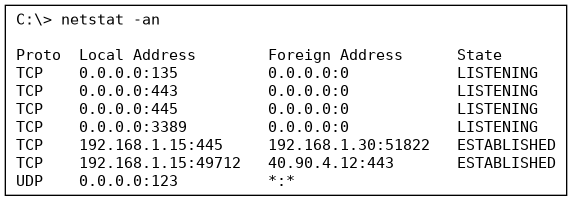
Refer to the output shown. Which listening port allows Remote Desktop connections to this PC?
- A. 443
- B. 445
- C. 3389 Correct answer
- D. 135
Option C is correct because port 3389 is the Remote Desktop port and it is listening. 445 is SMB, 135 is RPC and 443 is HTTPS.
Hardware
When installing a new hard drive, where should the SATA cable be connected?
- A. To the CPU socket.
- B. To the SATA port on the motherboard. Correct answer
- C. To the RAM slot.
- D. To the power supply's PCIe connector.
Option B is correct because a hard drive's SATA data cable connects to a SATA port on the motherboard to transfer data between the drive and the system. The CPU socket, RAM slots, and the power supply's PCIe connector serve entirely different components.
How should a CPU be installed to ensure proper cooling and performance?
- A. Install the CPU without applying any thermal paste at all
- B. Ensure the CPU is oriented correctly and secure it with the retention bracket. Correct answer
- C. Apply thermal paste directly onto the motherboard surface
- D. Attach the CPU to the power supply connector
Option B is correct because correctly orienting the CPU (matching its notches/pins to the socket) and securing it with the retention bracket ensures even contact with the heatsink for proper cooling and stable operation. Skipping thermal paste, applying it to the motherboard instead of the CPU, or attaching the CPU to the power supply would all prevent proper installation.
A user is installing a new RAM module into a desktop computer. Which steps should be taken to ensure proper installation?
- A. Align the notch on the RAM module with the slot on the motherboard. Correct answer
- B. Install the RAM module while the computer is powered on.
- C. Apply excessive force until the RAM module clicks into place.
- D. Use anti-static precautions such as wearing an anti-static wrist strap. Correct answer
- E. Fill the unused slots with blanking modules
Options A and D are correct because aligning the notch ensures the RAM module can only be inserted the correct way, preventing damage, and anti-static precautions protect the sensitive module from an electrostatic discharge during handling. Installing RAM while the system is powered on risks damaging both the RAM and the motherboard, and needing excessive force to click a module into place is a sign something is misaligned, not a proper installation step.
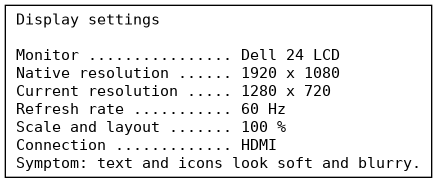
Examine the output shown. Why do text and icons look blurry?
- A. The scale is 100 %
- B. The connection is HDMI
- C. The refresh rate is 60 Hz
- D. The resolution is not the monitor's native resolution Correct answer
Option D is correct because the display runs at 1280 x 720 on a 1920 x 1080 native panel, so the image is scaled and blurry. The refresh rate, HDMI connection and 100% scaling are fine.
Virtualization and cloud computing
Which component is primarily responsible for managing virtual machines?
- A. Operating System
- B. BIOS
- C. Hypervisor Correct answer
- D. Firewall
Option C is correct because a hypervisor is the software layer specifically responsible for creating, running, and allocating hardware resources to virtual machines. The operating system, BIOS, and firewall serve other purposes and don't manage VMs directly.
A company is setting up a server to run multiple operating systems simultaneously. Which technology allows different operating systems to share the same hardware resources?
- A. Load balancing
- B. Virtualization Correct answer
- C. Clustering
- D. Partitioning
Option B is correct because virtualization creates isolated virtual machines that share the same underlying physical hardware, letting multiple operating systems run side by side on one server. Load balancing, clustering, and partitioning solve different problems around traffic distribution, high availability, and dividing storage.
Which features are typically found in a hypervisor?
- A. Resource allocation management Correct answer
- B. Physical hardware repair
- C. Virtual machine isolation Correct answer
- D. Direct execution of physical machine code
- E. Bare-metal disk formatting
Options A and C are correct because managing how CPU, memory, and other resources are divided among virtual machines, and keeping each VM isolated from the others, are core jobs of any hypervisor. Physically repairing hardware isn't something software can do, and a hypervisor's role is to mediate and virtualize access to hardware, not simply let guest code run against it with no oversight.
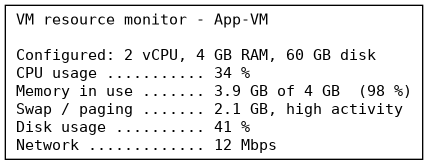
Based on the output shown, which VM resource should be increased first?
- A. Disk
- B. Network
- C. CPU
- D. Memory Correct answer
Option D is correct because memory is at 98% with heavy paging while the CPU and disk have headroom, so add RAM. CPU, disk and network are not the limit.
Hardware and network troubleshooting
Which actions can help resolve a mobile device's connectivity issues when it cannot connect to a Wi-Fi network?
- A. Restart the mobile device. Correct answer
- B. Forget and reconnect to the Wi-Fi network. Correct answer
- C. Reset the router's SSID to 'default'.
- D. Disable the device's Bluetooth connection.
- E. Disable location services
Options A and B are correct because restarting the device clears a stuck network stack, and forgetting the network and reconnecting forces it to re-negotiate with a fresh saved profile and password — both common first steps for a device that can't join Wi-Fi. Renaming the router's SSID, disabling Bluetooth, and disabling location services don't address the connection failure.
Which sound from a mechanical hard drive is most commonly associated with an imminent drive failure?
- A. A steady clicking noise from the case fan
- B. A soft hum from the power supply unit
- C. A repeated clicking noise from the drive Correct answer
- D. A single beep during the power-on test
Option C is correct because a mechanical hard drive on the verge of failure typically produces a repeated clicking or grinding noise as the read/write head struggles to seek or park correctly, often called the "click of death." A case fan clicking (A) points to a fan obstruction rather than the drive itself, a power supply hum (B) is normal operating noise, and a single POST beep (D) reflects a motherboard diagnostic code unrelated to drive mechanics.
What does the S.M.A.R.T. feature on a hard drive primarily monitor?
- A. Display refresh rate and panel resolution
- B. CPU core temperature and clock multiplier
- C. Drive health and reliability attributes Correct answer
- D. Network port link speed and duplex mode
Option C is correct because S.M.A.R.T. (Self-Monitoring, Analysis, and Reporting Technology) tracks internal drive attributes like reallocated sectors, spin-up time, and temperature to predict impending failures. Display settings (A), CPU clock behavior (B), and network port speed (D) are monitored by entirely different subsystems and have nothing to do with a drive's built-in health reporting.
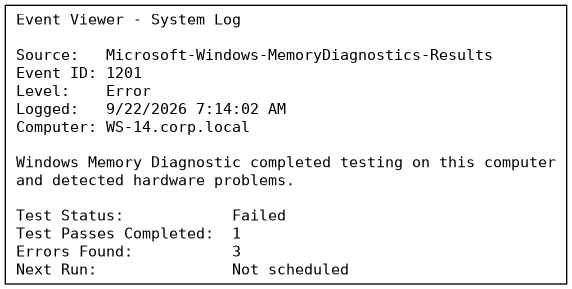
Refer to the memory diagnostic output shown. What should the technician do next?
- A. Reinstall the Windows operating system
- B. Update the motherboard's BIOS firmware
- C. Reseat each RAM module and retest individually Correct answer
- D. Replace the computer's power supply unit
Option C is correct because Windows Memory Diagnostic reported a failed test with 3 errors, which only confirms that the memory subsystem is failing, not which physical stick is at fault. The proper troubleshooting step is to reseat and retest each RAM module individually to isolate the specific defective stick. Options A, B, and D address unrelated components and skip the standard divide-and-isolate memory troubleshooting step.
Free Study Guide
Read the free CompTIA A+ 220-1201 study guide: every exam topic explained in plain English, with diagrams, exam tips and the mistakes to avoid.
More CompTIA Practice Exams
Practise with realistic mock exams to prepare for your CompTIA certification.