Database Management and Platform Security · Topic 2 of 5
Application and Access Control
ServiceNow CSA access control: users, groups, roles, ACL structure and evaluation, security_admin elevation and application scope access settings.
- 4 min
- Includes a diagram
- Assign roles to groups; users inherit them from every group they join.
- An ACL passes only if every requirement it sets (role, condition, script) passes.
- Table ACLs are checked before field ACLs, and both must pass.
What it is
Access control decides who can see and change data on the instance. It has three layers. Users, groups and roles identify who someone is and what they are allowed to do. Access control rules (ACLs) enforce that on tables and fields. Application settings control what one application may do with another application's data.
ACLs run on the server, so they are real security. A hidden field on a form is not.
How it works
Users, groups and roles
A user record lives in the User table. A group is a set of users, often a team such as Service Desk. A role is a named permission, such as itil, that ACLs and menus refer to.
Roles reach a user in two ways: assigned directly, or inherited from any group the user belongs to. One role can also contain other roles. Give roles to groups rather than to individual users, so that moving a person between teams changes access in one step.
The admin role is full administrative access. Creating or changing ACLs also needs the security_admin role, which an admin elevates to for the current session. The elevation does not last beyond the session.
How an ACL is built
An ACL names a table, optionally a field, and an operation such as read, write, create or delete. It passes only when all of its requirements that are set are met.
| Requirement | Meaning |
|---|---|
| Role | The user holds at least one of the listed roles |
| Condition | The record meets a condition set in the condition builder |
| Script | A script sets answer to true |
If the rule leaves a requirement empty, it is not checked.
How ACLs are evaluated
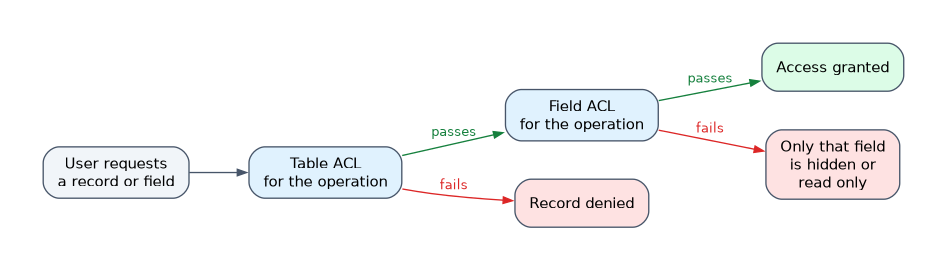 The platform checks the table-level rules first, then the field-level rules, and both must pass. If no rule matches the request, access is denied by default (the default deny setting).
For one table or field, the platform looks for the most specific rule first and moves to broader ones, ending with the wildcard rule that covers everything. When several rules apply at the same level, passing one of them is enough.
A failed field ACL does not hide the record. It makes only that field read-only or hidden, while the user still sees the rest of the form.
To test, use Impersonate User from the user menu. It shows what the person actually sees, without needing their password.
Application scope and access settings
Custom applications live in a scope that keeps their tables and scripts separate from the global scope and from other apps. Each table has Application Access settings:
| Setting | Effect |
|---|---|
| Accessible from | This application scope only, or all application scopes |
| Can read, Can create, Can update, Can delete | Whether other scopes may do that operation on this table's records |
| Allow access to this table via web services | Whether web service APIs may reach the table |
These settings control access between applications. They do not replace ACLs, which still decide whether the signed-in user may act.
How the exam asks about this
- "A group of agents must read incidents but not close them." Give them a role and write ACLs for the operations.
- "A new hire's team gets a new set of roles." Change the group's roles, not each user.
- "An admin cannot edit an ACL." Elevate to
security_admin.
What to remember for the exam
- Assign roles to groups; users inherit them from every group they join.
- An ACL passes only if every requirement it sets (role, condition, script) passes.
- Table ACLs are checked before field ACLs, and both must pass.
- No matching ACL means access is denied.
- Editing ACLs needs
security_admin, elevated for the session. - Impersonate User is the way to test what someone sees.
A UI policy or a hidden form field is not security. A user can still reach the data through a list, a report or an API unless an ACL blocks it.
Common mistakes
Granting roles to individuals. It works, but it is hard to audit. Group-based roles keep access traceable and easy to change.
Expecting a failed field ACL to hide the record. The user keeps seeing the record. Only the protected field becomes read-only or hidden.
Mixing up application access with ACLs. Application Access decides what another app may do with a table. An ACL decides what the user may do.
Check yourself
How does a user receive roles through a group?
A user inherits all roles granted to every group they belong to, in addition to roles assigned directly.
What happens if no ACL matches a request?
Access is denied, because the default is deny.
Why does an administrator need the security_admin role?
Creating and changing ACLs requires security_admin, which an admin elevates to for the session.
Topic 2 of 5 in Database Management and Platform Security
Test yourself on Database Management and Platform Security
The full ServiceNow CSA question bank has 600 questions, with timed practice exams and an explanation for every answer.
This study guide is independent and is not affiliated with, endorsed by, or sponsored by ServiceNow. Vendor names, certification names and exam codes are trademarks of their respective owners and are used for identification only.