Data Migration and Integration · Topic 2 of 4
Business Rules
ServiceNow business rules: server-side logic on insert, update, delete or query, with before, after, async and display timing, order and conditions.
- 4 min
- Includes a diagram
- Business rules are server-side and run on insert, update, delete or query.
- The timing choices are before, after, async and display.
- Lower Order runs first; the default is 100.
What it is
A business rule is server-side logic that runs when a record is inserted, updated, deleted or queried. It lets an administrator automate behavior at the database level, such as setting a field, adding a message or stopping an action.
Unlike a UI policy, a business rule runs on the server. It does not depend on which form, list, import or integration changed the record.
How it works
Where to find them
You manage business rules under System Definition > Business Rules. A rule is tied to one table and has a name, an active flag, a timing, the operations it responds to, and an optional condition.
| Setting | What it controls |
|---|---|
| Table | The table the rule belongs to |
| When | Before, after, async or display |
| Insert / Update / Delete / Query | The operations that fire the rule |
| Order | The sequence among rules with the same timing; lower numbers run first |
| Filter conditions | Narrow the rule to matching records |
| Actions tab | Set field values, add a message or abort, without script |
| Advanced | A server script for logic that needs code |
When the rule runs
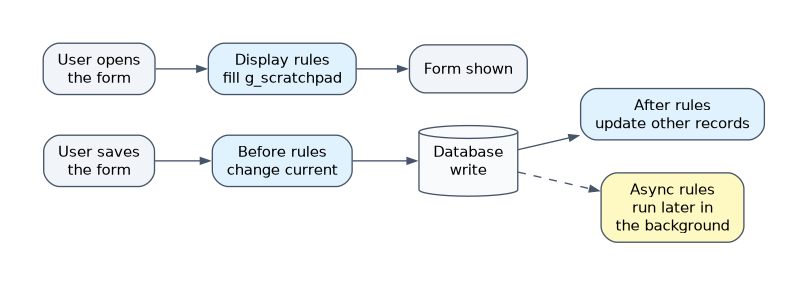
| When | Runs | Typical use |
|---|---|---|
| Before | Before the record is saved to the database | Set or change field values, validate and abort |
| After | Right after the record is saved | Update related records or trigger follow-up work |
| Async | Queued and run in the background shortly after the save | Slow work that the user should not wait for |
| Display | When a form loads, before it appears | Pass data to client scripts |
A before rule can change the fields of the record being saved without an extra update. An after rule runs once the save has happened, so it is the place to act on other records.
Conditions and order
A rule can run only for certain records by adding a condition, such as Priority is 1. This keeps the rule from running when it is not needed.
If several rules share the same timing, the Order value decides the sequence, with lower values first. The default order is 100.
The scripting objects
The Advanced tab uses a few standard objects:
| Object | Meaning |
|---|---|
| current | The record being processed |
| previous | The record as it was before the change |
| gs | The GlideSystem object, with helpers such as gs.info for logging |
A before rule changes values with current. Calling current.update() inside a before rule is wrong because the platform saves the record afterward.
Choosing between tools
| Need | Best fit |
|---|---|
| Set a field on save, whatever the source of the change | Business rule |
| Show or hide a field on the form | UI policy |
| Multi-step process with approvals and tasks | Flow in Workflow Studio |
| Restrict who can read a record | ACL, or a query business rule for filtering results |
A query business rule runs before a query and can add a filter so users only see certain records. It is not a replacement for an ACL where security is the goal.
How the exam asks about this
- "Set a field automatically whenever any record is saved, from any source." A before business rule.
- "Work should run in the background so users are not slowed down." An async business rule.
- "Pass information to the form's client script when it loads." A display business rule.
What to remember for the exam
- Business rules are server-side and run on insert, update, delete or query.
- The timing choices are before, after, async and display.
- Lower Order runs first; the default is 100.
- Before rules adjust the saved record without calling update.
- Conditions limit when a rule runs.
- Business rules normally run whatever the source: form, list, import or integration.
A business rule cannot see the user's browser. If the requirement depends on form behavior while the user is typing, that is a client script or UI policy, not a business rule.
Common mistakes
Calling current.update() in a before rule. The platform already saves the record, and an extra update can cause repeated processing.
Using an after rule to change the same record. The record has already been saved, so a before rule is the correct place.
Putting long running work in a before rule. It makes every save slow; use async when the user does not need to wait.
Check yourself
Which timing option changes the record before it is saved?
A before business rule, which can set values on current with no extra update.
What does an async business rule do?
It is queued and runs in the background after the save, so the user does not wait.
Which rule runs first when two share the same timing?
The one with the lower Order value.
Topic 2 of 4 in Data Migration and Integration
Test yourself on Data Migration and Integration
The full ServiceNow CSA question bank has 600 questions, with timed practice exams and an explanation for every answer.
This study guide is independent and is not affiliated with, endorsed by, or sponsored by ServiceNow. Vendor names, certification names and exam codes are trademarks of their respective owners and are used for identification only.