App Deployment · Topic 2 of 3
Change Sets and Troubleshooting Deployments
Salesforce change sets: deployment connections, outbound and inbound change sets, dependencies, validate and deploy, what they cannot move, and fixing failures.
- 4 min
- Includes a diagram
- Change sets move metadata only, between orgs connected to the same production org.
- The target org must allow inbound changes from the source.
- Use View/Add Dependencies to avoid missing components.
What it is
A change set moves metadata, such as custom objects, fields, flows, layouts and permission sets, from one Salesforce org to a related org through the Setup menu. It is the classic click-based way to deploy changes from a sandbox to production.
An outbound change set is built in the source org and uploaded. It then appears as an inbound change set in the target org, where it is validated and deployed.
How it works
Deployment connections
Change sets only move between orgs connected to the same production org: a production org and its sandboxes, or sandboxes of the same production org. In the target org, open Deployment Settings and edit the connection to Allow Inbound Changes from the source org.
Change sets cannot move between unrelated production orgs, or between a Developer Edition org and production.
Building and deploying
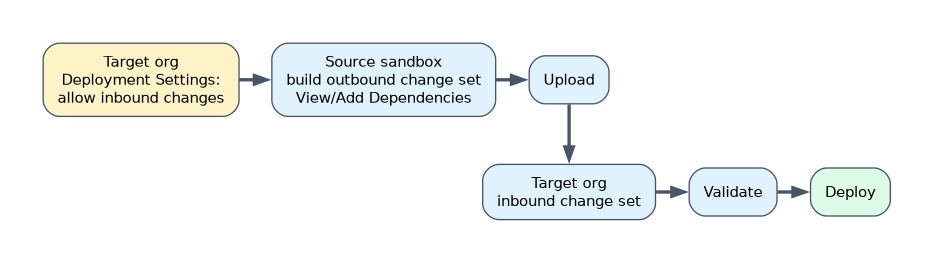
- In the source org, create an outbound change set and add components.
- Click View/Add Dependencies to include components the selected ones rely on, such as fields used by a flow.
- Add profile settings if needed; only settings for components in the change set are included.
- Upload the change set to the target org.
- In the target org, open Inbound Change Sets, validate it, then deploy it.
What change sets cannot do
| Limitation | What to do instead |
|---|---|
| Move records (data) | Use Data Loader or the Data Import Wizard |
| Delete or rename components in the target | Make the change by hand in the target, or use another deployment tool |
| Include some settings and component types | Add them as manual steps in the deployment plan |
| Edit a change set after upload | Clone it, change the clone and upload the clone |
| Merge two versions of a component | The deployed version replaces the target's version |
Troubleshooting failures
| Error | Fix |
|---|---|
| A referenced field or object does not exist in the target | Clone the change set, use View/Add Dependencies to add the missing component, and upload again |
| The source org is not listed for upload | Allow inbound changes on the deployment connection in the target |
| A component was changed in production since the sandbox was created | Merge the change into the sandbox version before deploying, or it will be overwritten |
| Apex tests fail in production | Fix the tests or code; deployments to production that include Apex need passing tests |
A deployed field can also seem to be missing because field-level security or the page layout in the target was not updated. Include the profile or permission set settings, or update them after deploying.
A worked example: an inbound change set with a new flow fails in production because a custom field the flow uses is missing. The uploaded change set cannot be edited, so the builder clones it in the sandbox, runs View/Add Dependencies to add the field, uploads the clone and validates it in production before deploying.
When a change set is already uploaded and something is missing, the answer is always "clone it", never "edit it".
How the exam asks about this
- "Move new custom objects and flows from a sandbox to production." An outbound change set.
- "The sandbox cannot upload to production." Allow inbound changes in production's Deployment Settings.
- "Move the records too." Not a change set; use a data tool.
What to remember for the exam
- Change sets move metadata only, between orgs connected to the same production org.
- The target org must allow inbound changes from the source.
- Use View/Add Dependencies to avoid missing components.
- Uploaded change sets are locked; clone to change them.
- Change sets cannot delete components or carry data.
A change set replaces a component in the target with the source version. Any change made directly in production to that component since then is lost unless it is also in the sandbox.
Common mistakes
Expecting a change set to delete a field in production. Delete it by hand there.
Trying to edit an uploaded change set. Clone it instead.
Forgetting field-level security. Deployed fields can be invisible to users until access is granted.
Check yourself
Between which orgs can change sets move?
A production org and its sandboxes, or sandboxes created from the same production org.
How do you fix an uploaded change set that is missing a component?
Clone it, add the component with View/Add Dependencies, and upload the clone.
Where does the target org allow a sandbox to send change sets?
In Deployment Settings, by allowing inbound changes on that sandbox's connection.
Topic 2 of 3 in App Deployment
Test yourself on App Deployment
The full Salesforce Platform App Builder question bank has 648 questions, with timed practice exams and an explanation for every answer.
This study guide is independent and is not affiliated with, endorsed by, or sponsored by Salesforce. Vendor names, certification names and exam codes are trademarks of their respective owners and are used for identification only.