App Deployment · Topic 1 of 3
Application Lifecycle, Sandboxes and Deployment Plans
Salesforce application lifecycle: sandbox types, storage and refresh intervals, development models, DevOps Center, and planning and testing a deployment.
- 4 min
- Includes a diagram
- Developer and Developer Pro copy metadata only and refresh daily.
- Partial Copy copies a sample of data with a sandbox template and refreshes every 5 days.
- Full copies all data and refreshes every 29 days.
What it is
Application lifecycle management (ALM) is the process of planning, building, testing and releasing changes without disrupting users. On Salesforce, changes are built and tested in sandboxes, copies of production, and then deployed to production.
A deployment plan lists what is being released, in what order, how it is tested and who does what on release day.
How it works
Sandbox types
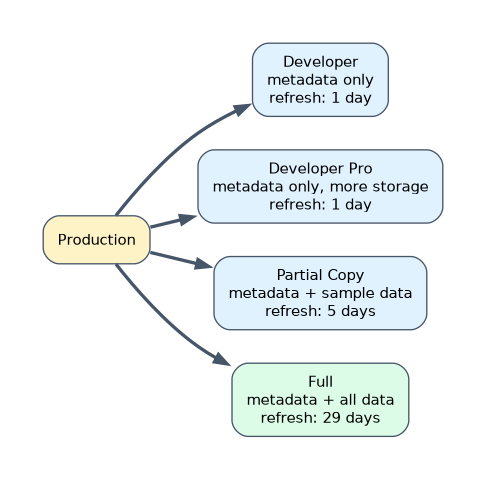
| Type | Copies | Storage | Refresh interval | Typical use |
|---|---|---|---|---|
| Developer | Metadata only | 200 MB data, 200 MB files | 1 day | Building and unit testing by one person |
| Developer Pro | Metadata only | 1 GB data, 1 GB files | 1 day | Larger development and testing work |
| Partial Copy | Metadata and a sample of data chosen with a sandbox template | 5 GB data, files as production | 5 days | Testing and training with realistic data |
| Full | Metadata and all data (templates can limit objects) | Same as production | 29 days | Performance, load and user acceptance testing, staging |
A refresh replaces the sandbox's metadata and data with a new copy of production, so unreleased work in the sandbox is lost unless it is moved elsewhere first.
Development models
| Model | How it works |
|---|---|
| Change set development | Changes are built in sandboxes and moved with change sets; production is the source of truth |
| Org development with source control | Changes are tracked in a version control system and deployed with tools such as the Salesforce CLI |
| Package development | Changes are organized into packages with versions, often using scratch orgs, short-lived orgs created from source |
DevOps Center gives admins and builders a click-based way to track changes as work items, store them in source control and promote them through a pipeline of environments.
A typical release path
- Build in a Developer sandbox.
- Combine and test changes from several builders in an integration sandbox.
- Run user acceptance testing in a Partial Copy or Full sandbox.
- Deploy to production in a planned window.
Apply hotfixes in a fresh sandbox, deploy them, and also apply them to sandboxes with work in progress so later deployments do not undo them.
The deployment plan
| Item | Example |
|---|---|
| Components and their dependencies | Fields before the layouts and flows that use them |
| Manual steps | Settings that cannot be deployed, such as some org settings |
| Order of steps | Deploy objects, then automation, then assign permission sets |
| Testing | Validate before deploying, then smoke test after |
| Communication | Notify users of downtime or changes |
| Rollback | What to do if the deployment fails |
Validate a deployment first to check that it will succeed without changing anything, then deploy during the release window.
A worked example: a team has a six-week project in user acceptance testing in a Full sandbox when a production bug must be fixed today. The builder creates a Developer sandbox from production, fixes and tests the bug there, deploys it, and applies the same fix in the Full sandbox so the project's later release does not overwrite it.
For testing with realistic but limited data, choose a Partial Copy sandbox. For a copy of all production data, choose Full.
How the exam asks about this
- "Test with all production data before go-live." Full sandbox.
- "Train users with a sample of real records." Partial Copy sandbox with a template.
- "Check that a release will succeed without deploying it." Validate the deployment.
What to remember for the exam
- Developer and Developer Pro copy metadata only and refresh daily.
- Partial Copy copies a sample of data with a sandbox template and refreshes every 5 days.
- Full copies all data and refreshes every 29 days.
- A refresh overwrites the sandbox, so move unreleased work first.
- A deployment plan covers components, order, manual steps, testing and rollback.
Refreshing a sandbox destroys work that has not been deployed elsewhere. Check with everyone using it before refreshing.
Common mistakes
Building in production. Build and test in sandboxes.
Choosing a Developer sandbox for testing with production data. It has no data copied.
Forgetting manual steps in the plan. Some settings must be done by hand.
Check yourself
Which sandbox types copy production data?
Partial Copy, which copies a sample using a template, and Full, which copies all data.
How often can a Full sandbox be refreshed?
Every 29 days.
What does validating a deployment do?
It checks whether the deployment would succeed without making any changes.
Topic 1 of 3 in App Deployment
Test yourself on App Deployment
The full Salesforce Platform App Builder question bank has 648 questions, with timed practice exams and an explanation for every answer.
This study guide is independent and is not affiliated with, endorsed by, or sponsored by Salesforce. Vendor names, certification names and exam codes are trademarks of their respective owners and are used for identification only.