App Deployment · Topic 3 of 3
Unmanaged, Managed and Unlocked Packages
Salesforce packages compared: unmanaged, managed and unlocked packages, namespaces, upgrades, editing installed components, and when to use each type.
- 4 min
- Includes a diagram
- Unmanaged: editable, no upgrades, no namespace; good for templates.
- Managed: namespace, upgrades, protected components; used for AgentExchange apps.
- Unlocked: versioned and upgradable, editable, for internal apps.
What it is
A package is a container of components, such as objects, fields, flows and Lightning pages, that can be installed into other orgs, including orgs that are not related to the source. Packages are how partners distribute apps on AgentExchange, and how teams share apps between separate orgs.
There are three package types for an app builder to know: unmanaged, managed and unlocked.
How it works
The three types compared
| Feature | Unmanaged | Managed | Unlocked |
|---|---|---|---|
| Typical use | Templates, samples, one-time sharing | Commercial apps from partners on AgentExchange | Internal apps for a company's own orgs |
| Upgrades | None; install a new copy | Yes, versioned upgrades | Yes, versioned upgrades |
| Editing installed components | Fully editable | Mostly locked; only some attributes, such as layouts, can be changed | Editable, but upgrades overwrite changes |
| Namespace | None | Required | Optional |
| Code visible | Yes | No, Apex is hidden | Yes |
Unmanaged packages hand over full ownership: once installed, the components belong to the installing org and the publisher cannot update them.
Managed packages
- Components carry the publisher's namespace prefix, for example acme__Invoice__c.
- The publisher can release upgrades that installed orgs receive.
- Installers can add their own fields, layouts and automation around the package, but cannot change protected components.
- After a managed package version is released, many components and attributes are locked, and some cannot be removed in later versions, so publishers plan carefully.
- Licences can be managed per user for paid apps.
Unlocked packages
Unlocked packages suit a company that wants to organize its own metadata into versioned modules and deploy them to its own orgs. They are built with the Salesforce CLI and a Dev Hub. Admins in the installing org can edit the components, but a later package version overwrites those changes.
Installing a package
- Install with a link from AgentExchange or the publisher.
- Choose Install for Admins Only, Install for All Users or Install for Specific Profiles.
- See installed packages and their components in Installed Packages in Setup.
- Install into a sandbox first to test.
- Uninstalling a package removes its components and their data.
Choosing between change sets and packages
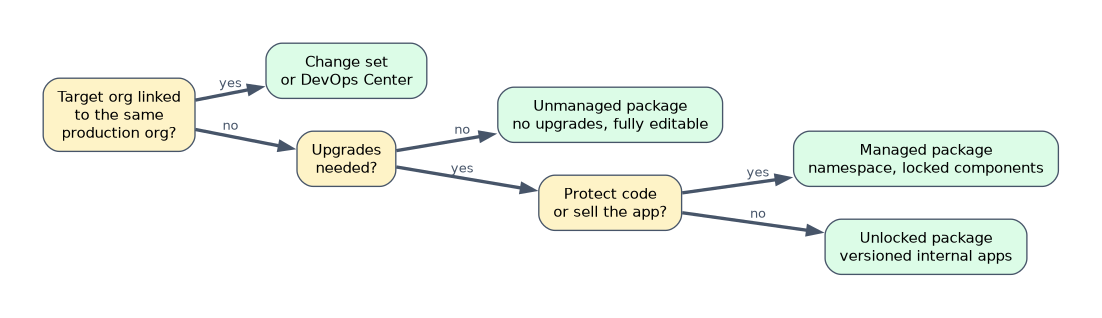
| Requirement | Tool |
|---|---|
| Move changes from a sandbox to its own production org | Change set or DevOps Center |
| Share a template with an unrelated org, no upgrades | Unmanaged package |
| Sell an app with protected code and upgrades | Managed package |
| Distribute versioned internal apps to several company orgs | Unlocked package |
A worked example: a company has three separate production orgs and wants a central team to ship 30 flows and 6 custom objects to all of them each quarter as a numbered version. Each org's admins must be able to adjust the flows, and nothing needs to be hidden. Change sets cannot reach unrelated orgs, unmanaged packages cannot upgrade, and managed packages lock components, so an unlocked package fits.
"Upgrades" plus "protect intellectual property" means managed. "No upgrades needed, just a starting point" means unmanaged.
How the exam asks about this
- "What does acme__ in an API name mean?" The component came from a managed package with that namespace.
- "Share a sample app with a customer's unrelated org." An unmanaged package.
- "The installing org must receive future upgrades." Managed or unlocked, depending on whether components must be protected.
What to remember for the exam
- Unmanaged: editable, no upgrades, no namespace; good for templates.
- Managed: namespace, upgrades, protected components; used for AgentExchange apps.
- Unlocked: versioned and upgradable, editable, for internal apps.
- Packages can reach unrelated orgs; change sets cannot.
- Install in a sandbox first, choosing admins only, all users or specific profiles.
An unmanaged package cannot be upgraded. To get a newer version, you install it again and handle conflicts with the old components yourself.
Common mistakes
Using change sets to reach another company's org. Change sets work only between related orgs; use a package.
Expecting to edit a managed package's Apex. Its code is protected.
Choosing unmanaged when upgrades are needed. Unmanaged packages have no upgrade path.
Check yourself
Which package type protects its code and supports upgrades?
A managed package.
What does a namespace prefix on a component show?
That it belongs to a managed package registered under that namespace.
Which package type suits versioned internal apps whose components admins can still edit?
An unlocked package.
Topic 3 of 3 in App Deployment
Test yourself on App Deployment
The full Salesforce Platform App Builder question bank has 648 questions, with timed practice exams and an explanation for every answer.
This study guide is independent and is not affiliated with, endorsed by, or sponsored by Salesforce. Vendor names, certification names and exam codes are trademarks of their respective owners and are used for identification only.