Data Communication Network Basics · Topic 3 of 3
VRP, Logging In and Configuring Devices
Learn the Huawei VRP system, console, Telnet and STelnet login, command views and levels, and saving the configuration for HCIA-Datacom H12-811.
- 5 min
- Includes a diagram
- User view uses angle brackets
<Huawei>; system view uses square brackets[Huawei]. quitgoes back one level;returnor Ctrl+Z goes to the user view.- Command levels: 0 visit, 1 monitoring, 2 configuration, 3 management. User levels are 0 to 15.
What it is
VRP (Versatile Routing Platform) is the network operating system on Huawei routers, switches and other datacom devices. It provides the command line, routing and switching protocols, user management and the file system.
You log in through the console port for first setup, or remotely over Telnet, STelnet (SSH) or the web. You then configure the device by moving between command views and typing commands, and you save the configuration so it survives a reboot.
How it works
Login methods
| Method | Port or link | Notes |
|---|---|---|
| Console | Console port, user-interface console 0 | Local, for first configuration; default 9600 bit/s, 8 data bits, 1 stop bit, no parity, no flow control |
| Telnet | TCP 23, user-interface vty | Plain text, not secure |
| STelnet | TCP 22 (SSH), user-interface vty | Encrypted; preferred for remote login |
| Web | HTTPS | Graphical management on supported devices |
Remote users connect to virtual type terminal (VTY) user interfaces, configured together as user-interface vty 0 4. Each user interface has an authentication mode: aaa (user name and password), password, or none.
Command views
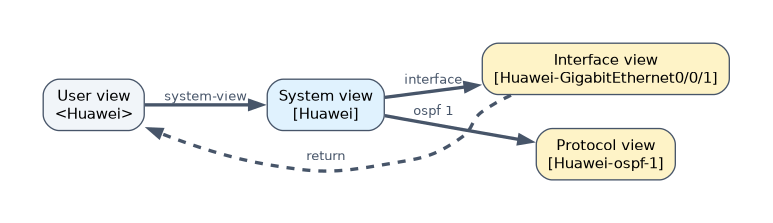
| View | Prompt | How to enter | What you do there |
|---|---|---|---|
| User view | <Huawei> | After login | Check status, run ping, save, reboot |
| System view | [Huawei] | system-view | Global settings such as sysname |
| Interface view | [Huawei-GigabitEthernet0/0/1] | interface GigabitEthernet0/0/1 | Interface settings |
| Protocol view | [Huawei-ospf-1] | ospf 1 | Protocol settings |
quit goes back one view, and return or Ctrl+Z goes straight back to the user view. Interface names follow type slot/card/port, for example GigabitEthernet0/0/1.
Command levels and user levels
| Command level | Name | Example commands |
|---|---|---|
| 0 | Visit | ping, tracert, telnet |
| 1 | Monitoring | display commands |
| 2 | Configuration | Service commands such as routing |
| 3 | Management | File system, FTP, user management, debugging |
User levels run from 0 to 15. A user can run commands at or below their own level, and levels 3 to 15 all reach the management commands.
Command line help
| Feature | Effect |
|---|---|
? | Lists the commands or keywords available here |
| Tab | Completes a partial keyword |
| Up arrow or Ctrl+P | Recalls the previous command |
undo prefix | Cancels a setting or restores the default |
display this | Shows the configuration of the current view |
Keywords can be shortened as long as they stay unique, so sys works for system-view.
Basic configuration and remote login
<Huawei> system-view
[Huawei] sysname R1
[R1] interface GigabitEthernet0/0/1
[R1-GigabitEthernet0/0/1] ip address 10.1.1.1 24
[R1-GigabitEthernet0/0/1] quit
[R1] aaa
[R1-aaa] local-user admin password irreversible-cipher Huawei@123
[R1-aaa] local-user admin service-type telnet
[R1-aaa] local-user admin privilege level 15
[R1-aaa] quit
[R1] telnet server enable
[R1] user-interface vty 0 4
[R1-ui-vty0-4] authentication-mode aaa
[R1-ui-vty0-4] protocol inbound telnet
For STelnet you also enable stelnet server enable, create a local key pair, set the local user's service type to ssh, and use protocol inbound ssh on the VTY lines. The Network Security and Services chapter covers SSH in detail.
Configuration files and the file system
| Item | Meaning |
|---|---|
| Current configuration | Running in memory; view with display current-configuration |
| Saved configuration | Stored in flash; view with display saved-configuration |
save | Writes the current configuration to the saved file, by default vrpcfg.zip |
display startup | Shows the configuration file and system software for this and the next startup |
startup saved-configuration | Chooses the file used at the next startup |
reset saved-configuration | Clears the saved configuration |
Changes take effect at once but are lost at reboot unless saved. File commands such as dir, cd, copy, move and delete work on flash. A plain delete moves a file to the recycle bin, and reset recycle-bin removes it for good.
A worked example
A new switch arrives with no configuration. The engineer connects a console cable at 9600 bit/s, sets the name with sysname, sets a management address, creates a local user with level 15, and enables STelnet on user-interface vty 0 4 with authentication-mode aaa.
After testing the STelnet login, the engineer runs save in the user view. display startup then shows vrpcfg.zip as the next startup file.
How the exam asks about this
- "Which command enters the system view from the user view?" →
system-view. - "Which command level do
displaycommands belong to by default?" → Level 1, monitoring. - "A device reboots and loses its new configuration. What was missed?" → The configuration was not saved with
save.
What to remember for the exam
- User view uses angle brackets
<Huawei>; system view uses square brackets[Huawei]. quitgoes back one level;returnor Ctrl+Z goes to the user view.- Command levels: 0 visit, 1 monitoring, 2 configuration, 3 management. User levels are 0 to 15.
- Console defaults: 9600 bit/s, 8 data bits, 1 stop bit, no parity, no flow control.
savewrites the running configuration; the default file name isvrpcfg.zip.
Telnet sends the password in plain text. When a question asks for secure remote management, the answer is STelnet (SSH), not Telnet.
Common mistakes
Using Cisco commands. VRP uses display, not show, and undo, not no. The exam options often mix the two.
Forgetting the VTY settings. Enabling the Telnet server is not enough. The VTY lines need an authentication mode, and with aaa a local user with the right service type.
Thinking commands save themselves. Each command takes effect at once, but only in the current configuration. Without save the change is lost at the next reboot.
Check yourself
What does the prompt
[R1-GigabitEthernet0/0/1]tell you?You are in the interface view of GigabitEthernet0/0/1 on a device named R1.
Which user interface does a Telnet user connect to?
A VTY user interface, configured with
user-interface vty 0 4.What is the difference between the current and the saved configuration?
The current configuration runs in memory and is lost at reboot; the saved configuration is stored in flash and loaded at startup.
Topic 3 of 3 in Data Communication Network Basics
Test yourself on Data Communication Network Basics
The full Huawei HCIA-Datacom H12-811 question bank has 600 questions, with timed practice exams and an explanation for every answer.
This study guide is independent and is not affiliated with, endorsed by, or sponsored by Huawei. Vendor names, certification names and exam codes are trademarks of their respective owners and are used for identification only.