Data Communication Network Basics · Topic 2 of 3
Reference Models and Standard Protocols
Learn how applications create data, the OSI and TCP/IP layers, PDU names, encapsulation, TCP and UDP, and common ports for HCIA-Datacom H12-811.
- 5 min
- Includes a diagram
- OSI has seven layers, from physical (1) up to application (7).
- PDUs: data, segment, packet, frame, bit.
- TCP is reliable and connection-oriented with a three-way handshake. UDP is connectionless and has an 8-byte header.
What it is
Applications such as web browsing, email, file transfer and video calls are why a network exists. They produce data, and the network's job is to carry that data correctly to the right application on another host.
A network reference model splits that job into layers, each with its own protocols and header. The OSI model has seven layers and the TCP/IP model is the one real networks run. Standard protocols from bodies such as the IETF, IEEE, ITU and ISO let devices from different vendors work together.
How it works
The OSI and TCP/IP models
| OSI layer | Job | TCP/IP equivalent model layer | PDU |
|---|---|---|---|
| 7 Application | Network services to applications | Application | Data |
| 6 Presentation | Format, encryption, compression | Application | Data |
| 5 Session | Set up and manage sessions | Application | Data |
| 4 Transport | End to end delivery, ports | Transport | Segment |
| 3 Network | Logical addressing and routing | Network | Packet |
| 2 Data link | Framing, MAC addressing, error check | Data link | Frame |
| 1 Physical | Bits on the medium | Physical | Bit |
The standard TCP/IP model has four layers: application, transport, internet and network access. The HCIA course mostly uses the five-layer TCP/IP equivalent model shown above, which splits network access into data link and physical.
Protocols at each layer
| Layer | Example protocols |
|---|---|
| Application | HTTP, HTTPS, FTP, TFTP, Telnet, SSH, SMTP, POP3, DNS, DHCP, SNMP |
| Transport | TCP, UDP |
| Network | IP, ICMP, IGMP, OSPF |
| Data link | Ethernet, PPP, ARP is often placed between Layers 2 and 3 |
| Physical | Twisted pair, optical fiber, radio |
Well-known ports
| Protocol | Transport | Port |
|---|---|---|
| FTP | TCP | 20 (data), 21 (control) |
| SSH and STelnet | TCP | 22 |
| Telnet | TCP | 23 |
| SMTP | TCP | 25 |
| DNS | UDP and TCP | 53 |
| DHCP | UDP | 67 (server), 68 (client) |
| TFTP | UDP | 69 |
| HTTP | TCP | 80 |
| SNMP | UDP | 161 (agent), 162 (trap) |
| HTTPS | TCP | 443 |
TCP and UDP
TCP is connection-oriented and reliable. It sets up a connection with a three-way handshake (SYN, SYN+ACK, ACK), numbers bytes with sequence numbers, acknowledges data, retransmits lost segments, and uses a sliding window for flow control. It closes with a four-way exchange of FIN and ACK.
UDP is connectionless with an 8-byte header and no acknowledgments. It suits DNS queries, TFTP, voice and video, where low delay matters more than retransmission. The basic TCP header is 20 bytes.
Encapsulation and decapsulation
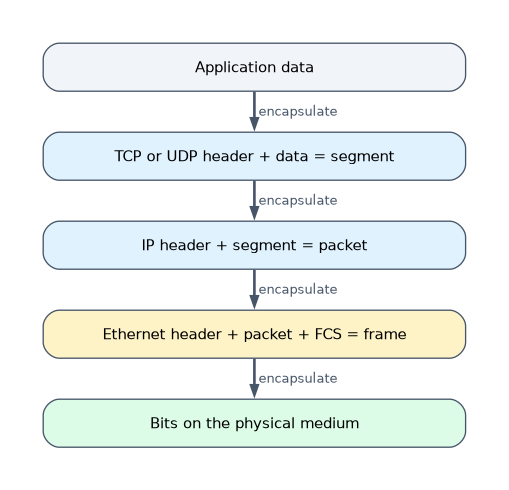 Each layer adds its header in front of the data from the layer above, and the data link layer also adds a trailer, the FCS. The receiver checks and strips each header in reverse order and passes the payload up.
Peer layers communicate logically: the receiver's transport layer reads the header the sender's transport layer wrote. Fields in each header, such as the Ethernet Type, the IP Protocol field and the TCP or UDP port, tell the receiver which upper protocol gets the payload.
| Header field | Value example | Meaning |
|---|---|---|
| Ethernet Type | 0x0800 | Payload is IPv4 |
| IP Protocol | 6 | Payload is TCP |
| IP Protocol | 17 | Payload is UDP |
| IP Protocol | 1 | Payload is ICMP |
| TCP destination port | 80 | Payload goes to the web service |
A worked example
A user opens a web page on a server. The browser creates an HTTP request, TCP adds source port 49152 and destination port 80, IP adds the two IP addresses with Protocol 6, and Ethernet adds the MAC addresses, Type 0x0800 and the FCS.
At the server, Ethernet sees Type 0x0800 and passes up to IP. IP sees Protocol 6 and passes up to TCP, and TCP sees port 80 and passes the request to the web service.
How the exam asks about this
- "What is the PDU at the network layer called?" → A packet.
- "Which of the following protocols use UDP?" → DNS (queries), TFTP, DHCP and SNMP. FTP, Telnet, SSH and HTTP use TCP.
- "Which layer of the OSI model is responsible for data encryption and format conversion?" → The presentation layer (Layer 6).
What to remember for the exam
- OSI has seven layers, from physical (1) up to application (7).
- PDUs: data, segment, packet, frame, bit.
- TCP is reliable and connection-oriented with a three-way handshake. UDP is connectionless and has an 8-byte header.
- Telnet is TCP 23, SSH is TCP 22, FTP is TCP 20 and 21, TFTP is UDP 69.
- The Ethernet Type, IP Protocol and transport port fields tell the receiver which upper layer gets the data.
TFTP and FTP are easy to swap. FTP uses TCP with ports 20 and 21 and needs a login, while TFTP uses UDP port 69 with no authentication.
Common mistakes
Calling every PDU a packet. The exam is precise: a segment at transport, a packet at network, a frame at data link.
Placing routing protocols at the transport layer. OSPF runs directly over IP with Protocol number 89 and belongs to the network layer.
Forgetting the trailer. Only the data link layer adds a trailer, the 4-byte FCS used to detect errors.
Check yourself
Which OSI layer handles logical addressing and path selection?
The network layer (Layer 3), where IP and routing work.
How many messages does TCP use to set up a connection, and what are they?
Three: SYN, SYN+ACK and ACK, known as the three-way handshake.
Which IP Protocol field value means the payload is UDP?
The value 17. TCP is 6 and ICMP is 1.
Topic 2 of 3 in Data Communication Network Basics
Test yourself on Data Communication Network Basics
The full Huawei HCIA-Datacom H12-811 question bank has 600 questions, with timed practice exams and an explanation for every answer.
This study guide is independent and is not affiliated with, endorsed by, or sponsored by Huawei. Vendor names, certification names and exam codes are trademarks of their respective owners and are used for identification only.