Virtualization and Cloud Computing · Topic 2 of 4
Virtualization Uses and Containers
See why virtualization is used: sandboxes, test labs, legacy support, cross platform work, virtual desktops, application virtualization and containers.
- 4 min
- Includes a diagram
- A sandbox isolates untrusted software; a VM is a natural sandbox.
- Test and development VMs are safe to break and easy to reset.
- Legacy VMs keep old software running but need isolation.
What it is
Virtualization is used for much more than running a second operating system. It gives a safe place to test, a way to keep old software alive, a way to run different systems on one computer and a way to deliver desktops from a central server.
This page lists the common purposes and compares virtual machines (VMs) with containers.
How it works
Sandbox
A sandbox is an isolated area where you can run untrusted software without risk to the main system. A VM is a good sandbox.
If the software is harmful, you delete the VM or return to a saved snapshot. Security staff use sandboxes to study suspicious files.
Test and development
Developers and technicians use VMs to try new software, updates, settings and scripts before using them on real systems. A test VM costs little, can be reset quickly and can be cloned many times. Test machines should be kept apart from the production network.
Legacy software and operating systems
Some old applications only run on old operating systems that no longer run on new hardware or get security updates. Running that system inside a VM keeps the application alive. Because the old system is exposed to risk, limit its network access and keep it isolated.
Cross platform virtualization
Cross platform virtualization runs one operating system on a computer that normally runs another, for example a Windows guest on a Mac or a Linux guest on Windows. It lets people reach apps that are not available on their main system.
An emulator mimics different hardware, such as a phone processor on a desktop computer. Emulation is slower than virtualization because it translates each instruction instead of using the real processor directly. Developers use emulators to test mobile apps.
Virtual desktop infrastructure
Virtual desktop infrastructure (VDI) runs users' desktops as virtual machines on central servers. Users connect from a thin client, a laptop or a phone and see the desktop on their screen.
Benefits include central management, easy updates and data that stays in the data centre. Drawbacks include the need for a good network connection and strong servers.
Application virtualization
Application virtualization runs a program in its own isolated environment without installing it fully on the user's computer. The app is delivered from a server or packaged, and it does not conflict with other software. It suits cases where an old version of an app must run beside a new one.
Containers
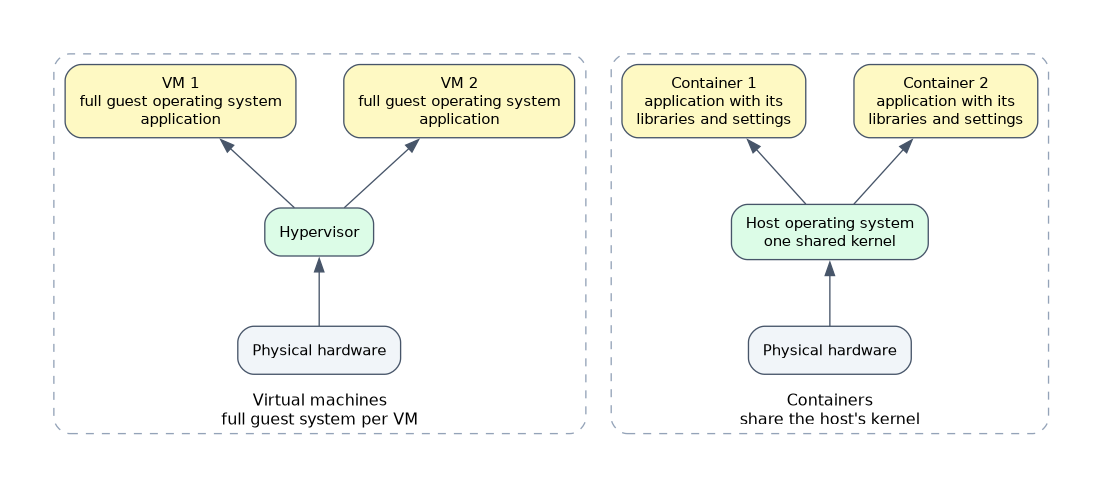 A container packages an application with the libraries and settings it needs, but shares the host's operating system kernel instead of carrying a full guest operating system. This makes containers small and quick to start.
| Feature | Virtual machine | Container |
|---|---|---|
| Operating system | Full guest system per VM | Shares the host's kernel |
| Size | Large (gigabytes) | Small |
| Start time | Slower | Very fast |
| Isolation | Strong, separate system | Lighter isolation |
| Typical use | Different operating systems, strong separation | Running many copies of an app on one system |
Containers suit modern applications that must scale quickly. A VM suits cases that need a whole separate operating system or stronger isolation.
If a question needs a whole different operating system, choose a VM. If it needs many small, quick copies of one application, choose containers.
Requirements to plan for
Virtualization needs enough processor cores, memory, storage space and network speed for all guests. It also needs security: patched guests, an updated hypervisor, controlled network access and a plan to protect the virtual disk files, since copying a file copies a whole machine.
What to remember for the exam
- A sandbox isolates untrusted software; a VM is a natural sandbox.
- Test and development VMs are safe to break and easy to reset.
- Legacy VMs keep old software running but need isolation.
- Cross platform virtualization runs a different operating system on one machine.
- Emulators mimic different hardware and are slower than virtualization.
- VDI delivers desktops from central servers.
- Application virtualization runs an app in its own isolated environment.
- Containers share the host kernel; VMs carry a full guest operating system.
Common mistakes
Mixing up emulation and virtualization. Virtualization uses the real processor; emulation imitates other hardware and is slower.
Using containers where a different operating system is needed. Containers share the host's kernel.
Leaving a legacy VM on the main network. An old unpatched system is a risk, so isolate it.
Forgetting network needs for VDI. A poor connection makes the remote desktop slow.
Treating a sandbox as a guarantee. A sandbox lowers risk but is not perfect, so keep the host patched.
Check yourself
Which technology shares the host's kernel and starts very quickly?
A container.
Why run an old application in a virtual machine?
It keeps the old operating system the app needs available, while isolating it from the rest of the network.
What does virtual desktop infrastructure do?
It runs user desktops as virtual machines on central servers that users reach from any device.
Topic 2 of 4 in Virtualization and Cloud Computing
Test yourself on Virtualization and Cloud Computing
The full CompTIA A+ 220-1201 question bank has 856 questions, with timed practice exams and an explanation for every answer.
This study guide is independent and is not affiliated with, endorsed by, or sponsored by CompTIA. Vendor names, certification names and exam codes are trademarks of their respective owners and are used for identification only.