Networking · Topic 7 of 10
Networking Hardware Devices
Compare routers, switches, access points, firewalls, hubs, modems, optical terminals, patch panels and Power over Ethernet, and know where each one fits.
- 4 min
- Includes a diagram
- A router links networks; a switch links devices within a network; a hub repeats to all ports.
- A managed switch can be configured; an unmanaged switch cannot.
- An access point adds wireless access to a wired network.
What it is
Networks are built from a small set of devices, and each one does a different job. Some join devices in one network, some link networks together, and some bring the signal in from a provider.
The exam asks you to tell them apart and to pick the right one for a scenario.
How it works
Core devices
| Device | Job | Notes |
|---|---|---|
| Router | Connects different networks and forwards packets between them | Works with Internet Protocol (IP) addresses; a home router also has switch ports and often Wi-Fi |
| Switch | Connects devices in the same network | Learns Media Access Control (MAC) addresses and sends frames only to the right port |
| Hub | Repeats every signal to all ports | Obsolete; causes collisions and no filtering |
| Access point (AP) | Gives wireless devices a link to the wired network | Needs a cable to the switch or router |
| Firewall | Allows or blocks traffic by rules | Can be a separate box or built into the router |
An unmanaged switch just works, with no settings. A managed switch can be configured, for example to create VLANs, monitor ports or set rules. A Layer 3 switch can also route between VLANs.
Hubs and switches differ in a key way. A hub sends data out of every port, while a switch sends it only to the destination.
Bringing the internet in
| Device | Used with |
|---|---|
| Cable modem | Cable television lines (coaxial cable) |
| Digital subscriber line (DSL) modem | Telephone lines |
| Optical network terminal (ONT) | Fiber to the premises; changes light signals into Ethernet |
A modem converts between the provider's signal and Ethernet. In a home, the modem, router, switch and access point are often combined into one box.
Extending and organising
- Repeater or extender: receives a signal and sends it again to cover more distance. A Wi-Fi extender can cut speed because it uses the same airtime for both directions.
- Patch panel: a wall or rack panel where cables from the building end. Short patch cables then link its ports to switch ports.
- Network interface card (NIC): the adapter that connects a computer to the network, wired or wireless.
- Small form factor pluggable (SFP) module: a swappable transceiver used in switches for fiber or copper links.
Power over Ethernet
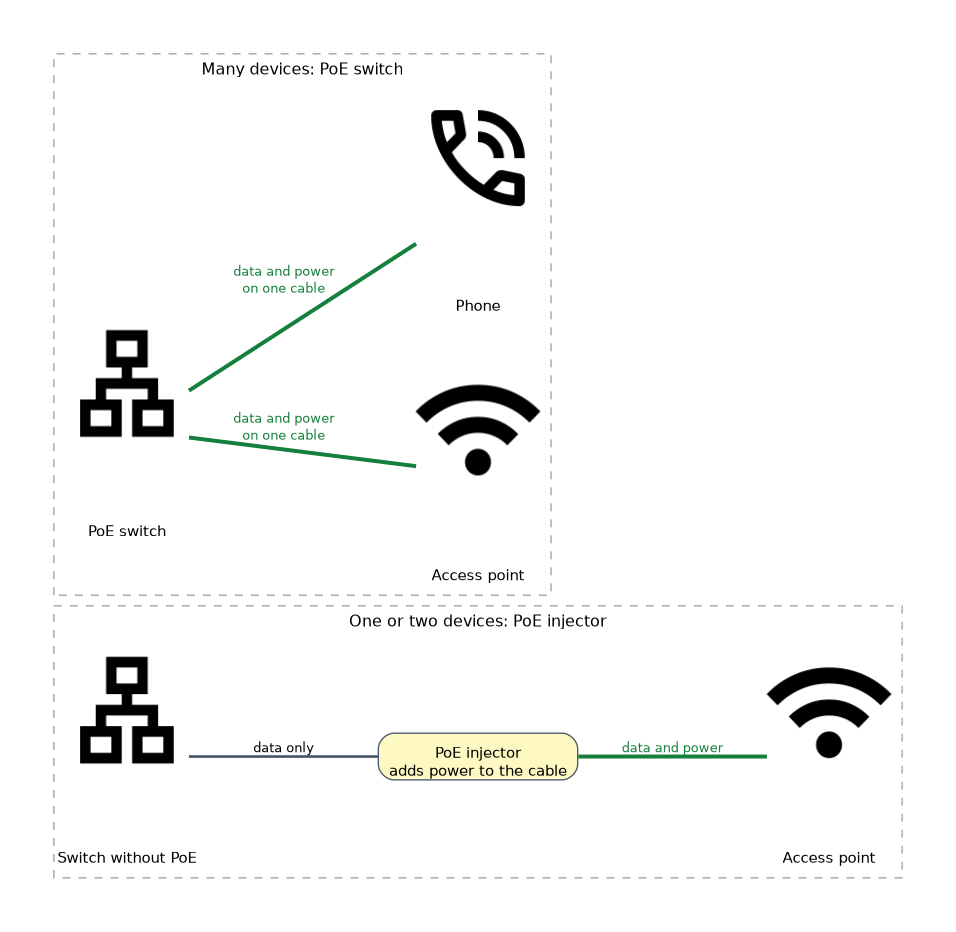 Power over Ethernet (PoE) sends electrical power along with data on the same twisted pair cable. It is useful for access points, cameras and phones, where a power outlet is not nearby.
| Standard | Name | Approximate power per port |
|---|---|---|
| 802.3af | PoE | Up to 15.4 watts |
| 802.3at | PoE+ | Up to 30 watts |
| 802.3bt | PoE++ | Higher again, for larger devices |
Power comes from a PoE switch or from a PoE injector placed between a non PoE switch and the device. Use a PoE switch if many devices need power and an injector for just one or two.
Choosing a device
A router connects networks and uses IP addresses; a switch connects devices inside a network and uses MAC addresses. Questions often hinge on this one difference.
Cloud managed hardware
Some access points and switches are managed from a cloud service instead of a local controller. This lets an administrator configure many sites from one web console.
What to remember for the exam
- A router links networks; a switch links devices within a network; a hub repeats to all ports.
- A managed switch can be configured; an unmanaged switch cannot.
- An access point adds wireless access to a wired network.
- Cable modems use coax, DSL modems use phone lines and an ONT is for fiber.
- A patch panel terminates building cable; patch cables connect it to the switch.
- PoE carries power and data together; 802.3af is 15.4 watts and 802.3at is 30 watts.
- A PoE injector adds power to one link when the switch is not PoE.
- A firewall filters traffic by rules.
Common mistakes
Calling a hub a switch. A hub floods all ports; a switch only forwards to the right one.
Thinking an access point is a router. An access point extends a network with wireless; it does not link two networks.
Plugging a PoE device into a non PoE port and expecting power. It needs a PoE switch or injector.
Putting a repeater where there is no signal. An extender must be placed where it still receives a good signal.
Forgetting the ONT. Fiber to the premises needs an ONT instead of a cable or DSL modem.
Check yourself
Which device connects two different networks?
A router.
What is the difference between a hub and a switch?
A hub repeats data to every port, while a switch sends it only to the port of the destination device.
What does PoE do?
It supplies electrical power to a device over the same Ethernet cable that carries its data.
Topic 7 of 10 in Networking
Test yourself on Networking
The full CompTIA A+ 220-1201 question bank has 856 questions, with timed practice exams and an explanation for every answer.
This study guide is independent and is not affiliated with, endorsed by, or sponsored by CompTIA. Vendor names, certification names and exam codes are trademarks of their respective owners and are used for identification only.