Networking · Topic 6 of 10
Network Configuration Concepts
Understand IP addressing, DHCP, static and APIPA addresses, IPv6, DNS record types, VLANs and VPNs, the concepts behind network configuration questions.
- 5 min
- Includes a diagram
- Private IPv4 ranges are 10.x, 172.16 to 172.31 and 192.168.x.
- APIPA addresses are 169.254.x.x and show that DHCP failed.
- A DHCP reservation ties an address to a MAC address.
What it is
Every device on a network needs a few settings to communicate: an Internet Protocol (IP) address, a subnet mask, a default gateway and a Domain Name System (DNS) server. Network configuration is the study of how those settings are given, what they mean and which extras (VLANs, VPNs) shape the traffic.
How it works
IPv4 addressing
An Internet Protocol version 4 (IPv4) address has four numbers from 0 to 255, such as 192.168.1.20. The subnet mask shows which part is the network and which is the host. The default gateway is the router address that a host uses to reach other networks.
Private ranges are not routed on the internet and are used inside homes and offices.
| Range | Common use |
|---|---|
| 10.0.0.0 to 10.255.255.255 | Large networks |
| 172.16.0.0 to 172.31.255.255 | Medium networks |
| 192.168.0.0 to 192.168.255.255 | Homes and small offices |
The address 127.0.0.1 is the loopback address, which points back to the same computer.
Static versus dynamic
A static address is typed in by hand and does not change. Servers, printers and network devices often use static addresses. A dynamic address is given by a Dynamic Host Configuration Protocol (DHCP) server, so clients configure themselves.
DHCP gives a lease, which is a time limit on how long the client may use the address. An administrator sets a scope, the range of addresses to hand out.
A DHCP reservation always gives the same address to one device, matched by its Media Access Control (MAC) address. Reservations keep dynamic convenience and a stable address.
A DHCP exclusion is a block of addresses inside the scope that the server must not hand out. Exclusions are kept for devices set up with static addresses, such as printers, servers and routers, so that no client is given the same address. Leaving static addresses inside the active scope without an exclusion or reservation is a classic cause of an address conflict.
APIPA
If a client set to use DHCP cannot reach a server, it gives itself an address in the range 169.254.0.0 to 169.254.255.255. This is Automatic Private IP Addressing (APIPA), also called a link local address.
Such an address lets the device talk to others on the same segment only, so it cannot reach the internet. Seeing 169.254.x.x is a sign that DHCP failed.
IPv6
Internet Protocol version 6 (IPv6) uses 128 bit addresses written in hexadecimal, in eight groups separated by colons. Leading zeros in a group may be dropped, and one run of all zero groups can be replaced by a double colon.
| Type | Meaning |
|---|---|
| Unicast | One sender to one receiver |
| Multicast | One sender to a group of receivers |
| Anycast | One sender to the nearest of several receivers that share an address |
| Link local | Starts with fe80, valid only on the local link |
IPv6 has no broadcast. Multicast does that job.
DNS records
DNS stores information in records. These are the common record types.
| Record | Purpose |
|---|---|
| A | Name to an IPv4 address |
| AAAA | Name to an IPv6 address |
| CNAME | An alias that points one name to another name |
| MX | The mail server for a domain |
| TXT | Free text, used for email checks and ownership proofs |
Email security settings such as Sender Policy Framework (SPF), DomainKeys Identified Mail (DKIM) and Domain based Message Authentication, Reporting and Conformance (DMARC) are published in TXT records. They help receivers check that mail really comes from the domain it claims.
VLAN
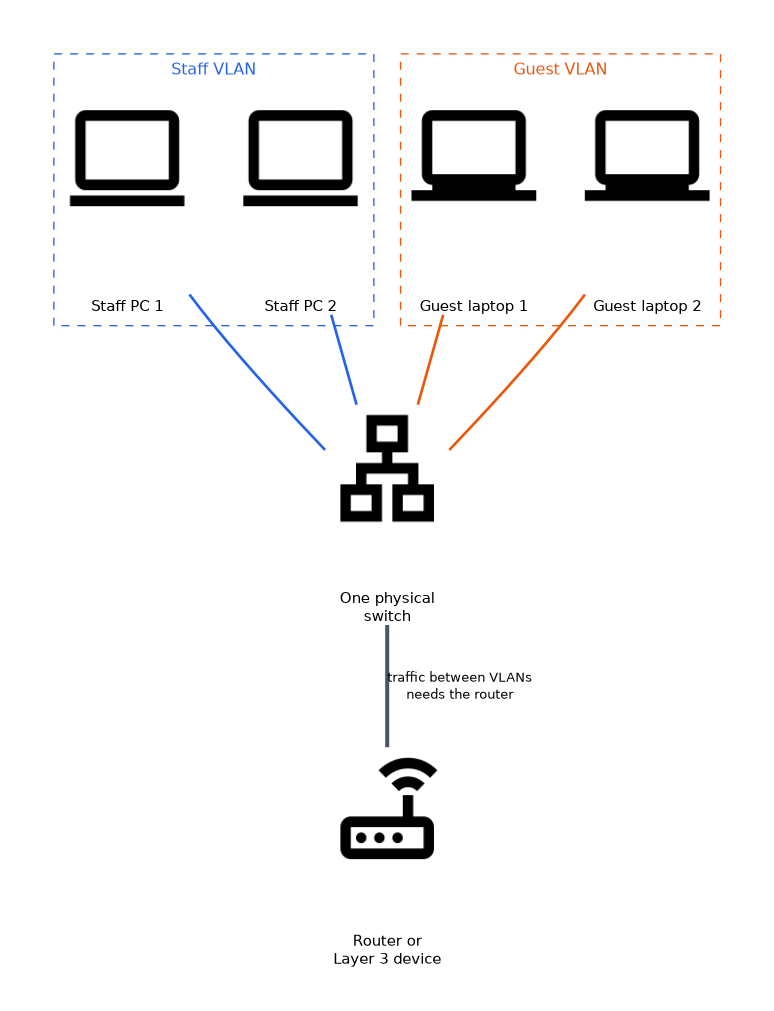 A virtual local area network (VLAN) splits one physical switch into separate logical networks. Devices in different VLANs cannot talk directly.
They need a router, or a Layer 3 device, between them. VLANs reduce broadcast traffic and keep groups such as guests and staff apart.
VPN
A virtual private network (VPN) builds an encrypted tunnel across another network, usually the internet. It lets remote users or sites reach private resources safely.
A client with an address that starts 169.254 has no working DHCP. Check the server, the cable and the network path before changing anything else.
What to remember for the exam
- Private IPv4 ranges are 10.x, 172.16 to 172.31 and 192.168.x.
- APIPA addresses are 169.254.x.x and show that DHCP failed.
- A DHCP reservation ties an address to a MAC address.
- A DHCP lease is the time a client may keep an address.
- IPv6 addresses are 128 bits and use hexadecimal; there is no broadcast.
- A record maps to IPv4, AAAA to IPv6, CNAME to an alias, MX to mail, TXT to text.
- SPF, DKIM and DMARC are email checks published in DNS.
- A VLAN splits one switch into logical networks; a VPN is an encrypted tunnel.
Common mistakes
Calling 169.254 addresses normal. They show a failed DHCP request and give only local reach.
Mixing up reservations and static addresses. A reservation is set on the DHCP server; a static address is typed on the device.
Thinking VLANs talk to each other freely. Traffic between VLANs needs routing.
Forgetting the double colon rule. Only one run of zeros can be shortened in an IPv6 address.
Confusing MX and A records. MX points to the server that takes mail; A points a name to an address.
Check yourself
What does an address starting 169.254 tell you?
The client could not get an address from DHCP and used APIPA, so it has only local connectivity.
What does a DHCP reservation do?
It always gives the same IP address to a device with a particular MAC address.
Which DNS record type points a domain to its mail server?
The MX record.
Topic 6 of 10 in Networking
Test yourself on Networking
The full CompTIA A+ 220-1201 question bank has 856 questions, with timed practice exams and an explanation for every answer.
This study guide is independent and is not affiliated with, endorsed by, or sponsored by CompTIA. Vendor names, certification names and exam codes are trademarks of their respective owners and are used for identification only.