Understanding and Using APIs · Topic 5 of 7
API Authentication Mechanisms
Learn how basic authentication, custom token headers, bearer tokens and API keys work, how to send them from Python, and how to keep credentials safe.
- 5 min
- Includes a diagram
- Authentication proves identity. Authorisation decides what is allowed.
- Basic authentication sends Base64 of
username:passwordin theAuthorizationheader. - Base64 is encoding and not encryption, so use HTTPS.
What it is
API authentication is the way a client proves who it is before the server allows a request.
The three mechanisms on the outline are basic authentication, custom tokens and API keys. They differ in what the client sends and how long it lasts.
Authentication answers who you are. Authorisation answers what you may do. A 401 code points to the first, and a 403 code to the second.
How it works
Each mechanism puts a credential into the request, usually in a header.
Basic authentication
The client sends a username and password in the Authorization header. The header value is the word Basic followed by the text username:password encoded with Base64.
Authorization: Basic YWRtaW46cGFzc3dvcmQ=Base64 is an encoding, not encryption. Anyone who sees the header can decode it. Basic authentication is therefore safe only over HTTPS.
In Python, requests builds the header for you.
import requests

response = requests.get(
    BASE_URL + "/v1/devices",
    auth=("admin", PASSWORD),
)
Custom token authentication
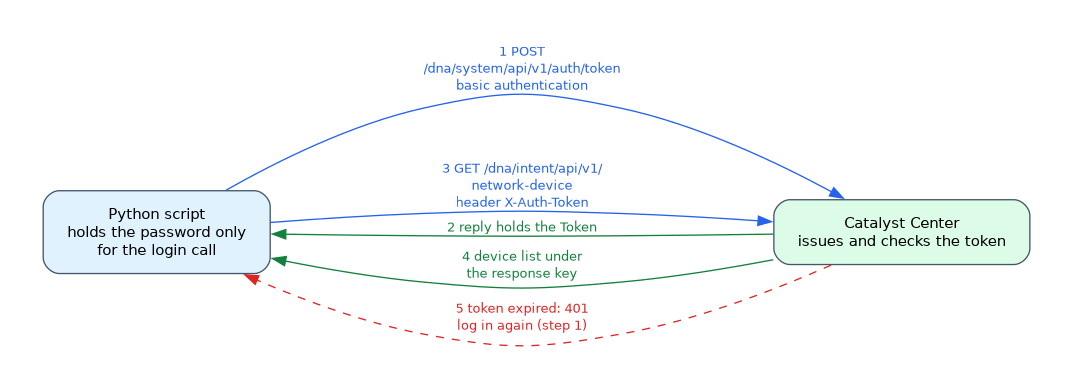 The client first logs in with its credentials and receives a token. It then sends the token with each later request, so the password is sent only once.
Cisco Catalyst Center works this way. A POST to /dna/system/api/v1/auth/token with basic authentication returns a token. The client sends it in the X-Auth-Token header on later calls.
auth_response = requests.post(
    BASE_URL + "/dna/system/api/v1/auth/token",
    auth=("admin", PASSWORD),
)
token = auth_response.json()["Token"]

headers = {"X-Auth-Token": token}
devices = requests.get(
    BASE_URL + "/dna/intent/api/v1/network-device",
    headers=headers,
)
A token has a limited life. When it expires, the API answers 401 and the client logs in again. The header name is chosen by each product, which is why this is called a custom token.
Bearer tokens
Many cloud services use the standard Authorization header with the word Bearer and then a token. This is typical for tokens issued after an OAuth login, such as Webex access tokens.
Authorization: Bearer ACCESS_TOKENThe token itself is a long random string. Whoever holds it can use it, so it must be protected like a password.
API keys
An API key is a long string that identifies the calling application or account. The client sends it with every request, often in a header, and sometimes as a query parameter.
Cisco Meraki uses an API key. The key is generated in the dashboard by a user and sent in a header.
headers = {
    "X-Cisco-Meraki-API-Key": API_KEY,
    "Content-Type": "application/json",
}
response = requests.get(BASE_URL + "/organizations", headers=headers)
A key does not normally expire by itself. It lasts until someone revokes it, so a leaked key stays dangerous.
Comparing the mechanisms
| Mechanism | What is sent | Lifetime | Example |
|---|---|---|---|
| Basic | Base64 of username and password on every call | Until the password changes | Many device APIs |
| Custom token | A token from a login call, in a product defined header | Short, then refresh | Catalyst Center X-Auth-Token |
| Bearer token | A token in the Authorization header | Limited, often refreshable | Webex |
| API key | A static key in a header or query | Until revoked | Meraki |
Keeping credentials safe
- Always use HTTPS, so that headers cannot be read on the network.
- Never write secrets into source code or commit them to Git.
- Read them from environment variables or a secrets manager.
- Give each token only the access it needs.
- Rotate or revoke a credential that may have leaked.
import os

API_KEY = os.environ["MERAKI_API_KEY"]When a question says that a login call returns a value which is then sent on every later request, the mechanism is token based authentication.
What to remember for the exam
Seven facts cover this topic.
- Authentication proves identity. Authorisation decides what is allowed.
- Basic authentication sends Base64 of
username:passwordin theAuthorizationheader. - Base64 is encoding and not encryption, so use HTTPS.
- Token based APIs return a token from a login call and expect it in later headers.
- Catalyst Center uses the
X-Auth-Tokenheader, and Meraki uses an API key header. - A bearer token goes in the
Authorizationheader after the wordBearer. - Keep secrets out of code and out of Git.
Common mistakes
Four mistakes are typical.
Calling Base64 encryption. It can be reversed in a second, so it gives no secrecy.
Putting a key in the URL. URLs appear in logs and browser history.
Hard coding a token in a script. If the script goes into Git, the secret is exposed.
Ignoring token expiry. A script that worked this morning fails with 401 later unless it renews the token.
Anyone who obtains a bearer token or an API key can act as you until it is revoked. Treat both like passwords.
Check yourself
Work through these three questions.
What does a client send in basic authentication?
It sends the username and password, joined with a colon and Base64 encoded, in the
Authorizationheader.How does token based authentication differ from sending a password on every call?
The client logs in once, receives a token, and sends only the token on later calls.
Why should API keys not be stored in source code?
Source code is often shared or committed to Git, which would expose the key.
Topic 5 of 7 in Understanding and Using APIs
Test yourself on Understanding and Using APIs
The full Cisco CCNA 200-901 DEVASC question bank has 808 questions, with timed practice exams and an explanation for every answer.
This study guide is independent and is not affiliated with, endorsed by, or sponsored by Cisco. Vendor names, certification names and exam codes are trademarks of their respective owners and are used for identification only.