Understanding and Using APIs · Topic 4 of 7
Webhooks and API Constraints
Learn how webhooks push events to your code, and the limits you meet when consuming APIs such as rate limits, pagination, timeouts, versions and retries.
- 5 min
- Includes a diagram
- A webhook is a push from the provider to your endpoint, usually an HTTP POST with a JSON body.
- You register your endpoint address and the events you want.
- Your receiver should answer quickly with a success code.
What it is
A webhook is an HTTP callback in which a service sends a message to your application when an event happens.
Normal API use is pull. Your code asks and the server answers.
A webhook is push. The server contacts you as soon as something changes.
When you consume any API, you also work within limits such as rate limits, page sizes and time outs. Good code expects them.
How it works
A webhook needs a registration step, a receiving endpoint and a safe way to process events.
The webhook pattern
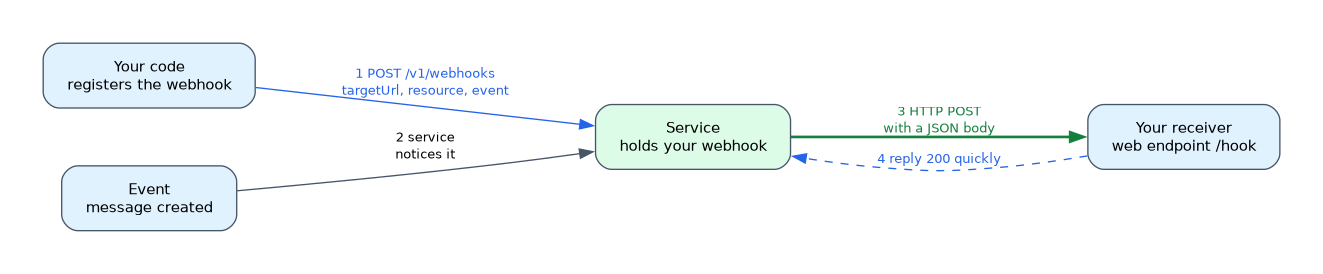
- You build a small web service with an endpoint that accepts POST requests.
- You register that address with the provider and say which events you want.
- When an event occurs, the provider sends a POST with a JSON body that describes it.
- Your endpoint replies with a success code, normally 200, quickly.
- Your code then acts on the event.
Webhooks avoid polling. Polling wastes calls and delays your reaction. A webhook gives near real time news with no repeated requests.
Registering a webhook
Many platforms let you register through their API. For example, Webex accepts a POST to /v1/webhooks with a body like this.
{
  "name": "New messages",
  "targetUrl": "RECEIVER_ADDRESS",
  "resource": "messages",
  "event": "created"
}
RECEIVER_ADDRESS stands for the public address of your endpoint. The provider must be able to reach it from the internet, or through a tunnel when you test on a laptop.
A simple receiver
from flask import Flask, request

app = Flask(__name__)


@app.route("/hook", methods=["POST"])
def hook():
    event = request.get_json()
    print(event)
    return "", 200
Keep the handler quick. If the work takes long, store the event and process it afterwards, so you can answer at once.
Securing a webhook
- Serve the endpoint over HTTPS.
- Many providers sign each message with a shared secret, so your code can check that the call is genuine.
- Treat the body as untrusted input, and validate it before you use it.
Constraints when consuming APIs
| Constraint | What it means | How to cope |
|---|---|---|
| Rate limiting | The provider caps calls in a period and answers 429 when you exceed it | Slow down, wait, and read Retry-After if present |
| Pagination | A list comes back in pages | Follow the next page until none is left |
| Timeouts | A slow call may never answer | Set a timeout and handle the failure |
| Authentication | Tokens expire or need a scope | Refresh the token and request the right scope |
| Versioning | The path or header names an API version | Pin a version and watch for deprecation |
| Payload size | Large bodies may be refused | Send smaller batches |
| Availability | The service may return 5xx errors | Retry with a growing delay |
Pagination in practice
An API may return only part of a large list, with a way to get the next part. Some APIs give a Link header that points to the next page. Others use a limit and offset, or a cursor value.
url = BASE_URL + "/v1/devices"
params = {"limit": 100}
items = []

while url:
    response = requests.get(url, headers=headers, params=params, timeout=10)
    response.raise_for_status()
    items.extend(response.json()["items"])
    url = response.links.get("next", {}).get("url")
    params = None
The requests library parses the Link header into response.links. This pattern works only for APIs that use that header, so check the documentation for yours.
Retrying politely
When a call fails with 429 or a 5xx code, wait and try again. Doubling the wait each time is called exponential backoff. Set a maximum number of tries so the script cannot loop forever.
A webhook replaces polling. If a question asks how to learn about an event without repeatedly asking, the answer is a webhook.
What to remember for the exam
Seven facts cover this topic.
- A webhook is a push from the provider to your endpoint, usually an HTTP POST with a JSON body.
- You register your endpoint address and the events you want.
- Your receiver should answer quickly with a success code.
- Webhooks reduce polling and give near real time updates.
- A 429 response means a rate limit was hit.
- Pagination returns a long list in pages, and your code must follow them.
- Timeouts, retries with backoff and versioning make API code reliable.
Common mistakes
Four mistakes are common.
Registering an address that the provider cannot reach. A private address on your laptop is not visible from the internet.
Doing slow work inside the handler. The provider may time out and send the event again.
Reading only the first page. The script then misses items without any error.
Retrying with no limit or delay. A tight loop makes rate limiting worse.
Do not trust a webhook call just because it arrives at your endpoint. Verify the signature or another check that the provider supports.
Check yourself
Work through these three questions.
How does a webhook differ from polling?
With a webhook the provider pushes the event to your endpoint. With polling your code keeps asking.
What does a 429 response mean and how should code react?
It means a rate limit was exceeded. The code should wait, honour
Retry-Afterif present, and try again.Why must code handle pagination?
A long list can come back in pages, so without following them you receive only part of the data.
Topic 4 of 7 in Understanding and Using APIs
Test yourself on Understanding and Using APIs
The full Cisco CCNA 200-901 DEVASC question bank has 808 questions, with timed practice exams and an explanation for every answer.
This study guide is independent and is not affiliated with, endorsed by, or sponsored by Cisco. Vendor names, certification names and exam codes are trademarks of their respective owners and are used for identification only.