Network Access · Topic 1 of 9
VLANs, Access Ports and Inter-VLAN Routing
Learn how to create VLANs across switches, assign access ports for data and voice, understand the default VLAN, and connect VLANs with inter-VLAN routing.
- 6 min
- Exam objective 2.1
- Includes a diagram
- A VLAN is a broadcast domain. Different VLANs need a Layer 3 device to communicate.
- Normal-range VLANs are 1 to 1005.
- VLAN 1 is the default VLAN, and all ports start in it.
What it is
A VLAN splits one physical switch into several separate Layer 2 networks.
A VLAN (virtual LAN) is its own broadcast domain. A broadcast sent by a host in VLAN 10 reaches only the ports in VLAN 10, even though other VLANs live on the same switch.
VLANs group devices by function, such as staff, guests and phones, rather than by where they sit. They reduce broadcast traffic and keep groups of devices apart.
Because each VLAN is a separate network, it normally has its own IP subnet. To move traffic from one VLAN to another, you need a Layer 3 device.
How it works
You create the VLANs, place ports in them, and add routing if the VLANs must talk.
Creating VLANs
The normal range of VLAN IDs is 1 to 1005. The extended range, 1006 to 4094, is outside the scope of this topic. VLANs 1 and 1002 to 1005 are reserved defaults that cannot be deleted.
vlan 10
 name SALES
vlan 20
 name VOICE
A VLAN must exist on every switch that has ports in it.
On older software, a port assigned to a missing VLAN stays inactive. Many current switches create the VLAN automatically when you assign the port, but creating it first is the safer habit.
In the normal range, VLANs are stored in a file called vlan.dat in flash memory, not only in the running configuration.
The default VLAN
Out of the box, every port on a Cisco switch belongs to VLAN 1, the default VLAN.
Because it exists everywhere, best practice is to avoid VLAN 1 for user traffic. Move unused ports to a separate, unused VLAN and shut them down.
Access ports
An access port carries traffic for one VLAN and connects an end device. Frames travel untagged between the device and the switch.
interface GigabitEthernet0/5
 switchport mode access
 switchport access vlan 10
Voice VLAN
An IP phone usually has a PC plugged into the back of it. The phone uses a single switch port, but the phone and the PC should be in different VLANs. The voice VLAN feature allows that.
interface GigabitEthernet0/5
 switchport mode access
 switchport access vlan 10
 switchport voice vlan 20
The switch tells the phone which voice VLAN to use, usually through a discovery protocol. The phone then tags its own frames with VLAN 20, while the PC's frames stay untagged and belong to VLAN 10. The port still counts as an access port in the configuration.
Verifying
show vlan brief
show interfaces GigabitEthernet0/5 switchport
show running-config interface GigabitEthernet0/5
show vlan brief lists VLANs and the access ports in each. Trunk ports are not shown there. The switchport view shows the port's mode, its access VLAN and its voice VLAN.
Inter-VLAN routing
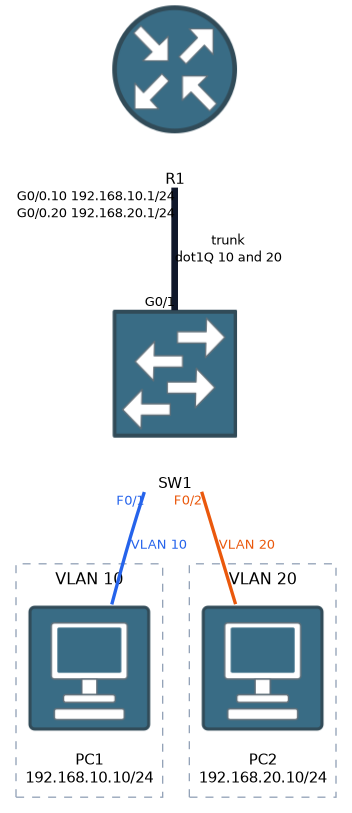 Hosts in different VLANs cannot reach each other without routing. There are three common methods.
| Method | How it works |
|---|---|
| Router with one interface per VLAN | Legacy approach, one physical router port per VLAN |
| Router-on-a-stick | One trunk link to a router, with a subinterface per VLAN |
| Layer 3 switch with SVIs | The switch routes between switched virtual interfaces |
Router-on-a-stick uses a single trunk between the switch and the router. Each VLAN gets a subinterface that acts as its gateway.
interface GigabitEthernet0/0
 no shutdown
interface GigabitEthernet0/0.10
 encapsulation dot1Q 10
 ip address 192.168.10.1 255.255.255.0
interface GigabitEthernet0/0.20
 encapsulation dot1Q 20
 ip address 192.168.20.1 255.255.255.0
A Layer 3 switch does the same job inside the switch, using a switched virtual interface (SVI) per VLAN.
ip routing
interface vlan 10
 ip address 192.168.10.1 255.255.255.0
 no shutdown
ip routing turns on routing in the switch. The SVI address becomes the default gateway of the hosts in that VLAN. An SVI stays down until the VLAN exists and at least one active port is in it.
Layer 3 switching is faster and scales better than router-on-a-stick, because it does not squeeze all inter-VLAN traffic through one link.
What to remember for the exam
Eight facts cover most questions on this topic.
- A VLAN is a broadcast domain. Different VLANs need a Layer 3 device to communicate.
- Normal-range VLANs are 1 to 1005.
- VLAN 1 is the default VLAN, and all ports start in it.
- An access port belongs to one data VLAN and connects an end device.
switchport voice vlanadds a second VLAN for a phone on the same port.- Use
show vlan briefto list VLANs and their access ports. Trunks do not appear there. - Router-on-a-stick uses subinterfaces and
encapsulation dot1Q. - A Layer 3 switch uses SVIs and
ip routing.
A port with both an access VLAN and a voice VLAN is still an access port, and the phone is the device that tags its own frames.
Common mistakes
These five slips are common.
Assigning a port to a VLAN that does not exist. On many switches, the VLAN is created automatically, but the safer habit is to create it first and check with show vlan brief.
Forgetting to create the VLAN on every switch. A VLAN must be present on each switch it crosses.
Looking for trunk ports in show vlan brief. Use show interfaces trunk for those.
No gateway on the SVI. A host with no default gateway can talk only inside its own VLAN.
Leaving the router interface shut down. In router-on-a-stick, the physical interface needs no shutdown, or none of the subinterfaces come up.
In router-on-a-stick the link to the router must be a trunk, or only one VLAN can reach it.
Check yourself
Work through these three prompts.
Why can two hosts in different VLANs on the same switch not reach each other without a Layer 3 device?
Each VLAN is its own broadcast domain and normally its own IP subnet, so moving traffic between VLANs needs a Layer 3 device to route it.
How can a phone and a PC share one access port and still be in different VLANs?
Add
switchport voice vlan 20to the access port that hasswitchport access vlan 10. The phone tags its own frames with VLAN 20, while the PC's frames stay untagged in VLAN 10.What is the difference between router-on-a-stick and a Layer 3 switch using SVIs?
Router-on-a-stick sends all inter-VLAN traffic over one trunk to a router that has a subinterface per VLAN. A Layer 3 switch routes inside the switch with an SVI per VLAN, which is faster and scales better.
Topic 1 of 9 in Network Access
Test yourself on Network Access
The full Cisco CCNA 200-301 question bank has 1,206 questions, with timed practice exams and an explanation for every answer.
This study guide is independent and is not affiliated with, endorsed by, or sponsored by Cisco. Vendor names, certification names and exam codes are trademarks of their respective owners and are used for identification only.