Network Access · Topic 2 of 9
Trunk Ports, 802.1Q and the Native VLAN
Learn how trunk ports carry multiple VLANs between switches using 802.1Q tagging, how the native VLAN works, and how to configure and verify a trunk.
- 6 min
- Exam objective 2.2
- Includes a diagram
- A trunk carries many VLANs over one link, using 802.1Q tags.
- The 802.1Q tag is 4 bytes and has a 12-bit VLAN ID.
- The native VLAN is sent untagged. The default native VLAN is 1.
What it is
A trunk is a single link that carries traffic for many VLANs between switches.
When VLANs span more than one switch, the switches need such a link. Without trunking, you would need a separate cable between the switches for every VLAN.
A trunk marks each frame with a tag so the receiving switch knows which VLAN it belongs to. The standard for this tagging is IEEE 802.1Q, often written as dot1q.
How it works
Tagged frames cross the trunk, the native VLAN crosses untagged, and DTP can negotiate the link.
The 802.1Q tag
When a frame leaves a trunk port, the switch inserts a 4-byte tag into the Ethernet header, between the source MAC address and the type field.
The tag holds:
- a tag protocol identifier that marks the frame as tagged
- a 3-bit priority field, used for class of service
- a 1-bit field for drop eligibility
- a 12-bit VLAN ID, which allows 4096 values
The receiving switch reads the VLAN ID, removes the tag, and delivers the frame only to ports in that VLAN. Because the frame has grown by 4 bytes, the maximum frame size on a trunk is a little bigger than on an ordinary link.
The native VLAN
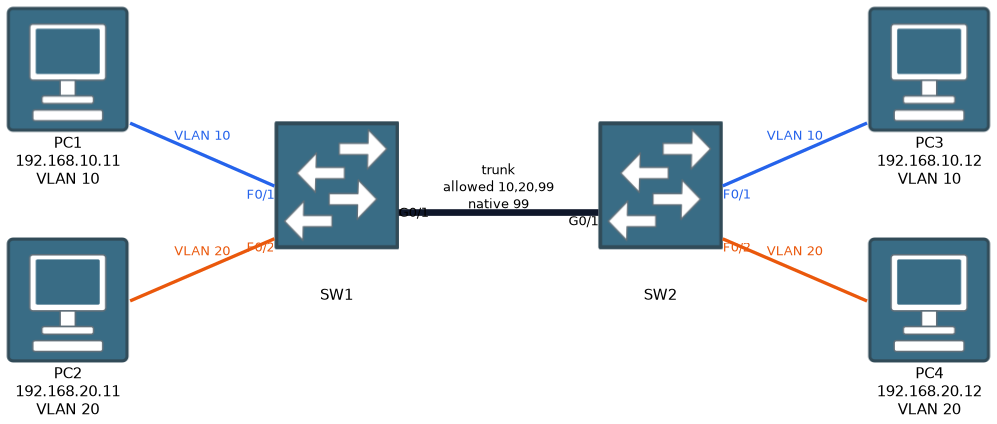
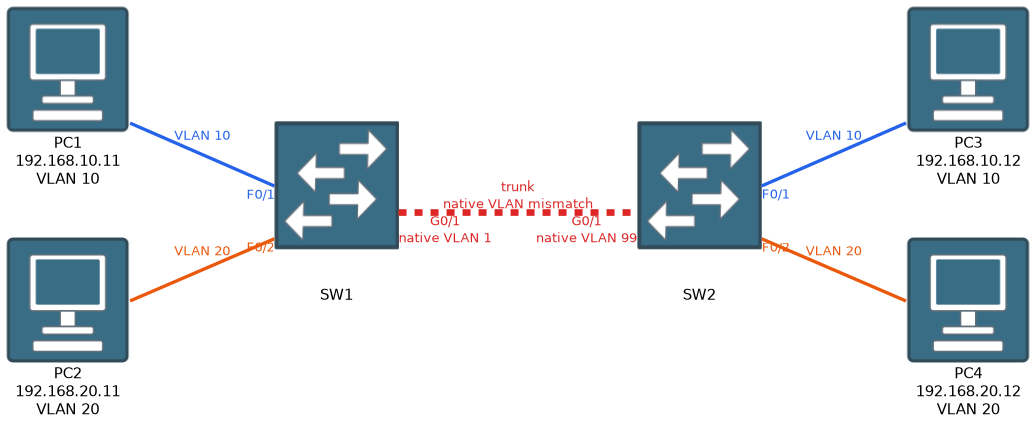 One VLAN on a trunk is handled differently. Frames in the native VLAN are sent without a tag, and untagged frames that arrive on a trunk are placed in the native VLAN. The default native VLAN is VLAN 1.
The native VLAN exists for compatibility, for example with devices that do not understand tags.
Both ends of a trunk must use the same native VLAN. If they disagree, frames can leak between VLANs, and the switches normally log a native VLAN mismatch message. As good practice, many networks set the native VLAN to an unused VLAN rather than leaving it as VLAN 1.
Configuring a trunk
interface GigabitEthernet0/1
 switchport trunk encapsulation dot1q
 switchport mode trunk
 switchport trunk native vlan 99
 switchport trunk allowed vlan 10,20,99
switchport trunk encapsulation dot1qis needed only on switches that also support the older ISL protocol. Switches that support only 802.1Q reject this command, and you simply leave it out.switchport mode trunkmakes the port a trunk, whatever the other end says.switchport trunk native vlan 99changes the native VLAN.switchport trunk allowed vlanlimits which VLANs may cross the trunk. By default, all VLANs are allowed. Limiting them reduces unnecessary traffic and tightens security.
Dynamic Trunking Protocol
Cisco switches can negotiate a trunk automatically with DTP (Dynamic Trunking Protocol). The outcome depends on the mode at each end.
| One side | Other side | Result |
|---|---|---|
| trunk | trunk, dynamic desirable, dynamic auto | Trunk |
| dynamic desirable | dynamic desirable or dynamic auto | Trunk |
| dynamic auto | dynamic auto | Access (no trunk) |
| access | any | Access (no trunk) |
A port in dynamic auto waits for the other side to ask. A port in dynamic desirable actively asks. Two auto ports will wait for each other forever, and no trunk forms.
The default mode on most Catalyst switches is dynamic auto.
For security, it is best practice to configure trunks by hand and turn off negotiation.
interface GigabitEthernet0/1
 switchport mode trunk
 switchport nonegotiate
Verifying
show interfaces trunk
show interfaces GigabitEthernet0/1 switchport
show vlan brief
show interfaces trunk is the key command. It shows which ports are trunking, the encapsulation, the native VLAN, the VLANs allowed on the trunk, and the VLANs that are allowed and active.
If a VLAN is missing from the last list, the VLAN may not exist on this switch, or it may be pruned or not allowed.
What to remember for the exam
Eight facts cover most questions on this topic.
- A trunk carries many VLANs over one link, using 802.1Q tags.
- The 802.1Q tag is 4 bytes and has a 12-bit VLAN ID.
- The native VLAN is sent untagged. The default native VLAN is 1.
- Both ends of a trunk must agree on the native VLAN.
switchport mode trunkforces a trunk.switchport trunk allowed vlanlimits the VLANs.- Dynamic auto with dynamic auto does not form a trunk.
switchport nonegotiateturns off DTP.show interfaces trunkis the main verification command.
For DTP questions, a trunk forms if either side is trunk or desirable. Auto with auto, or anything with access, gives no trunk.
Common mistakes
These five errors appear again and again.
Mismatched native VLANs. One side uses VLAN 1 and the other uses 99. The link may still work, but frames are placed in the wrong VLAN, and warnings appear in the logs.
Two dynamic auto ports. Both sides wait, and no trunk forms.
Forgetting the allowed list. A VLAN that is not in the allowed list does not cross the trunk, so hosts in that VLAN on the far switch are cut off.
Tagging the native VLAN by mistake. The native VLAN is untagged by default. If one end tags it and the other does not, traffic is lost.
Assuming show vlan brief shows trunk ports. Use show interfaces trunk instead.
A trunk that is up does not mean every VLAN crosses it. Check the allowed list and the active list before blaming the hosts.
Check yourself
Work through these three prompts.
What does the 802.1Q tag add to a frame, and why does the receiving switch need it?
It adds a 4-byte tag that includes a 12-bit VLAN ID. The receiving switch reads the VLAN ID, removes the tag, and delivers the frame only to ports in that VLAN.
What happens to untagged frames that arrive on a trunk, and why is a native VLAN mismatch a problem?
Untagged frames are placed in the native VLAN, which is VLAN 1 by default. If the two ends use different native VLANs, frames land in the wrong VLAN and can leak between VLANs, and a mismatch message is logged.
Which combinations of DTP modes form a trunk, and which do not?
A trunk forms when one side is trunk or dynamic desirable and the other side is trunk, dynamic desirable or dynamic auto. Dynamic auto with dynamic auto, or anything with access, gives no trunk.
Topic 2 of 9 in Network Access
Test yourself on Network Access
The full Cisco CCNA 200-301 question bank has 1,206 questions, with timed practice exams and an explanation for every answer.
This study guide is independent and is not affiliated with, endorsed by, or sponsored by Cisco. Vendor names, certification names and exam codes are trademarks of their respective owners and are used for identification only.