Data and Object Management · Topic 7 of 11
External Volumes for Iceberg Tables and the Polaris Open Catalog
Create and manage an EXTERNAL_VOLUME for Iceberg tables, set default volumes, and understand the Polaris Catalog now called Snowflake Open Catalog.
- 5 min
- Includes a diagram
- An external volume is an account level object with the IAM entity for Iceberg storage; many tables can share one.
- The
EXTERNAL_VOLUMEdefault can be set on account, database or schema; the lowest scope wins and it affects only new tables. - Verify with
SYSTEM$VERIFY_EXTERNAL_VOLUME.
What it is
An external volume is a named, account level Snowflake object that links Snowflake to cloud storage for Iceberg tables. It holds an IAM entity that Snowflake uses to reach table data, Iceberg metadata and manifest files.
Polaris Catalog is the name the exam outline uses for the open catalog service built on Apache Polaris. Snowflake documents it as Snowflake Open Catalog: a managed Apache Iceberg catalog based on the Iceberg REST protocol, so several engines can read and write the same Iceberg tables with central access control.
How it works
External volumes
One external volume can serve many Iceberg tables. Each volume stores its own IAM entity, and the cloud role must trust it. Storage integrations serve stages; Iceberg table storage is reached through an external volume.
Supported storage is Amazon S3, Google Cloud Storage, Azure Storage and S3 compatible storage.
CREATE EXTERNAL VOLUME lake_vol
  STORAGE_LOCATIONS = (
    (
      NAME = 'lake-east'
      STORAGE_PROVIDER = 'S3'
      STORAGE_BASE_URL = 's3://lake-bucket/iceberg/'
      STORAGE_AWS_ROLE_ARN = 'arn:aws:iam::123456789012:role/snowflake_lake'
    )
  );

DESC EXTERNAL VOLUME lake_vol;
SELECT SYSTEM$VERIFY_EXTERNAL_VOLUME('lake_vol');
The setup pattern mirrors a storage integration:
- Create the cloud role and policy for the bucket.
- Create the external volume with the base URL and role.
- Run
DESC EXTERNAL VOLUMEand copy the Snowflake principal and external ID into the role's trust policy. - Verify with
SYSTEM$VERIFY_EXTERNAL_VOLUME(or Verify connection in Snowsight).
Management points:
| Task | How |
|---|---|
| Add another location | ALTER EXTERNAL VOLUME ... ADD STORAGE_LOCATION |
| Let roles use it | GRANT USAGE ON EXTERNAL VOLUME |
| Remove and restore | DROP and UNDROP EXTERNAL VOLUME |
| Inspect | SHOW EXTERNAL VOLUMES, DESC EXTERNAL VOLUME |
| Options | S3 region type (standard or government), encryption (none, SSE-S3, SSE-KMS), public or private AWS PrivateLink connectivity; Azure tenant ID |
USAGE lets a role reference the volume and see its details. Creating the volume needs a role with the privilege to create it, typically a high level administrator role.
Default external volume
Instead of naming the volume in every CREATE ICEBERG TABLE, set the EXTERNAL_VOLUME parameter on the account, a database or a schema. The lowest scope wins: schema over database over account. A change applies only to tables created afterward.
ALTER SCHEMA lake.orders SET EXTERNAL_VOLUME = 'lake_vol';Setting the parameter needs USAGE on the volume plus the right to alter the target object.
A scenario with an Iceberg table that must write to a different bucket per team points to several external volumes, with the default volume set per schema.
Snowflake Open Catalog (Polaris)
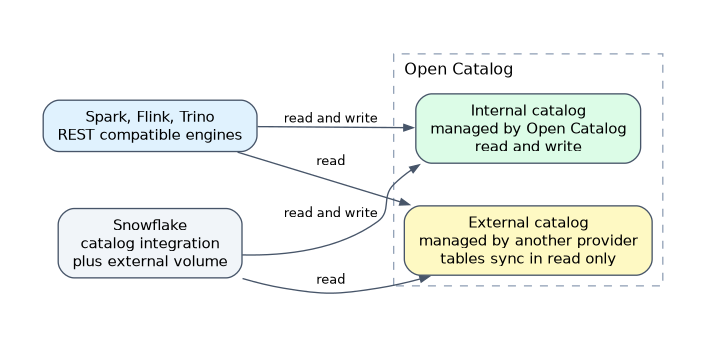 Open Catalog is a managed service for Apache Polaris. It runs on Snowflake managed infrastructure and gives REST compatible engines such as Spark, Flink and Trino secure read and write access to Iceberg tables.
Concepts to know:
| Concept | Meaning |
|---|---|
| Internal catalog | Managed by Open Catalog; Snowflake and third party engines can read and write its tables |
| External catalog | Managed by another provider; tables sync in as read only |
| Catalog role | Holds privileges on catalog resources (catalogs, namespaces, tables) |
| Principal role | Groups service principals and receives catalog roles |
| Service principal | Identity with a client ID and secret that an engine uses to connect |
| Service connection | Represents an engine; its principal is given a principal role |
Access follows a chain: privileges go to a catalog role, the catalog role goes to a principal role, and the principal role goes to a service principal.
To query these tables from Snowflake, an external catalog is registered in Snowflake through a catalog integration, and Iceberg tables are created against it. The Snowflake side still needs an external volume that points to the storage location of the data files.
The docs state that new customers are directed to Snowflake Horizon Catalog, because new Open Catalog accounts are no longer offered to them. For the exam, know the role chain and the internal versus external split.
Common mistakes
Using a storage integration for an Iceberg table. Iceberg locations need an external volume.
Reusing another volume's trust values. Read the principal and external ID of each external volume from its own DESC EXTERNAL VOLUME.
Changing the default volume and expecting old tables to move. It applies only to new tables.
Mixing the role types in Open Catalog. Privileges go to catalog roles, which go to principal roles, not directly to principals.
Forgetting to verify. A failed trust relationship is the usual reason an Iceberg table cannot read files.
What to remember for the exam
- An external volume is an account level object with the IAM entity for Iceberg storage; many tables can share one.
- The
EXTERNAL_VOLUMEdefault can be set on account, database or schema; the lowest scope wins and it affects only new tables. - Verify with
SYSTEM$VERIFY_EXTERNAL_VOLUME. - Open Catalog (Polaris) is a managed Apache Polaris service using the Iceberg REST protocol.
- Role chain: catalog role, then principal role, then service principal.
Check yourself
Can a storage integration give access to an external volume location?
No, external volumes use their own IAM entity and trust relationship.
How do you check that Snowflake can reach the bucket behind an external volume?
Run
SYSTEM$VERIFY_EXTERNAL_VOLUMEor use Verify connection in Snowsight.In Open Catalog, where are table privileges granted first?
To a catalog role, which is then granted to a principal role.
Topic 7 of 11 in Data and Object Management
Test yourself on Data and Object Management
The full Snowflake ADA-C02 question bank has 814 questions, with timed practice exams and an explanation for every answer.
This study guide is independent and is not affiliated with, endorsed by, or sponsored by Snowflake. Vendor names, certification names and exam codes are trademarks of their respective owners and are used for identification only.