Data and Object Management · Topic 8 of 11
Tasks - Configure, Schedule and Set Permissions
Manage Snowflake tasks: configure them, schedule with intervals, cron or streams, build task graphs, and grant the privileges to create and run them.
- 5 min
- Includes a diagram
- Tasks are created suspended and need
RESUME. - Schedules: interval, cron with a time zone, or
WHENwithSYSTEM$STREAM_HAS_DATA. - Only one scheduled instance runs at a time; overlap is skipped.
What it is
A task runs one SQL statement, a call to a stored procedure or a procedural script on a schedule or when a condition is true. Tasks are how Snowflake automates recurring work such as loading, transforming, purging and refreshing.
Tasks can be chained into a task graph: a root task with a schedule, and child tasks that run after their predecessors finish.
How it works
Configuring a task
CREATE TASK load_orders
  WAREHOUSE = etl_wh
  SCHEDULE = '15 MINUTES'
  AS
  INSERT INTO orders_clean SELECT * FROM orders_raw_stream;
Main properties:
| Property | Purpose |
|---|---|
WAREHOUSE | A named warehouse (user-managed compute). Omit it for serverless |
SCHEDULE | Interval or cron expression |
WHEN | Boolean condition that must be true or the run is skipped |
AFTER | Predecessor tasks in a graph |
SUSPEND_TASK_AFTER_NUM_FAILURES | Auto-suspend after this many consecutive failed or timed-out runs |
TASK_AUTO_RETRY_ATTEMPTS | Retry a failed run; disabled by default |
USER_TASK_TIMEOUT_MS | Maximum run time of one task run |
ALLOW_OVERLAPPING_EXECUTION | Lets graph runs overlap when set |
New tasks are created suspended. Run ALTER TASK load_orders RESUME; before anything happens. SUSPEND_TASK_AFTER_NUM_FAILURES can be set on the task, schema, database or account, and the lower level overrides the higher.
Timeouts interact: if both STATEMENT_TIMEOUT_IN_SECONDS and USER_TASK_TIMEOUT_MS are set, the lower non-zero value applies.
Scheduling
There are three ways to trigger a task:
| Trigger | Example | Use |
|---|---|---|
| Interval | SCHEDULE = '30 MINUTES' | Regular cadence |
| Cron | SCHEDULE = 'USING CRON 0 2 * * * America/Los_Angeles' | Fixed time of day, with a time zone |
| Stream condition | WHEN SYSTEM$STREAM_HAS_DATA('orders_stream') | Run only when there is new data |
The WHEN condition can be combined with SCHEDULE: Snowflake checks the stream on the timer, and if it is empty the run is skipped without using the warehouse. That avoids paying for empty runs.
Only one instance of a scheduled task runs at a time. If a run is still active when the next scheduled time arrives, that occurrence is skipped.
For a daily job in local time, use a cron schedule with a time zone. Interval schedules count from when the task was resumed and have no time zone.
Child tasks use AFTER instead of SCHEDULE and run when predecessors complete. All tasks in a graph must have the same owner. A finalizer task (created with FINALIZE = <root task>) runs after the graph finishes, whether the graph succeeded or not, which suits cleanup and notification.
Managing a task over time
| Action | Command |
|---|---|
| Start or stop | ALTER TASK ... RESUME or SUSPEND |
| Run now | EXECUTE TASK |
| Change definition | ALTER TASK ... SET, MODIFY AS or CREATE OR ALTER TASK |
| Look at tasks | SHOW TASKS, DESCRIBE TASK |
To change a graph, suspend the root task first. Suspending stops future scheduled runs; runs already in progress finish on their current version. Resuming or manually running a suspended, modified task creates a new version.
Cloning a database or schema that holds tasks gives suspended tasks that you must resume.
Permissions
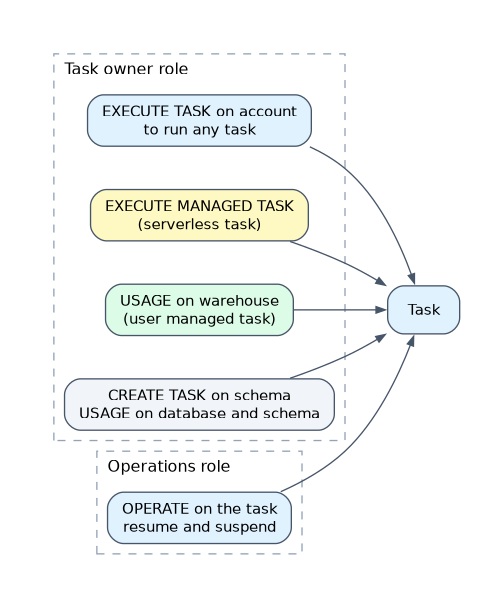
| To do this | The role needs |
|---|---|
| Create a task with a warehouse | CREATE TASK on the schema, USAGE on database and schema, USAGE on the warehouse |
| Create a serverless task | CREATE TASK on the schema, USAGE on database and schema, and the account level EXECUTE MANAGED TASK |
| Run any task | Owner role has the account level EXECUTE TASK, and USAGE on the database and schema |
| Resume or suspend | Ownership of the task, or OPERATE on it, with USAGE on its database and schema |
| View history | ACCOUNTADMIN, ownership of the task, or the global MONITOR EXECUTION privilege |
The task owner role also needs the privileges for the SQL the task runs, for example INSERT on the target table. When a task is resumed, Snowflake checks that the owner still holds the privileges to run it.
GRANT EXECUTE TASK ON ACCOUNT TO ROLE task_admin;
GRANT CREATE TASK ON SCHEMA etl.public TO ROLE task_admin;
GRANT OPERATE ON TASK etl.public.load_orders TO ROLE ops_team;
ACCOUNTADMIN holds EXECUTE TASK and grants it to the role that owns tasks. Granting OPERATE lets an operations team pause or resume a task without owning it.
Common mistakes
Creating a task and expecting it to run. Tasks start suspended; resume them.
Giving the owner role no EXECUTE TASK. The task is created but never runs.
Changing a child task while the graph is resumed. Suspend the root first.
Interval schedule for a fixed clock time. Use cron with a time zone.
Mixed owners in a graph. All tasks in a graph must share one owner.
What to remember for the exam
- Tasks are created suspended and need
RESUME. - Schedules: interval, cron with a time zone, or
WHENwithSYSTEM$STREAM_HAS_DATA. - Only one scheduled instance runs at a time; overlap is skipped.
- Privileges:
CREATE TASK, account levelEXECUTE TASK,EXECUTE MANAGED TASKfor serverless,OPERATEto resume and suspend. - Suspend the root before editing a graph.
Check yourself
A new task never runs. What is the most likely cause?
It was created suspended, or its owner role lacks the account level
EXECUTE TASKprivilege.How can a task run only when a stream has new rows?
Add
WHEN SYSTEM$STREAM_HAS_DATA('<stream>')to the task.Which privilege lets another team resume and suspend a task without owning it?
OPERATEon the task.
Topic 8 of 11 in Data and Object Management
Test yourself on Data and Object Management
The full Snowflake ADA-C02 question bank has 814 questions, with timed practice exams and an explanation for every answer.
This study guide is independent and is not affiliated with, endorsed by, or sponsored by Snowflake. Vendor names, certification names and exam codes are trademarks of their respective owners and are used for identification only.