Data and Object Management · Topic 6 of 11
Staging Data, Storage Integrations and Data Exfiltration Controls
Stage data with internal and external stages, create storage integrations for secure cloud access, and block data exfiltration with account parameters.
- 5 min
- Includes a diagram
- Stages: user
@~, table@%, named internal, named external. - A storage integration holds the cloud identity and allowed or blocked locations; no keys in SQL.
- Create with
ACCOUNTADMINorCREATE INTEGRATION; the trust relationship uses the IAM user ARN and external ID fromDESC INTEGRATION.
What it is
A stage is a location where data files wait to be loaded or have been unloaded. Stages are either internal (inside Snowflake) or external (in your cloud storage).
A storage integration is a Snowflake object that stores a cloud identity and a list of allowed storage locations. An external stage that uses it needs no secret keys in its definition. Together with a few account parameters, integrations also stop users from moving data to places the administrator has not approved.
How it works
Choosing a stage
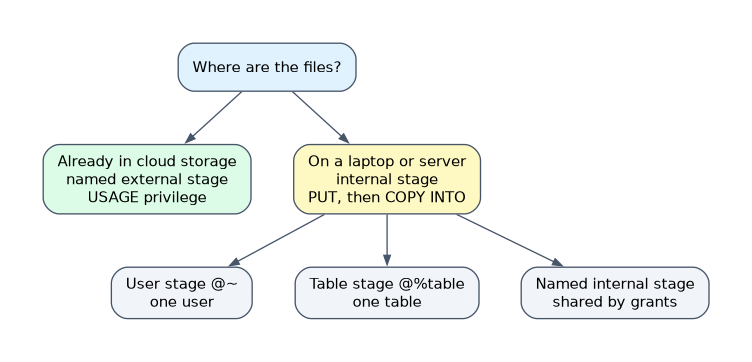
| Stage | Reference | Scope | Use when |
|---|---|---|---|
| User stage | @~ | One user | Private files for a single user |
| Table stage | @%table | One table | Files meant only for one table |
| Named internal stage | @stage | Shared by grants | Shared team loading inside Snowflake |
| Named external stage | @stage with a URL | Shared by grants | Files already sit in S3, Azure or Google Cloud Storage |
Internal stages are loaded with PUT (from a client such as SnowSQL or a driver) and read back with GET. Use LIST to see files, REMOVE to delete them, and COPY INTO <table> to load. A directory table can be enabled on a stage to list its files as a table.
Access to a named stage is controlled by privileges: READ and WRITE on an internal stage, USAGE on an external stage.
The scenario rule: files already in cloud storage use an external stage; files on a laptop or a server with no cloud bucket use an internal stage.
Creating a storage integration
Only ACCOUNTADMIN, or a role with the global CREATE INTEGRATION privilege, can create one. On AWS the pattern is:
CREATE STORAGE INTEGRATION s3_int
  TYPE = EXTERNAL_STAGE
  STORAGE_PROVIDER = 'S3'
  ENABLED = TRUE
  STORAGE_AWS_ROLE_ARN = 'arn:aws:iam::123456789012:role/snowflake_access'
  STORAGE_ALLOWED_LOCATIONS = ('s3://sales-data/landing/')
  STORAGE_BLOCKED_LOCATIONS = ('s3://sales-data/landing/private/');

DESC INTEGRATION s3_int;- Create the IAM role in your cloud account.
- Create the integration with that role and the allowed locations.
- Run
DESC INTEGRATIONand readSTORAGE_AWS_IAM_USER_ARNandSTORAGE_AWS_EXTERNAL_ID. - Put those two values into the role's trust policy.
- Grant
USAGEon the integration and create the stage.
Azure and Google Cloud follow the same idea with their own identities. The IAM user Snowflake creates is one per account, shared by all its S3 storage integrations. If you recreate an integration without its original external ID, the trust policy must be updated.
Using it in an external stage
GRANT USAGE ON INTEGRATION s3_int TO ROLE loader;
CREATE STAGE landing
  URL = 's3://sales-data/landing/'
  STORAGE_INTEGRATION = s3_int;
To create the stage a role needs CREATE STAGE on the schema and USAGE on the integration. To load or unload through an existing external stage, the role needs USAGE on the stage plus the privileges on the target or source table. A stage URL must fall inside STORAGE_ALLOWED_LOCATIONS and outside the blocked ones.
Benefits over putting keys in the stage:
- No credentials in SQL, in history or in object definitions.
- Access is checked each time data is loaded or unloaded.
- One governed object lists exactly which paths are reachable.
Snowflake caches temporary credentials for up to 60 minutes, so revoking access in the cloud may take effect only after the cache expires.
Preventing data exfiltration
Exfiltration is a user copying data out to a location they control, for example with COPY INTO 's3://my-own-bucket/' or through an inline URL. Storage integrations help because only approved paths are reachable. Account administrators add parameters that close the other routes.
| Parameter | Effect when set to TRUE |
|---|---|
REQUIRE_STORAGE_INTEGRATION_FOR_STAGE_CREATION | New external stages must use a storage integration |
REQUIRE_STORAGE_INTEGRATION_FOR_STAGE_OPERATION | Loading and unloading through a stage requires one that uses a storage integration |
PREVENT_UNLOAD_TO_INLINE_URL | COPY INTO <location> cannot unload to a URL typed in the statement |
PREVENT_UNLOAD_TO_INTERNAL_STAGES | Unloading to internal stages is blocked |
Combine these with a tight STORAGE_ALLOWED_LOCATIONS list and with network policies and privileges on who can create stages and integrations. Few roles should hold CREATE INTEGRATION.
Common mistakes
Using access keys in stage definitions. They appear in object definitions and are hard to rotate. Use an integration.
Allowing a whole bucket. Limit STORAGE_ALLOWED_LOCATIONS to the needed prefixes and add blocked paths.
Forgetting the trust policy step. Without the IAM user ARN and external ID in the cloud role, access fails.
Granting CREATE INTEGRATION widely. Anyone with it could point Snowflake at new locations.
Setting only PREVENT_UNLOAD_TO_INLINE_URL. Users can still create a stage on their own bucket unless integrations are required.
What to remember for the exam
- Stages: user
@~, table@%, named internal, named external. - A storage integration holds the cloud identity and allowed or blocked locations; no keys in SQL.
- Create with
ACCOUNTADMINorCREATE INTEGRATION; the trust relationship uses the IAM user ARN and external ID fromDESC INTEGRATION. - Exfiltration controls: require integrations for stage creation and operation, and block unloading to inline URLs.
Check yourself
What two values from
DESC INTEGRATIONgo into the cloud role's trust policy?The Snowflake IAM user ARN and the external ID.
Which parameter stops
COPY INTOfrom unloading to a URL typed into the statement?PREVENT_UNLOAD_TO_INLINE_URL.Which privilege does a role need on the integration to create a stage that uses it?
USAGEon the integration, plusCREATE STAGEon the schema.
Topic 6 of 11 in Data and Object Management
Test yourself on Data and Object Management
The full Snowflake ADA-C02 question bank has 814 questions, with timed practice exams and an explanation for every answer.
This study guide is independent and is not affiliated with, endorsed by, or sponsored by Snowflake. Vendor names, certification names and exam codes are trademarks of their respective owners and are used for identification only.