Managing Applications · Topic 2 of 2
Delegated Development and Git Source Control
Delegated Development and Git for the ServiceNow CAD exam: per-app developer permissions, code review, linking apps to Git, commits, branches and stashes.
- 5 min
- Includes a diagram
- Delegated Development is granted per application, never for the whole instance.
- Advanced scripts need both All file types and Enable Scripting.
- The Source Control permission gives a delegated developer source control access.
What it is
Delegated Development lets users without the admin role develop a chosen application. An administrator grants them only the permissions that application needs, such as scripting or source control, and nothing on the rest of the instance.
The Git integration stores an application's source code in a Git repository. Developers commit their work, pull each other's changes and use branches, all from Studio, while the repository keeps the history.
How it works
Delegated Development
Delegated Development is granted per application: permissions given for one application do not carry over to any other. An administrator opens Manage Developers for the application and adds users or groups.
Each permission grants system-managed roles behind the scenes, so the developer can work without becoming an instance admin.
| Permission | What it allows in that application |
|---|---|
| All file types | Work with all application file types, with limits compared to admin |
| Enable Scripting | Write to script fields, such as business rules and client scripts |
| Manage ACLs & Roles | Create access controls and user roles |
| Tables & Forms | Table columns, form layouts and list layouts |
| Integrations | Web service and REST APIs and data sources |
| Workflow Studio | Flows and actions |
| Source Control | Full access to source control operations |
| Delegated Admin | All delegated development permissions together |
Permissions combine. To write an advanced business rule, a developer needs both All file types and Enable Scripting.
Deployment permissions are separate. They include Publish To App Repo, Publish To App Store and Upgrade App, so a delegated developer can also release the application.
Code review
Code review is part of Team Development, where child instances push changes to a parent instance. When code review is enabled on the parent, every push starts a review instead of loading straight away.
Users with the teamdev_code_reviewer role are notified. They open Team Development > Code Review Requests on the parent and approve or reject the push as a whole. Approved changes load into the parent; rejected ones are marked as rejected. While a push waits for review, the child cannot push to or pull from the parent.
Linking an application to Git
The Git integration works on non-production instances. Linking needs the admin role. In Studio, Link to Source Control asks for the repository URL, the branch and a credential for the Git account. A MID Server can be used when the repository sits behind a firewall.
Once linked, all developers on that instance share the repository connection and its credentials. An instance tracks one branch for each linked application at a time.
Source control operations
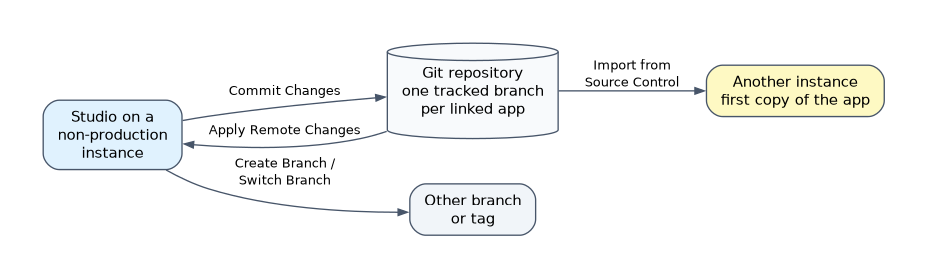
| Operation | What it does |
|---|---|
| Commit Changes | Sends local changes to the repository, with a commit comment |
| Apply Remote Changes | Brings remote commits into the instance |
| Create Branch | Starts a new branch for a separate line of work |
| Switch Branch | Updates the instance's application to match another branch |
| Stash Local Changes | Sets aside uncommitted local changes to apply later |
| Manage Stashes | Applies or deletes stashed changes |
| Create Tag | Marks a commit as a named application version |
| Import from Source Control | Brings an application from the repository onto a non-production instance for the first time |
When remote and local changes touch the same file, Studio shows the conflicts to resolve before the changes are applied.
Delegated Development, code review or Git
| Requirement | Feature |
|---|---|
| Let a non-admin build one application | Delegated Development |
| Let that developer commit and pull | Delegated Development with the Source Control permission |
| Require approval before changes reach a parent instance | Team Development code review |
| Keep history, branches and a shared copy of the code | Git integration |
How the exam asks about this
- "A contractor must build one application but must not be an instance admin." Use Delegated Development for that application.
- "Developer B committed changes; Developer A needs them on another development instance." Run Apply Remote Changes on A's instance.
- "A developer must switch branches but has unfinished work." Stash Local Changes, switch, then apply the stash later.
What to remember for the exam
- Delegated Development is granted per application, never for the whole instance.
- Advanced scripts need both All file types and Enable Scripting.
- The Source Control permission gives a delegated developer source control access.
- Code reviewers hold teamdev_code_reviewer and approve or reject a whole push.
- Linking to Git needs the admin role and a non-production instance.
- Commit sends changes out; Apply Remote Changes brings remote commits in.
An instance tracks one branch per linked application. Switching branches replaces the application on that instance with the other branch, so commit or stash local work first.
Common mistakes
Giving the admin role to a developer who needs one application. That opens the whole instance. Delegated Development limits the access to the chosen application and permissions.
Thinking Commit Changes updates other instances. A commit only updates the repository. Each other instance must run Apply Remote Changes to receive it.
Confusing Git with publishing. Git shares work in progress between development instances. Test and production get the application from a published version in the application repository.
Check yourself
Is Delegated Development granted for the whole instance?
No. It is granted per application, and permissions for one application do not apply to any other.
Which operation brings a teammate's commits into your instance?
Apply Remote Changes, which updates the local application to match the repository.
How are pushes approved when Team Development code review is on?
A user with the teamdev_code_reviewer role approves or rejects the whole push from Code Review Requests on the parent instance.
Topic 2 of 2 in Managing Applications
Test yourself on Managing Applications
The full ServiceNow CAD question bank has 600 questions, with timed practice exams and an explanation for every answer.
This study guide is independent and is not affiliated with, endorsed by, or sponsored by ServiceNow. Vendor names, certification names and exam codes are trademarks of their respective owners and are used for identification only.