Designing and Creating an Application · Topic 4 of 4
Application Scope Basics
CAD application scope basics: the x_ namespace and company code, the application picker, scoped APIs, default table access and cross scope privileges.
- 5 min
- Includes a diagram
- The namespace is x_ plus the company code plus the app, from glide.appcreator.company.code.
- Scoped artifact names begin with the namespace.
- Files are recorded against the application in the picker; Global files are not packaged in your app.
What it is
Application scope puts every artifact of an application, such as tables, scripts, modules and properties, inside one named boundary. The scope gives the application a unique namespace, records which application each file belongs to, and controls what other applications may do with it.
Custom applications are normally built as scoped applications. The alternative is the global scope, which has no namespace and no protection between applications.
How it works
The namespace
A scoped application's namespace has the form x_<company code>_<app>, for example x_acme_loans. The company code comes from the property glide.appcreator.company.code; the rest comes from the application name when you create it.
Artifact names start with the namespace. A table is named like x_acme_loans_request, and a script include is called from outside its scope as x_acme_loans.LoanUtils. Global script includes are referenced with the global. prefix from a scoped application.
The application picker
The application picker shows which application you are currently working in. Anything you create is recorded against that application.
| Picker set to | Result of creating a table or script |
|---|---|
| Your scoped application | The file belongs to the app and is packaged with it |
| Global | The file belongs to global and is not packaged in your scoped app |
| Another application | The file belongs to that other application |
Studio sets the picker to the application you open, which is one reason developers build there. When you open a record from a different scope, the platform shows it as read only with a message naming its scope. You switch to that scope to edit it.
Scoped APIs
Server scripts in a scoped application run against the scoped API, a subset of the server API. Some global methods are not available.
// Scoped logging: gs.log is not available in a scoped app
gs.info('Loan {0} created', current.number);
gs.warn('Overdue loan: ' + current.number);
Use gs.info, gs.warn, gs.error and gs.debug for logging in a scoped application.
What other scopes may do
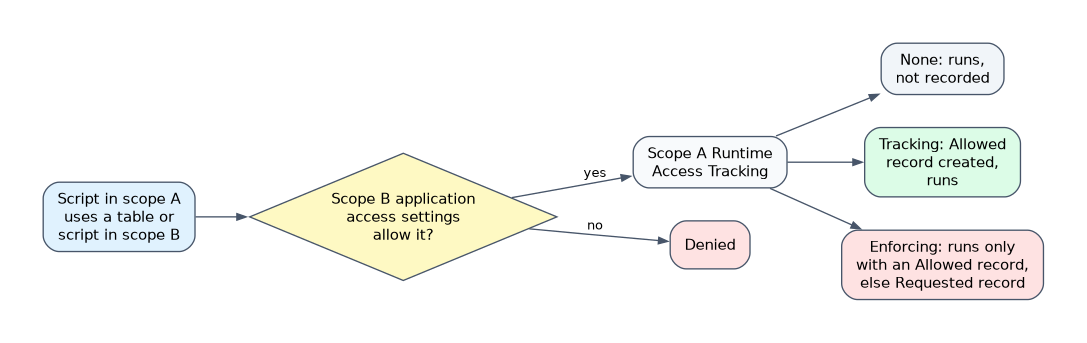 A new table in a scoped application defaults to Accessible from: All application scopes with only Can read selected. Other applications can read its records but not create, update or delete them unless you select those options.
Script includes have their own Accessible from setting: This application scope only keeps them private, All application scopes lets other applications call them.
When a script in your application touches a resource in another scope, the platform can record a cross scope privilege record. The application's Runtime Access Tracking setting decides how that works:
| Setting | Behavior |
|---|---|
| None | Requests are not tracked; they run if the target's application access settings allow them |
| Tracking | A cross scope privilege record with status Allowed is created for each new request, and the request runs |
| Enforcing | A request without an Allowed record is denied, and a Requested record is created for an administrator to review |
A cross scope privilege record never grants more than the target table's application access settings allow.
These settings control application to application access. They do not replace access controls, which decide what the signed-in user may do.
How the exam asks about this
- "A developer created a business rule but it is missing from the published application." The application picker was set to Global, so the file was not in the app.
- "What does the scope namespace look like?" x_ followed by the company code and the application name, such as x_acme_loans.
- "Another application must create records in your table." Select Can create in the table's application access settings.
What to remember for the exam
- The namespace is x_ plus the company code plus the app, from glide.appcreator.company.code.
- Scoped artifact names begin with the namespace.
- Files are recorded against the application in the picker; Global files are not packaged in your app.
- New scoped tables default to All application scopes with only Can read.
- Scoped scripts use gs.info, gs.warn, gs.error and gs.debug instead of gs.log.
- Runtime Access Tracking is None, Tracking or Enforcing.
Application access settings and cross scope privilege records are not user security. A user still needs to pass the ACLs on the table and fields.
Common mistakes
Building in the wrong scope. A table or script created with Global or another app in the picker is not part of your application and will not move with it. Check the picker first.
Assuming other scopes have full access. By default other scopes can only read a new scoped table. Create, update and delete must be selected on purpose.
Copying global code into a scoped script. Methods such as gs.log are not part of the scoped API. Use the scoped equivalents, or the script fails.
Check yourself
Where does the company code part of the namespace come from?
From the property glide.appcreator.company.code, which sets the x_ prefix that every scoped artifact name starts with.
What can another scope do with a new table in your scoped application by default?
Only read its records, because the default is Accessible from All application scopes with only Can read selected.
Why might a script be missing from a published scoped application?
It was created while the application picker was set to Global or to another application, so it was never part of the app.
Topic 4 of 4 in Designing and Creating an Application
Test yourself on Designing and Creating an Application
The full ServiceNow CAD question bank has 600 questions, with timed practice exams and an explanation for every answer.
This study guide is independent and is not affiliated with, endorsed by, or sponsored by ServiceNow. Vendor names, certification names and exam codes are trademarks of their respective owners and are used for identification only.