Application User Interface · Topic 2 of 4
Client Side Scripts
CAD client side scripting: onLoad, onChange, onSubmit and onCellEdit client scripts, g_form and g_user, UI policies, GlideAjax and how to debug them.
- 5 min
- Includes a diagram
- Client scripts: onLoad, onChange, onSubmit and onCellEdit, all in the browser.
- onSubmit returns false to cancel the save; onChange should check isLoading.
- GlideAjax calls a client callable script include that extends AbstractAjaxProcessor.
What it is
Client side scripts run in the user's browser while a form or list is open. They react to the user: show a message, make a field mandatory, set a value or stop a save that is not ready. Because they run in the browser, they make the form feel responsive, but they are not security and they do not run for imports, APIs or server scripts.
The two main tools are client scripts, written in JavaScript, and UI policies, which do common form changes with conditions and little or no code.
How it works
Client script types
You create client scripts in System Definition > Client Scripts or as an application file in Studio. Each names a table, a UI Type (Desktop, Mobile / Service Portal, or All) and a type.
| Type | Runs when |
|---|---|
| onLoad | The form loads, before the user can work with it |
| onChange | A chosen field's value changes, and also when the form loads |
| onSubmit | The user saves or submits; returning false cancels the save |
| onCellEdit | A value is changed by editing a list cell |
An onChange script receives control, oldValue, newValue, isLoading, isTemplate. Checking isLoading stops the script from acting when the form first opens.
function onChange(control, oldValue, newValue, isLoading, isTemplate) {
  if (isLoading || newValue === '') return;
  g_form.setMandatory('justification', newValue == 'high');
}
g_form and g_user
g_form works with the current form. Common methods are getValue, setValue, clearValue, setMandatory, setReadOnly, setDisplay, setVisible, showFieldMsg, addInfoMessage and addErrorMessage.
g_user describes the signed-in user: g_user.userID, g_user.userName, g_user.firstName and g_user.hasRole('x_acme_loans.approver'). A role check in the browser only shapes the form; real restriction is an access control.
Getting server data: GlideAjax
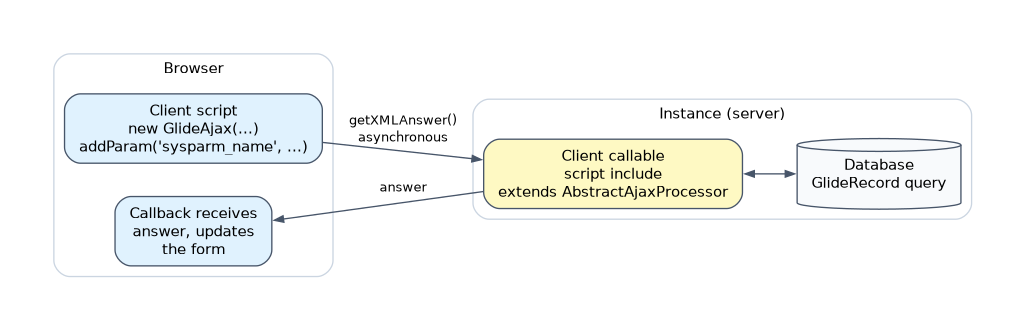 Querying tables from the browser is discouraged. Instead, the client script calls a client callable script include that extends
 AbstractAjaxProcessor, asynchronously:
var ga = new GlideAjax('x_acme_loans.LoanAjax');
ga.addParam('sysparm_name', 'getOpenCount');
ga.addParam('sysparm_user', g_form.getValue('requested_for'));
ga.getXMLAnswer(function(answer) {
  g_form.addInfoMessage('Open loans: ' + answer);
});
sysparm_name names the method to run. The callback runs when the answer returns, so the form is never frozen. If the data is only needed once at load time, a display business rule can put it in g_scratchpad instead, with no extra round trip.
Client script or UI policy?
UI policies (System UI > UI Policies) set fields mandatory, visible or read only when a condition is true, through UI policy actions. Reverse if false undoes the actions when the condition stops being true, and On load applies them when the form opens. A UI policy can also run scripts when its condition is true or false.
| Requirement | Better choice |
|---|---|
| Make a field mandatory, hidden or read only under a condition | UI policy |
| Set a value, show a message, or call the server | Client script |
| Stop a save after a check | onSubmit client script |
| Rule must hold for imports, APIs and list edits | Business rule or data policy on the server |
UI policies run after client scripts, so a UI policy can override a client script that changes the same field. UI policies do not apply to list editing or imports; for list edits, only onCellEdit client scripts run.
Testing and debugging
- Test as a user with the right roles, using Impersonate User.
- Use the browser's developer console for errors and
console.log, orjslog()with the platform's JavaScript Log panel. - Use temporary
g_form.addInfoMessage()calls to show values, and remove them afterwards. - Check the client script is Active, on the right table, UI Type and field, and not stopped by an
isLoadingcheck you did not intend.
How the exam asks about this
- "A field must become mandatory when Priority is High, with no code." A UI policy with a mandatory action and Reverse if false.
- "Show the number of open loans for the selected user as soon as the user is chosen." An onChange client script using GlideAjax.
- "Stop the form from saving if the end date is before the start date." An onSubmit client script that returns false.
What to remember for the exam
- Client scripts: onLoad, onChange, onSubmit and onCellEdit, all in the browser.
- onSubmit returns false to cancel the save; onChange should check isLoading.
- GlideAjax calls a client callable script include that extends AbstractAjaxProcessor.
- getXMLAnswer is asynchronous and keeps the form responsive.
- UI policies set mandatory, visible and read only without code and run after client scripts.
- UI policies do not apply to list editing or imports; onCellEdit is the client script type for list edits.
A client script or UI policy is not a security control. An import, an API call or a server script bypasses it, so protect data with access controls and enforce rules with server side logic.
Common mistakes
Writing a client script for a simple mandatory rule. A UI policy does it with conditions and actions, is easier to maintain, and can reverse itself when the condition changes.
Forgetting isLoading in onChange. onChange also runs as the form loads. Without the check, the script may overwrite values or show messages before the user touches anything.
Calling the server synchronously. A synchronous call freezes the browser until it returns. Use GlideAjax with getXMLAnswer and a callback, or g_scratchpad from a display business rule.
Check yourself
Which client script type can stop a record from being saved, and how?
An onSubmit client script, by returning false when the check fails.
What must a script include be for a client script to call it with GlideAjax?
It must be client callable and extend AbstractAjaxProcessor; the method is named in sysparm_name.
When is a UI policy a better choice than a client script?
When the need is to make fields mandatory, visible or read only under a condition, which a UI policy does without code.
Topic 2 of 4 in Application User Interface
Test yourself on Application User Interface
The full ServiceNow CAD question bank has 600 questions, with timed practice exams and an explanation for every answer.
This study guide is independent and is not affiliated with, endorsed by, or sponsored by ServiceNow. Vendor names, certification names and exam codes are trademarks of their respective owners and are used for identification only.