Application Automation · Topic 3 of 4
Events, Scheduled Jobs and Utils Script Includes
ServiceNow CAD: register events and fire them with gs.eventQueue, respond with script actions, schedule script executions and build Utils script includes.
- 4 min
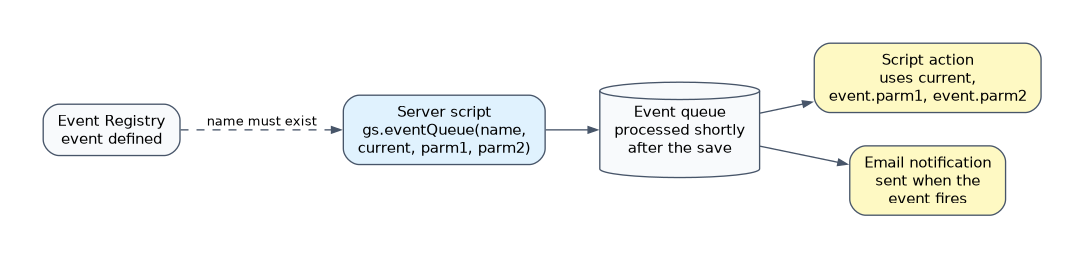
- Includes a diagram
- Register an event in the Event Registry before firing it; scoped event names begin with the namespace.
gs.eventQueue(name, record, parm1, parm2)fires the event from a server script.- Script actions and notifications respond to events;
event.parm1andevent.parm2carry the extra values.
What it is
Three building blocks let an application do server work outside a single form save. An event announces that something happened so other logic can respond. A scheduled script execution (scheduled job) runs a script at set times. A Utils script include holds shared functions that both of them, and any other server script, can call.
The design question is always: does the work start when something happens (event) or at a time (scheduled job)?
How it works
Registering and firing an event
Every event is first defined in the Event Registry (System Policy > Events > Registry). In a scoped application the event name begins with the scope namespace, for example x_acme_travel.request.approved.
A server script fires the event with gs.eventQueue(), passing the event name, a GlideRecord and two optional parameters.
// after business rule on x_acme_travel_request
if (current.state.changesTo('approved')) {
    gs.eventQueue('x_acme_travel.request.approved', current,
        current.requested_for, current.number);
}
The event is written to the event queue and processed shortly after, not inside the user's transaction. That keeps the save fast.
Responding to an event
| Responder | Use |
|---|---|
| Script action | Runs a server script when the event is processed |
| Email notification | Sends email when the event is fired |
In a script action, current is the record passed to gs.eventQueue() and the extra values are event.parm1 and event.parm2.
// script action for x_acme_travel.request.approved
var util = new TravelUtils();
util.bookTrip(current, event.parm1);
Because one event can have several responders, a single gs.eventQueue() call can both send email and run a script.
Scheduled script executions
A scheduled script execution is created as an application file, or under System Definition > Scheduled Jobs. It holds the script and the schedule.
| Run option | Meaning |
|---|---|
| Daily, Weekly, Monthly | At a set time on those days |
| Periodically | Every set interval, such as every 4 hours |
| Once | One run at a set date and time |
| On Demand | Only when someone runs it with Execute Now |
A scheduled job has no current record. It queries the records it needs, for example every request still open past its travel date.
A job can fire an event for each record it finds, which lets notifications and script actions handle the response.
Utils script includes
A script include stores reusable server code that runs only when called. A Utils script include groups helper functions for the application, often named after it, such as TravelUtils.
var TravelUtils = Class.create();
TravelUtils.prototype = {
    initialize: function() {},
    isOverBudget: function(req) {
        return req.estimated_cost > req.budget;
    },
    type: 'TravelUtils'
};
Business rules, script actions and scheduled jobs all call new TravelUtils(). One fix in the script include then changes every caller.
| Setting | Effect |
|---|---|
| Name | Must match the class name in the script |
| Accessible from | This application scope only, or All application scopes |
| Client callable | Lets GlideAjax call it; the class then extends AbstractAjaxProcessor |
How the exam asks about this
- "Send an email and update a related record whenever a request is approved." Fire one event with gs.eventQueue and add a notification and a script action.
- "Every night, close requests older than 90 days." A scheduled script execution that queries and updates them.
- "Three business rules repeat the same calculation." Move it into a Utils script include.
What to remember for the exam
- Register an event in the Event Registry before firing it; scoped event names begin with the namespace.
gs.eventQueue(name, record, parm1, parm2)fires the event from a server script.- Script actions and notifications respond to events;
event.parm1andevent.parm2carry the extra values. - Events are processed from the queue, after the transaction that fired them.
- Scheduled jobs run on a schedule and have no current record.
- A script include runs only when called; its name must match the class.
Events are not the tool for time-based work. If nothing happens to a record, nothing fires the event; a scheduled job is needed to find records by date.
Common mistakes
Firing an event that was never registered. Script actions and notifications look for a registered event name. Register the event first and use the exact name.
Doing slow work in a before business rule. Fire an event or use an async rule so the user does not wait.
Copying helper code into many scripts. It drifts out of sync. Put it in a Utils script include and call it.
Check yourself
What values does a script action receive from gs.eventQueue?
The record passed as current, and the two extra values as event.parm1 and event.parm2.
Which feature runs a script every night at 02:00?
A scheduled script execution with a daily run time, which queries the records it needs.
Why must a script include's name match its class name?
The platform loads the script include by that name when a script calls it, so a mismatch means the class is not found.
Topic 3 of 4 in Application Automation
Test yourself on Application Automation
The full ServiceNow CAD question bank has 600 questions, with timed practice exams and an explanation for every answer.
This study guide is independent and is not affiliated with, endorsed by, or sponsored by ServiceNow. Vendor names, certification names and exam codes are trademarks of their respective owners and are used for identification only.