Data and Analytics Management · Topic 1 of 2
Data Management and Data Quality
Salesforce data: Data Import Wizard versus Data Loader, exports and backups, mass transfer and delete, plus duplicate, matching and validation rules.
- 4 min
- Includes a diagram
- Import Wizard: browser, up to 50,000, limited objects, insert/update/upsert.
- Data Loader: client, up to 5 million, all API objects, includes delete and export.
- External ID fields enable upsert from other systems.
What it is
Administrators move data into and out of Salesforce, transfer and delete it in bulk, back it up, and protect its quality. The main tools are the Data Import Wizard, Data Loader and Data Export, together with duplicate rules, matching rules and validation rules.
How it works
Data Import Wizard versus Data Loader
| Data Import Wizard | Data Loader | |
|---|---|---|
| Where it runs | In the browser, from Setup | Client application (and command line) |
| Volume | Up to 50,000 records at a time | Up to 5 million records at a time |
| Objects | Accounts, contacts, leads, solutions, campaign members, person accounts and custom objects | All objects that support the API |
| Operations | Insert, update, upsert (add and update) | Insert, update, upsert, delete, hard delete, export, export all |
| Duplicate handling | Built-in matching options for some objects | Uses record IDs or external ID fields for upsert |
| Automation | Can choose whether workflow and other automation fires for some imports | Runs normally; scheduling via command line |
External ID fields let you upsert records using an ID from another system.
Other data tools
| Tool | Use |
|---|---|
| Data Export | Export of org data as CSV files, as a basic backup: weekly (every 7 days) in Enterprise, Performance and Unlimited Editions, or monthly (every 29 days) |
| Mass Transfer Records | Change ownership of many accounts, leads or custom records at once |
| Mass Delete Records | Delete many records of certain standard objects |
| Recycle Bin | Holds deleted records for 15 days so they can be restored |
| Backup and archival | Plan regular backups and archive old data you must keep but rarely use |
Data quality tools
| Tool | What it does |
|---|---|
| Matching rule | Defines how records are compared to find duplicates, such as exact or fuzzy matching on name and email |
| Duplicate rule | Uses a matching rule and decides what happens: allow with an alert or block the save, and whether to report |
| Validation rule | A formula that returns true when data is invalid, blocking the save with an error message |
A worked example: the company must load 200,000 contacts and later delete 30,000 test records. The Data Import Wizard's limit is 50,000 and it can't delete, so use Data Loader for both: upsert by an external ID, then delete using exported IDs.
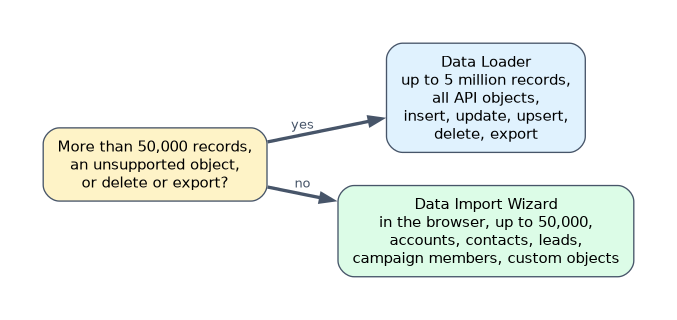
More than 50,000 records, an object the wizard doesn't support, or a delete or export means Data Loader.
How the exam asks about this
- "Import 120,000 leads." Data Loader.
- "Warn users when they create a contact that looks like an existing one." A duplicate rule with a matching rule, set to allow with alert.
- "Prevent saving an opportunity with a close date in the past." A validation rule.
What to remember for the exam
- Import Wizard: browser, up to 50,000, limited objects, insert/update/upsert.
- Data Loader: client, up to 5 million, all API objects, includes delete and export.
- External ID fields enable upsert from other systems.
- Data Export gives weekly or monthly CSV backups; Recycle Bin restores recently deleted records.
- Matching rules find duplicates; duplicate rules decide allow or block; validation rules block bad data.
Hard delete in Data Loader bypasses the Recycle Bin. Records can't be restored afterwards.
Common mistakes
Choosing the Import Wizard for a delete. It can't delete records.
Using a validation rule to stop duplicates. Use duplicate and matching rules.
Relying on the Recycle Bin as a backup. It is short-term only; schedule exports.
Check yourself
When must you use Data Loader instead of the Data Import Wizard?
For more than 50,000 records, unsupported objects, or deleting and exporting records.
What is the relationship between matching rules and duplicate rules?
A matching rule defines how duplicates are found; a duplicate rule uses it and decides whether to allow or block.
What does a validation rule's formula return to block a save?
True, meaning the data is invalid.
Topic 1 of 2 in Data and Analytics Management
Test yourself on Data and Analytics Management
The full Salesforce Platform Administrator question bank has 650 questions, with timed practice exams and an explanation for every answer.
This study guide is independent and is not affiliated with, endorsed by, or sponsored by Salesforce. Vendor names, certification names and exam codes are trademarks of their respective owners and are used for identification only.