Wireless Bridging · Topic 2 of 3
Pseudobridge Modes
Learn how pseudobridge and pseudobridge clone station modes bridge a LAN through any access point by translating MAC addresses, and where their limits are.
- 5 min
- Includes a diagram
- Pseudobridge lets a station bridge through any access point by translating MAC addresses.
- The modes are
station-pseudobridgeandstation-pseudobridge-clone. - The clone mode copies the MAC address of one host behind the station.
What it is
Pseudobridge is a station mode that lets devices behind a station reach an access point by using MAC address translation.
The station cannot send the real source address of the devices behind it, so it hides them. It uses its own address, or the address of one chosen device, towards the access point, and it keeps a table to translate replies back.
The big advantage is that it works with any access point, not only with RouterOS devices. The price is that it is not a true bridge.
How it works
The station rewrites addresses towards the access point and keeps a table to send replies to the right host.
The problem it solves
A standard wireless station cannot pass the MAC addresses of devices behind it. Station WDS solves this, but it needs a RouterOS access point with WDS. When the access point belongs to somebody else, WDS is not possible.
A pseudobridge works with the access point as it is. No special setting is needed on that side.
The two modes
RouterOS offers two station modes for this purpose:
| Mode | How the station presents itself |
|---|---|
station-pseudobridge | It uses its own wireless MAC address, and translates the addresses of the hosts behind it |
station-pseudobridge-clone | It copies the MAC address of one host behind it, and uses that address as its own |
In the clone mode, the station adopts the identity of a device. The access point then sees that device, not the station. This can help when the access point only accepts a known MAC address, for example because it uses MAC filtering.
Configuration
The station is put into the mode, and then bridged to the Ethernet port:
/interface wireless set wlan1 mode=station-pseudobridge ssid=Remote
/interface bridge add name=bridge1
/interface bridge port add bridge=bridge1 interface=wlan1
/interface bridge port add bridge=bridge1 interface=ether1
For the clone mode, the address that is copied can be named:
/interface wireless set wlan1 mode=station-pseudobridge-clone station-bridge-clone-mac=00:11:22:33:44:55If the address is not named, the station can learn it from traffic. Naming it is more predictable.
How the translation works
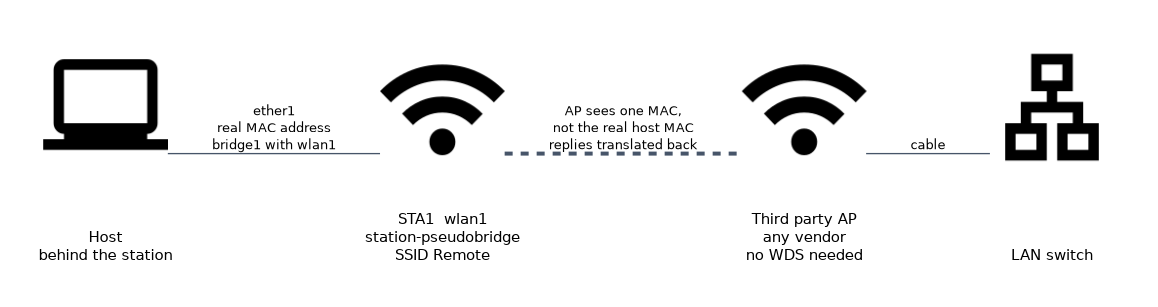 The station keeps a table that links the address of each host behind it with the traffic that the host sends. Frames to the access point use the station's chosen MAC. When a reply returns, the station looks up which host the reply belongs to and sends it there.
For this lookup the station relies on IP and ARP information. That is why the mode works well for ordinary IP traffic.
Limits
| Limit | Meaning |
|---|---|
| Not transparent | The access point never sees the real MAC addresses of the hosts |
| IP centred | Traffic that is not IP based may not work |
| One side only | The access point side has no view of the hosts behind the station |
| Small networks | Many hosts behind one station make the translation table harder to manage |
Some protocols that depend on real MAC addresses can fail. Examples are those that run directly over Ethernet and not over IP.
A pseudobridge is a compromise. If you control both ends, use a proper WDS bridge or a routed design instead.
When to use it
Use a pseudobridge when:
- The access point is not a RouterOS device, and you cannot change it.
- You need a quick bridge for a few IP devices behind one station.
- The access point filters by MAC address, and the clone mode fits.
Avoid it when you control both ends, because WDS is cleaner. Avoid it when non IP traffic must cross.
Comparing the bridge methods
| Method | Both ends RouterOS | Original MAC kept | Typical use |
|---|---|---|---|
| WDS between access points | Yes | Yes | Backhaul between sites |
| Station WDS | Yes | Yes | Client side of a RouterOS link |
| Pseudobridge | No | No | Third party access point |
| Pseudobridge clone | No | One host only | Access point with MAC filtering |
Checking the result
/interface wireless registration-table print
/interface bridge host print
/ping 192.168.88.20
The registration table shows the connection to the access point. The bridge host table lists addresses learned on the bridge. A ping from one side to a host on the other side proves that IP traffic crosses.
If a non IP protocol fails across a pseudobridge, that is expected. Move to station WDS or a tunnel.
What to remember for the exam
Six facts cover this topic.
- Pseudobridge lets a station bridge through any access point by translating MAC addresses.
- The modes are
station-pseudobridgeandstation-pseudobridge-clone. - The clone mode copies the MAC address of one host behind the station.
station-bridge-clone-maccan name the address to copy.- It is not a true transparent bridge, and non IP traffic can fail.
- The wireless interface and the Ethernet port both go into the bridge.
Common mistakes
Four errors are typical.
Expecting a transparent bridge. The access point never sees the real hosts.
Using it when WDS is possible. Station WDS is cleaner when you control both ends.
Many hosts behind one station. The translation becomes harder to manage.
Forgetting the bridge. Without the bridge, no traffic crosses.
Check yourself
Work through these three questions.
What is the main advantage of a pseudobridge?
It works with any access point, not only RouterOS devices with WDS. No special setting is needed on the access point.
What does
station-pseudobridge-clonedo?It copies the MAC address of one host behind the station and uses it as its own. The access point then sees that host.
Why is a pseudobridge not a true transparent bridge?
The station hides the real MAC addresses of the hosts and translates them. The access point never sees them, and non IP traffic can fail.
Topic 2 of 3 in Wireless Bridging
Test yourself on Wireless Bridging
The full MikroTik MTCWE question bank has 447 questions, with timed practice exams and an explanation for every answer.
This study guide is independent and is not affiliated with, endorsed by, or sponsored by MikroTik. Vendor names, certification names and exam codes are trademarks of their respective owners and are used for identification only.