Wireless Bridging · Topic 1 of 3
Transparent Wireless Bridging with WDS and Station WDS
Learn why a normal wireless station cannot bridge Layer 2, and how WDS and station WDS mode with an access point build a transparent bridge in RouterOS.
- 5 min
- Includes a diagram
- A transparent bridge joins two LANs so that they act as one segment.
- A normal station cannot bridge, because it cannot pass the original source MAC address.
- WDS uses four address frames to keep the original addresses.
What it is
A transparent wireless bridge joins two wired networks over a radio link so that they behave as one Ethernet segment.
Devices on both sides keep their own MAC addresses, and they do not know that a radio link lies between them. No routing is needed, and a DHCP server or a broadcast on one side reaches the other.
Plain 802.11 cannot do this in station mode, so MikroTik offers extra modes.
How it works
Standard stations lose the source addresses, and WDS keeps them by using four address frames.
Why a normal station cannot bridge
A standard 802.11 frame between a station and an access point carries three addresses: the transmitter, the receiver and one more. A station can only send frames with its own MAC as the source. If a device behind the station sends a frame, the station cannot pass the real source address through.
That is why a plain station is not a bridge. Devices behind it are hidden, and they cannot take part in a shared Layer 2 segment.
Ways to get a transparent bridge
| Method | How it works | Needs |
|---|---|---|
| WDS between access points | Four address frames keep the original addresses | WDS on both ends |
| Station WDS mode | A station uses WDS frames towards a WDS access point | A RouterOS access point with WDS |
| Pseudobridge | The station translates MAC addresses | Any access point, with limits |
| Routed link with a tunnel | The radio link is IP, and a tunnel carries Layer 2 | Layer 3 on both ends |
This page covers the first two. The pseudobridge and the tunnel come next.
WDS between two access points
Two devices in access point mode, with WDS turned on, can link to each other. This was covered in the WDS chapter. The WDS interface goes into a bridge together with the Ethernet port, and the result is a transparent bridge.
Station WDS mode
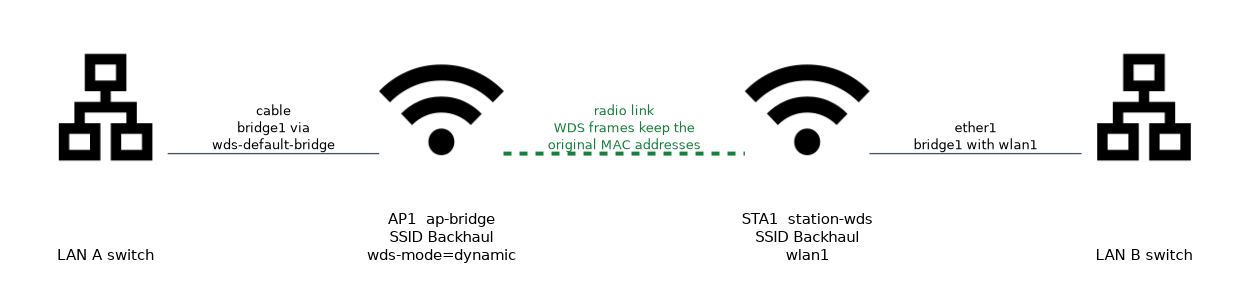 Station WDS mode is a variation of the station that supports WDS. It connects to an access point as a client, and it uses WDS frames so that the original MAC addresses of the devices behind it are kept.
The access point must allow WDS, so its wds-mode is set to dynamic or static:
# On the access point
/interface wireless set wlan1 mode=ap-bridge ssid=Backhaul wds-mode=dynamic wds-default-bridge=bridge1

# On the station side
/interface wireless set wlan1 mode=station-wds ssid=Backhaul
/interface bridge port add bridge=bridge1 interface=wlan1
/interface bridge port add bridge=bridge1 interface=ether1
On the access point, a dynamic WDS interface appears when the station connects, and wds-default-bridge puts it into the bridge. On the station, the wireless interface itself is a bridge port, together with the Ethernet port.
Station WDS needs a RouterOS access point with WDS enabled. A third party access point does not understand the WDS frames.
Access point and station roles
| Device | Mode | WDS setting |
|---|---|---|
| Access point | ap-bridge | wds-mode=dynamic or static |
| Remote end | station-wds | Not needed, the mode is enough |
The remote device acts as a client, so it can use a scan list and find the access point itself. The access point can serve normal clients too, in the same time.
Security and conditions
The link uses the security profile of the interfaces. Set the same profile on both ends, with encryption, so that nobody else can join the bridge. As with other WDS links, the SSID, band and frequency must be compatible.
Loops
If the two sides are also connected by another path, such as a cable, a loop forms. Use RSTP on the bridges, as in the WDS chapter, whenever a second path exists.
Checking the result
/interface wireless registration-table print
/interface wireless wds print
/interface bridge host print
The registration table should show the partner. The WDS list shows the dynamic interface on the access point. The bridge host table shows MAC addresses from both sides, which proves that the link is transparent.
Limits
A WDS bridge shares one channel for the link and for other clients. The throughput of a bridged link is also half duplex, because the radio sends and receives on the same channel. For a high capacity backhaul, use a dedicated radio pair.
To check that the bridge is truly transparent, look for MAC addresses of devices from the far side in the bridge host table.
What to remember for the exam
Six facts cover this topic.
- A transparent bridge joins two LANs so that they act as one segment.
- A normal station cannot bridge, because it cannot pass the original source MAC address.
- WDS uses four address frames to keep the original addresses.
station-wdsmode connects to an access point that has WDS enabled.- The access point needs
wds-mode=dynamicorstatic. - Both the wireless interface and the Ethernet port must be in the bridge.
Common mistakes
Four errors are typical.
Using plain station mode for a bridge. Devices behind the station are hidden.
Forgetting WDS on the access point. The station cannot form a WDS link.
Leaving the interface out of the bridge. Traffic does not cross.
Creating a loop with two paths. Use RSTP.
Check yourself
Work through these three questions.
Why can a normal wireless station not bridge Layer 2 traffic?
A standard frame carries only three addresses, so the station cannot pass the real source MAC address of devices behind it. Those devices are hidden.
What does
station-wdsmode need on the access point?The access point must be a RouterOS device with
wds-modeset todynamicorstatic. A third party access point does not understand WDS frames.How can you prove that a WDS bridge is transparent?
Check the bridge host table for MAC addresses of devices from the far side. They appear only when the original addresses are carried across the link.
Topic 1 of 3 in Wireless Bridging
Test yourself on Wireless Bridging
The full MikroTik MTCWE question bank has 447 questions, with timed practice exams and an explanation for every answer.
This study guide is independent and is not affiliated with, endorsed by, or sponsored by MikroTik. Vendor names, certification names and exam codes are trademarks of their respective owners and are used for identification only.