Wireless Bridging · Topic 3 of 3
MPLS and VPLS Tunnel over a Wireless Link
Learn how an MPLS and VPLS tunnel carries Layer 2 traffic over a routed wireless link, using a loopback address, LDP and a VPLS interface in a bridge.
- 5 min
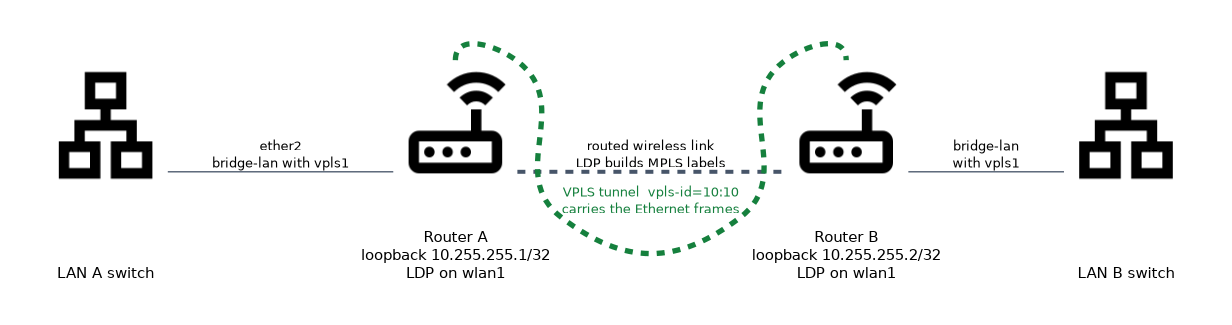
- Includes a diagram
- VPLS carries Ethernet frames over a routed network, so it can bridge two LANs over a wireless IP link.
- The wireless link is a normal routed link, and the station needs no special bridge mode.
- A loopback address identifies each router.
What it is
A VPLS tunnel carries Ethernet frames across a routed network, so it can bridge two LANs over a wireless IP link.
The radio link itself is a normal routed connection with IP addresses on both ends. A station on that link can be an ordinary station, with no special bridge mode. The tunnel adds the Layer 2 service on top.
This avoids the limits of pseudobridge and does not need WDS. The original MAC addresses are carried inside the tunnel.
How it works
LDP builds the MPLS labels, VPLS builds a pseudowire, and the pseudowire joins a bridge on each side.
The building blocks
| Part | Role |
|---|---|
| Routed wireless link | Carries IP between the two routers |
| Loopback address | A stable address for each router, used to identify it |
| LDP | The protocol that hands out MPLS labels |
| VPLS | A Layer 2 tunnel between two routers over MPLS |
| Bridge | Joins the VPLS interface to the local LAN |
MPLS switches packets using short labels instead of looking at the IP address at every hop. VPLS uses those labels to carry Ethernet frames, so two sites appear to share one switch.
Step 1: loopback addresses
Each router needs a stable address that does not depend on one link. A common way is an empty bridge with a single host address:
/interface bridge add name=lo
/ip address add address=10.255.255.1/32 interface=lo
The two routers must be able to reach each other's loopback addresses, with static routes or a routing protocol. LDP and VPLS use these addresses.
Step 2: the wireless link
The link is a normal IP network. One side is an access point, the other a station, and both have addresses in a small subnet. No bridging is involved, so the standard station mode is enough.
Step 3: LDP
LDP tells each router which labels to use. In the older RouterOS syntax, which applies to version 6, the setup looks like this:
/mpls ldp set enabled=yes lsr-id=10.255.255.1 transport-address=10.255.255.1
/mpls ldp interface add interface=wlan1
The first command turns LDP on and sets the identity of the router. The second command makes LDP run on the wireless interface.
RouterOS version 7 uses different LDP commands from version 6. Check the syntax for the version on your devices.
Step 4: the VPLS interface
A VPLS interface points at the loopback of the other router:
/interface vpls add name=vpls1 remote-peer=10.255.255.2 vpls-id=10:10remote-peeris the loopback address of the other router.vpls-ididentifies the tunnel, and it must be the same on both ends.
The other router has a matching interface with remote-peer set to the first router.
Step 5: bridge it
The VPLS interface is added to a bridge with the LAN port:
/interface bridge add name=bridge-lan
/interface bridge port add bridge=bridge-lan interface=ether2
/interface bridge port add bridge=bridge-lan interface=vpls1
Now frames from LAN A flow through the bridge into the tunnel, and out of the bridge on the other side, with their original MAC addresses.
Frame size
The tunnel adds headers: a label for MPLS, and more for the pseudowire. The wireless link must be able to carry the larger frames, or large frames are dropped. Check the MPLS and L2 frame size settings on the path, and test with large pings.
If small pings work but large transfers stall, suspect the frame size on the path of the tunnel.
Checking the result
/mpls ldp neighbor print
/interface vpls print
/interface bridge host print
The LDP neighbour list should show the other router. The VPLS list shows whether the tunnel is running. The bridge host table shows MAC addresses from the far LAN.
Pros and cons
| Point | Result |
|---|---|
| Original MAC addresses kept | Yes |
| Works with plain station mode | Yes |
| Needs a routed link | Yes |
| Setup effort | Higher than a WDS bridge |
| Overhead | Extra headers reduce the usable frame size |
What to remember for the exam
Six facts cover this topic.
- VPLS carries Ethernet frames over a routed network, so it can bridge two LANs over a wireless IP link.
- The wireless link is a normal routed link, and the station needs no special bridge mode.
- A loopback address identifies each router.
- LDP provides the MPLS labels, and it must run on the wireless interface.
- The VPLS interface needs
remote-peerand a matchingvpls-id, and it joins a bridge. - The tunnel headers make frames larger, so the path must support the larger size.
Common mistakes
Four errors are typical.
Unreachable loopbacks. LDP and VPLS need routes to the other router's loopback address.
Different tunnel identifiers. The vpls-id must match on both ends.
Forgetting the bridge. The VPLS interface carries nothing for the LAN until it is a bridge port.
Ignoring frame size. Large frames are dropped when the path cannot carry the extra headers.
Check yourself
Work through these three questions.
What does a VPLS tunnel give you over a wireless link?
It carries Ethernet frames across the routed link, so two LANs act as one segment. The original MAC addresses are kept inside the tunnel.
Why do the routers need loopback addresses?
They give each router a stable address for LDP and for the VPLS
remote-peer. The routers must be able to reach each other's loopbacks.What must match on both ends of the VPLS tunnel?
The
vpls-idmust be the same, and each side'sremote-peermust be the other router's loopback address.
Topic 3 of 3 in Wireless Bridging
Test yourself on Wireless Bridging
The full MikroTik MTCWE question bank has 447 questions, with timed practice exams and an explanation for every answer.
This study guide is independent and is not affiliated with, endorsed by, or sponsored by MikroTik. Vendor names, certification names and exam codes are trademarks of their respective owners and are used for identification only.