WDS and MESH · Topic 2 of 3
WDS Bridges and RSTP
Learn why WDS links in a bridged network need RSTP, how to bridge WDS interfaces and set protocol mode rstp, and how WDS path cost affects the path.
- 5 min
- Includes a diagram
- A WDS interface must be a bridge port to carry traffic.
- Redundant bridged paths make loops, and RSTP blocks the extra paths.
protocol-mode=rstpon the bridge turns RSTP on.
What it is
A WDS link is bridged into the network, and RSTP stops the bridged links from forming loops.
When several access points are linked by WDS and also by cables, there can be more than one path between two points. In a bridged network, more than one path means a loop. A loop makes frames circulate for ever, and it can bring the network down in seconds.
RSTP (Rapid Spanning Tree Protocol) blocks the extra paths. It keeps them ready, and it uses them if the main path fails.
How it works
The WDS interface is a bridge port, and RSTP chooses which bridge ports forward.
Bridging the WDS interface
A WDS interface only carries traffic if it belongs to a bridge. A typical setup has a bridge with the wired port and the WDS interface:
/interface bridge add name=bridge1 protocol-mode=rstp
/interface bridge port add bridge=bridge1 interface=ether2
/interface bridge port add bridge=bridge1 interface=wds1
With dynamic WDS, the wds-default-bridge setting adds the interfaces for you. The protocol-mode of the bridge decides which loop prevention protocol runs, with rstp being the modern choice.
Newer RouterOS versions have a different bridge implementation than older ones, but protocol-mode=rstp and the port commands used here are the same idea. Check the version you work with.
How RSTP works
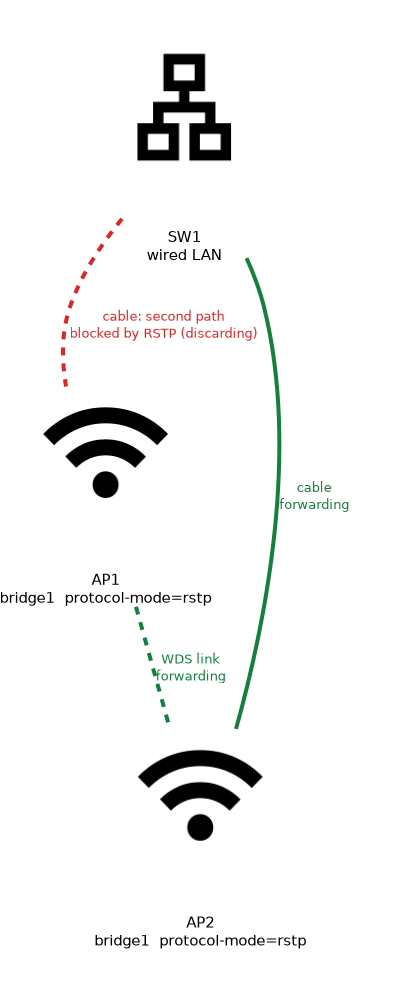 RSTP follows a few steps:
- The bridges elect a root bridge. The one with the lowest priority wins, and if priorities tie, the lowest MAC address wins.
- Every other bridge finds its best path to the root. The cost of each link adds up along the path.
- A port on the best path to the root forwards. Ports that would create a loop are put into a blocking state, which RSTP calls discarding.
- If a link fails, a blocked port can start forwarding after a short time.
This is why RSTP is the safe choice for any redundant bridged network.
Port cost and WDS
The cost of a port is a number. A lower cost is more attractive, and the total along a path decides the route. For wired ports the cost is the path-cost of the bridge port, which you can set by hand.
For dynamic WDS interfaces, RouterOS lets you set the starting cost and a range:
/interface wireless set wlan1 wds-default-cost=100 wds-cost-range=50-150| Setting | Purpose |
|---|---|
wds-default-cost | The base cost given to dynamic WDS ports |
wds-cost-range | The range within which RouterOS adjusts the cost to match the link quality |
Wireless links vary, so the router can raise the cost of a poor link. The path then moves to a better one, without you doing anything.
Choosing the root
The root bridge should be the device that sits at the centre of the network, usually the one that connects to the core or to the Internet. Set its priority lower, so that it always wins:
/interface bridge set bridge1 priority=0x1000If you leave all priorities equal, the lowest MAC address wins, and that may be a poor choice, such as a remote access point.
Checking the result
/interface bridge port print
/interface bridge monitor bridge1
The port list shows the role and state of each port. The monitor command shows the root bridge and the state of the bridge. Look for a port that is blocking, which shows that RSTP has prevented a loop.
Typical mistakes in a WDS network
If a network with WDS links becomes slow or unstable, look for these causes:
- The protocol mode is off, so a loop forms.
- Two different bridges use different protocol modes.
- The root bridge is a poor choice, so traffic takes long paths.
- A WDS link flaps, so RSTP keeps recalculating.
Never join two bridges with two paths and no loop prevention. A loop can overload the whole network within seconds.
Limits of RSTP
RSTP leaves redundant links idle, so you do not get extra bandwidth from them. The change after a failure is fast, but not instant. For a network that needs many paths and quick recovery, the mesh protocol on the next page is an alternative.
What to remember for the exam
Six facts cover this topic.
- A WDS interface must be a bridge port to carry traffic.
- Redundant bridged paths make loops, and RSTP blocks the extra paths.
protocol-mode=rstpon the bridge turns RSTP on.- The root bridge is the one with the lowest priority, then the lowest MAC address.
wds-default-costandwds-cost-rangeset the cost of dynamic WDS ports.- A blocked port is normal, and it shows that RSTP is working.
Common mistakes
Four errors are typical.
No loop protection. A bridge with two paths and no RSTP creates a loop.
Leaving the root to chance. A remote device with the lowest MAC address may become the root.
Expecting extra bandwidth. RSTP blocks the second path, so it only gives resilience.
Not checking port states. A port that is blocking is not a fault.
Check yourself
Work through these three questions.
Why does a WDS network need RSTP?
Redundant bridged paths create loops, and RSTP blocks the extra paths. It uses them again if the main path fails.
How is the root bridge chosen?
The bridge with the lowest priority wins, and if priorities tie, the lowest MAC address wins. You should set the priority so that a central device is the root.
What do
wds-default-costandwds-cost-rangedo?They set the base cost for dynamic WDS ports and the range within which RouterOS adjusts it. This lets the path move away from a poor link.
Topic 2 of 3 in WDS and MESH
Test yourself on WDS and MESH
The full MikroTik MTCWE question bank has 447 questions, with timed practice exams and an explanation for every answer.
This study guide is independent and is not affiliated with, endorsed by, or sponsored by MikroTik. Vendor names, certification names and exam codes are trademarks of their respective owners and are used for identification only.