WDS and MESH · Topic 1 of 3
WDS with Dynamic and Static Links
Learn how the Wireless Distribution System links access points, how dynamic and static WDS differ, and what a RouterOS WDS link needs to come up.
- 5 min
- Includes a diagram
- WDS links access points over the air using four address frames.
- Each link appears as an interface that you add to a bridge.
wds-modecan bedisabled,dynamic,static,dynamic-meshorstatic-mesh.
What it is
WDS (Wireless Distribution System) lets access points connect to each other over the air and pass Layer 2 frames between them.
A normal access point talks to stations and uses a cable for the rest of the network. With WDS, two access points can also talk to each other, so a wired network can be extended without cable between them.
Each WDS link appears as an extra interface that you can add to a bridge, just like an Ethernet port.
How it works
A WDS link is a point to point connection between two access points, and it is either created automatically or defined by hand.
Why WDS is needed
Standard 802.11 frames between a station and an access point carry three addresses. That is not enough to pass a frame from a device behind one station with its own source address. WDS uses frames with four addresses, so the original source and destination are kept, and the link is transparent at Layer 2.
Because of this, bridging over a WDS link keeps the real MAC addresses of the devices on both sides.
The WDS mode setting
The setting that turns WDS on is wds-mode on the wireless interface:
/interface wireless set wlan1 mode=ap-bridge wds-mode=dynamic wds-default-bridge=bridge1Value of wds-mode | Meaning |
|---|---|
disabled | No WDS links |
dynamic | Links are created automatically when a partner is found |
static | Only links that you define by hand are used |
dynamic-mesh and static-mesh | The same, but for HWMP+ mesh, covered later |
Dynamic WDS
With dynamic WDS, the access point accepts a WDS partner that it finds. When the partner is found, a new interface is created automatically, and it is marked as dynamic in the interface list. The link goes away when the partner goes away.
The wds-default-bridge setting names the bridge to which these interfaces are added at once. This saves manual work, and it keeps the network working when links come and go.
Dynamic WDS is quick to set up. It suits links between devices that you control. It accepts partners automatically, so it relies on the security profile to keep out strangers.
Static WDS
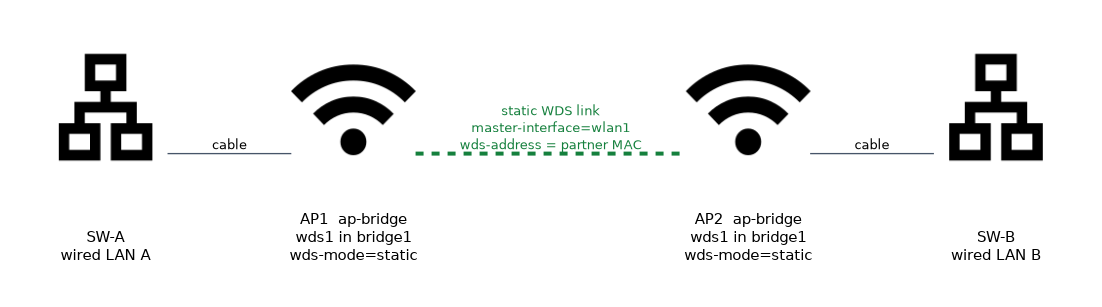 With static WDS, you create the WDS interface yourself and name the partner by MAC address:
/interface wireless wds add name=wds1 master-interface=wlan1 wds-address=00:11:22:33:44:55
/interface bridge port add bridge=bridge1 interface=wds1master-interfaceis the wireless interface that carries the link.wds-addressis the MAC address of the partner's wireless interface.
The same entry must exist on the other side, naming the first device. You add the interface to a bridge yourself.
| Point | Dynamic WDS | Static WDS |
|---|---|---|
| Creation | Automatic | By hand |
| Partner control | Any suitable partner | Only the named partner |
| Bridge membership | Through wds-default-bridge | Added by hand |
| Best for | Quick setup | Fixed, controlled links |
Use static WDS when you want to be sure that only known devices join the link.
Conditions for a WDS link
For a WDS link to come up, these must match on both devices:
- The same SSID, unless
wds-ignore-ssidis set to yes. - The same band and frequency.
- Compatible security, because the link uses the security profile of the master interface.
- A wireless mode that allows WDS, such as
ap-bridge.
There is also a wds-slave mode for the end that should follow an access point. It acts like an access point, but it scans for an access point with the same SSID and links to it, following its frequency.
Checking the result
/interface wireless wds print
/interface wireless registration-table print
/interface bridge port print
The first command lists the WDS interfaces, and a flag shows whether each is dynamic. The registration table shows the WDS partner as a connected peer. The bridge port list shows whether the WDS interface is in the bridge.
A word on capacity
All WDS links and all clients on the interface share the same radio and channel. A WDS link between two access points that also serve clients uses the same airtime as the clients. For a busy backhaul, use a separate radio for the link.
WDS links in a bridged network can create loops. Use a loop prevention protocol, which the next page explains.
What to remember for the exam
Six facts cover this topic.
- WDS links access points over the air using four address frames.
- Each link appears as an interface that you add to a bridge.
wds-modecan bedisabled,dynamic,static,dynamic-meshorstatic-mesh.- Dynamic WDS creates interfaces automatically, and
wds-default-bridgeadds them to a bridge. - Static WDS needs a WDS interface with
wds-addressset to the partner MAC address. - The SSID, band, frequency and security must be compatible at both ends.
Common mistakes
Four errors are typical.
Mismatched frequency or SSID. The link never forms, because the two ends are not on the same network.
Forgetting the bridge. A static WDS interface that is not in a bridge carries no traffic.
Using one radio for everything. The link and the clients share airtime, so throughput falls.
Using dynamic WDS without security. Any suitable device can become a partner.
Check yourself
Work through these three questions.
What does WDS add to a wireless network?
It lets access points link to each other over the air and pass Layer 2 frames, with the original MAC addresses kept. Each link appears as an interface.
What is the difference between dynamic and static WDS?
Dynamic WDS creates the interface automatically when a partner is found. Static WDS needs you to create the interface and give the partner
wds-address.Which setting adds dynamic WDS interfaces to a bridge automatically?
wds-default-bridgenames the bridge. Static interfaces are added to a bridge by hand.
Topic 1 of 3 in WDS and MESH
Test yourself on WDS and MESH
The full MikroTik MTCWE question bank has 447 questions, with timed practice exams and an explanation for every answer.
This study guide is independent and is not affiliated with, endorsed by, or sponsored by MikroTik. Vendor names, certification names and exam codes are trademarks of their respective owners and are used for identification only.