WDS and MESH · Topic 3 of 3
Wireless Mesh with HWMP+
Learn how the MikroTik HWMP plus mesh protocol finds paths between wireless devices, how it differs from RSTP, and how to set up a mesh and its ports.
- 5 min
- Includes a diagram
- HWMP+ is a Layer 2 mesh routing protocol, which MikroTik based on the 802.11s protocol.
- The mesh uses WDS links with
wds-mode=dynamic-meshorstatic-mesh. - A mesh interface carries the traffic, and ports are added with
/interface mesh port.
What it is
HWMP+ is MikroTik's mesh routing protocol, and it picks the best path between devices over wireless links.
In a mesh, many devices link to each other, and a frame can take several routes. The protocol decides which route to use, and it changes the route when a link gets worse or fails.
It works at Layer 2, so the mesh behaves like one big switch, while the devices pick paths among themselves.
How it works
Devices discover paths with request and reply messages, and each frame follows the path that the protocol chose.
Mesh and WDS together
The mesh uses WDS links, so the WDS mode is set to one of the mesh values:
/interface wireless set wlan1 mode=ap-bridge wds-mode=dynamic-meshWith dynamic-mesh the links are created automatically. With static-mesh you create them by hand, as with static WDS. Then you create a mesh interface and add the ports to it.
/interface mesh add name=mesh1
/interface mesh port add interface=ether1 mesh=mesh1
/interface mesh port add interface=wlan1 mesh=mesh1
The mesh interface carries the traffic, and its ports can be wireless or wired.
HWMP+ messages
HWMP+ is based on the Hybrid Wireless Mesh Protocol from the mesh standard 802.11s. It has a few message types:
| Message | Purpose |
|---|---|
| PREQ (path request) | A device asks the mesh for a path to a destination |
| PREP (path reply) | The destination, or a device that knows it, answers |
| PERR (path error) | A device reports that a path no longer works |
| RANN (root announcement) | A root device announces itself, so others learn the way to it |
Reactive and proactive paths
Paths are found in two ways:
- Reactive: when a device needs a path and has none, it sends a PREQ. The reply builds the path on demand.
- Proactive: a root device sends RANN messages at intervals. Other devices keep a ready path to the root, such as a gateway.
Reactive discovery adds a delay for the first frame to a new destination. The proactive method gives paths to the gateway without that delay.
Choosing paths
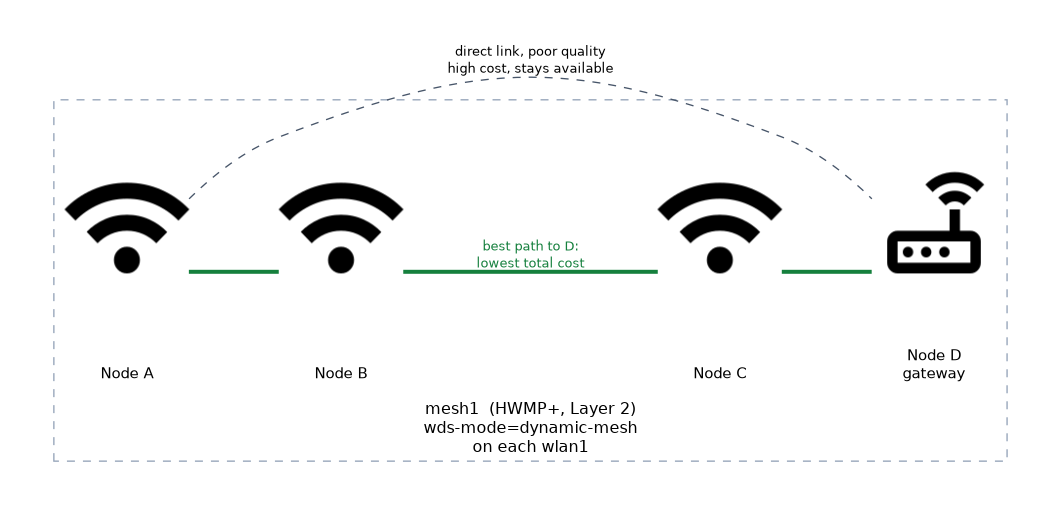 Each link has a cost, based on its quality. A path through several good links can beat a direct, poor one. When a link degrades or fails, the protocol finds another path.
This is different from RSTP, which blocks the extra links and keeps them idle. In a mesh, links stay in use, and the best path is picked for each destination.
| Point | RSTP bridge | HWMP+ mesh |
|---|---|---|
| Redundant links | Blocked until needed | Available for path choice |
| Path choice | One tree for the whole network | Best path for each destination |
| Recovery | After the protocol recalculates | By finding another path |
| Vendor | Standard | MikroTik, so RouterOS devices |
Tuning
The mesh interface has settings that begin with hwmp, such as the default hop limit, the number of path request retries and the interval for root announcements. The hop limit stops frames from travelling too far, and the intervals set how quickly the mesh reacts.
The defaults suit most networks. Change them only with a measured reason.
Checking the result
/interface mesh print
/interface mesh port print
/interface mesh fdb print
The mesh interface list shows the mesh. The port list shows the members. The forwarding database shows the destinations that the mesh knows and the path to each.
When to use mesh
Use mesh where a network has many nodes that can reach each other, and where links change. Use RSTP for simple topologies, or when only a few links exist. A mesh also gives less predictable paths, which can make a network harder to design and debug.
Test a mesh by switching off one node and watching the forwarding database. The paths should change, and traffic should keep flowing.
What to remember for the exam
Six facts cover this topic.
- HWMP+ is a Layer 2 mesh routing protocol, which MikroTik based on the 802.11s protocol.
- The mesh uses WDS links with
wds-mode=dynamic-meshorstatic-mesh. - A mesh interface carries the traffic, and ports are added with
/interface mesh port. - PREQ and PREP find paths on demand, and RANN builds paths to a root.
- The protocol chooses the best path for each destination and keeps links in use.
/interface mesh fdb printshows the known destinations and paths.
Common mistakes
Four errors are typical.
Plain WDS mode. Without a mesh mode on the wireless interface, the mesh does not form.
Forgetting the ports. Interfaces that are not mesh ports do not carry mesh traffic.
Mixing mesh and RSTP on the same links. Use one method to choose paths.
Expecting other vendors to join. The protocol is MikroTik's own.
Check yourself
Work through these three questions.
What does HWMP+ do?
It finds and selects the best Layer 2 path between devices in a wireless mesh. It also changes the path when a link gets worse or fails.
How is the mesh different from an RSTP bridge?
RSTP blocks redundant links and uses one tree, while the mesh keeps all links available and picks the best path for each destination.
Which setting makes a wireless interface use mesh links?
wds-mode=dynamic-meshorstatic-meshon the wireless interface. The interface then also needs to be a mesh port.
Topic 3 of 3 in WDS and MESH
Test yourself on WDS and MESH
The full MikroTik MTCWE question bank has 447 questions, with timed practice exams and an explanation for every answer.
This study guide is independent and is not affiliated with, endorsed by, or sponsored by MikroTik. Vendor names, certification names and exam codes are trademarks of their respective owners and are used for identification only.