VLANs · Topic 1 of 6
802.1Q and 802.1ad VLAN Tagging Concepts
Learn how 802.1Q tags separate VLANs on one link, what the tag fields mean, how 802.1ad adds a service tag, and how RouterOS treats tagged frames.
- 5 min
- Includes a diagram
- 802.1Q adds a four byte tag that holds the VLAN ID.
- The VLAN ID has 12 bits, and 1 to 4094 are usable.
- The tag protocol identifier for 802.1Q is
0x8100.
What it is
A VLAN splits one physical switch network into several separate Layer 2 networks, and a tag tells a frame which one it belongs to.
Without VLANs, every port in a switch shares one broadcast domain. With VLANs, a broadcast sent in VLAN 10 stays in VLAN 10. Hosts in different VLANs need a router to talk to each other.
IEEE 802.1Q defines the tag. IEEE 802.1ad extends it with a second, outer tag so that a provider can carry customer VLANs.
How it works
The tag is inserted into the Ethernet header, and ports decide whether to add it, keep it or remove it.
The 802.1Q tag
The tag adds four bytes between the source MAC address and the type field.
| Field | Size | Meaning |
|---|---|---|
| TPID | 16 bits | Tag protocol identifier, 0x8100 for 802.1Q |
| PCP | 3 bits | Priority code point, used for 802.1p priority |
| DEI | 1 bit | Drop eligible indicator |
| VID | 12 bits | The VLAN ID |
The VLAN ID is 12 bits long, so it ranges up to 4095. The values 0 and 4095 are reserved, which leaves 1 to 4094 for normal use. A frame with VID 0 carries only priority and no VLAN.
Because the tag adds four bytes, the frame can exceed the standard size. The MTU chapter explains why ports must have enough L2MTU for it.
Tagged and untagged
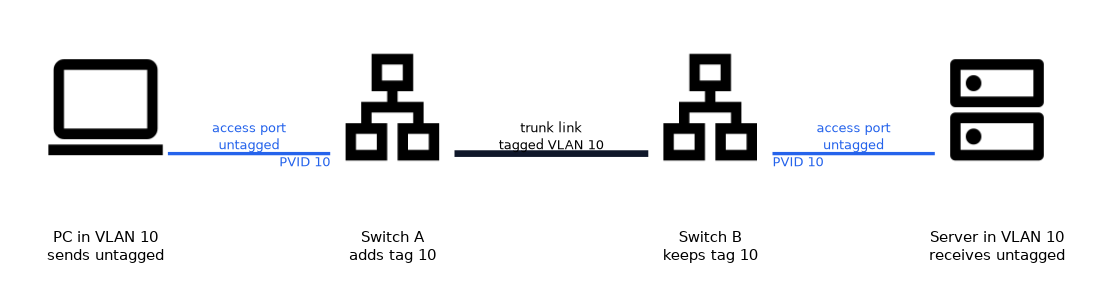 A frame leaves a port either with a tag or without one.
- Tagged: the VLAN ID travels in the frame. Used on links between switches, routers and VLAN aware servers.
- Untagged: no tag is present. Used towards ordinary hosts such as PCs and printers.
A port that sends and receives frames for one VLAN without tags is an access port. A port that carries several VLANs with tags is a trunk port. A port that carries some VLANs tagged and one untagged is often called a hybrid port.
The native or port VLAN
Untagged frames that arrive on a port need a VLAN to belong to.
The port assigns them to its port VLAN ID, called the PVID in RouterOS. On an access port the PVID is the VLAN of the host. On a trunk, untagged frames go into the PVID too, so mismatched values on the two ends join the wrong VLANs.
802.1ad service tags
802.1ad adds an outer tag, so a frame can carry two.
| Tag | Name | TPID |
|---|---|---|
| Outer | Service tag (S-VLAN) | 0x88a8 |
| Inner | Customer tag (C-VLAN) | 0x8100 |
The provider uses the outer tag to keep customers apart, and leaves the inner tag untouched. This is often called QinQ or provider bridging. The second tag adds another four bytes to the frame.
How RouterOS handles VLANs
RouterOS gives you three ways to work with VLANs.
| Method | Where the work happens |
|---|---|
| VLAN interfaces | CPU, one interface per VLAN on a parent interface |
| Bridge VLAN filtering | The bridge, offloaded to the chip on supported devices |
| Switch chip VLAN tables | The /interface ethernet switch menus on chips that use them |
The following pages cover each method in turn. Which one you use depends on the device and the task.
/interface vlan add name=vlan10 vlan-id=10 interface=ether1
/interface vlan printA tag only means something on the link where it is carried. A host never needs to know its VLAN ID if the switch port is an access port.
What to remember for the exam
Eight facts cover most questions on this topic.
- 802.1Q adds a four byte tag that holds the VLAN ID.
- The VLAN ID has 12 bits, and 1 to 4094 are usable.
- The tag protocol identifier for 802.1Q is
0x8100. - PCP carries the 802.1p priority in three bits.
- Access ports use untagged frames, and trunk ports use tagged frames.
- Untagged frames on a port join the port VLAN ID, the PVID.
- 802.1ad adds an outer service tag with
0x88a8above the customer tag. - The two tags of QinQ add eight bytes in total.
Different PVID values on the two ends of a trunk silently join untagged traffic to different VLANs. The link works and the networks leak into each other.
Common mistakes
These four mistakes appear often.
Thinking a VLAN is an IP subnet. A VLAN is a Layer 2 domain. You normally map one subnet to one VLAN, but the two are separate ideas.
Mismatched PVID on a trunk. Untagged frames then end up in different VLANs on each side.
Expecting VLANs to talk without a router. Different VLANs need Layer 3 routing between them.
Mixing up the two tag values. 0x8100 is the 802.1Q and customer tag, and 0x88a8 is the 802.1ad service tag.
Check yourself
Work through these three questions.
How many bytes does an 802.1Q tag add, and which VLAN IDs can you use?
It adds four bytes, and the usable VLAN IDs are 1 to 4094.
What happens to an untagged frame that arrives on a port?
It is placed in the VLAN set as the port VLAN ID, the PVID.
How does an 802.1ad frame differ from an 802.1Q frame?
It carries an outer service tag with
0x88a8above the inner customer tag, which adds a second four bytes.
Topic 1 of 6 in VLANs
Test yourself on VLANs
The full MikroTik MTCSWE question bank has 484 questions, with timed practice exams and an explanation for every answer.
This study guide is independent and is not affiliated with, endorsed by, or sponsored by MikroTik. Vendor names, certification names and exam codes are trademarks of their respective owners and are used for identification only.