MikroTik MTCSWE Practice Exam
MikroTik Certified Switching Engineer (MTCSWE)
The MikroTik Certified Switching Engineer (MTCSWE) certification validates associate-level ability to implement and manage Layer 2 forwarding on MikroTik hardware. It covers bridge and switch chip behavior, MTU and L2MTU, VLAN tagging (802.1Q/802.1ad) and QinQ, Spanning Tree and MSTP, link aggregation, port isolation, Layer 2 QoS, security features like DHCP/IGMP snooping and loop protect, PoE, and SwOS configuration.
Question bank updated : questions, answers, explanations and chapters.
Certification Overview
- Exam name: MTCSWE
- Vendor: MikroTik
- Exam code: MTCSWE
- Duration: 60 minutes
- Total questions: about 25
- Official passing score: 60% (source)
- Our practice exam pass mark: 60%
Who Should Take This Exam?
Network Engineer, Network Technician, Network Administrator, NOC Technician, Systems Administrator, ISP Engineer, Field Network Engineer, Data Center Technician
Prerequisites
MTCNA certification or equivalent foundational MikroTik RouterOS and basic Layer2 networking knowledge (bridging, switching, VLAN fundamentals).
Topics Covered
- Introduction
- MTU
- VLANs
- Spanning Tree Protocol
- Link Aggregation
- Port Isolation
- QoS
- Layer 2 Security
- Power over Ethernet (PoE)
- Tools
- SwOS
Question Types
- Multiple Choice (Single Answer)
- Multiple Choice (Multiple Answers)
- True / False
- Scenario-Based
MTCSWE Practice Questions
Our question bank contains 520+ practice questions for this certification. Sample questions from each exam chapter. Expand a question to see the answer choices. With full access, you get unlimited practice exams with randomised questions from our full question bank.
Introduction
In RouterOS, which type of interface creates a single Layer 2 broadcast domain from multiple physical ports?
- A. VLAN interface
- B. Bonding interface
- C. EoIP tunnel
- D. Bridge interface Correct answer
Option D is correct because a bridge interface in RouterOS connects multiple physical ports into a single Layer 2 broadcast domain, functioning like a traditional network switch. VLAN interfaces provide Layer 2 segmentation, bonding aggregates links for bandwidth/redundancy, and EoIP creates Layer 2 tunnels over IP.
Which TWO statements accurately describe the behavior of a RouterOS bridge with hardware offloading enabled on a CRS3xx device? (Choose two)
- A. VLAN filtering can be offloaded to the switch chip on CRS3xx models Correct answer
- B. Bridge firewall filter rules are evaluated in hardware by the switch chip
- C. The CPU must process every frame before the switch chip can forward it
- D. The switch chip performs MAC learning and frame forwarding independently of the CPU Correct answer
Options D and A are correct because hardware offloading on CRS3xx allows the switch chip to perform MAC learning and frame forwarding independently of the CPU, and VLAN filtering can also be offloaded to the switch chip. Bridge firewall filter rules (B) are always processed by the CPU, not the switch chip, and hardware offloading means the CPU does not need to process every frame (C).
MTU
What is the default L2MTU value for standard Ethernet interfaces on MikroTik RouterOS devices?
- A. 9000 bytes
- B. 1522 bytes
- C. 1500 bytes
- D. 1518 bytes Correct answer
Option D is correct because the default L2MTU for standard Ethernet interfaces on MikroTik devices is 1518 bytes. This accommodates the standard Ethernet frame (14-byte header + 1500-byte payload + 4-byte FCS), allowing a single 802.1Q VLAN tag to fit within the maximum frame size.
Which TWO scenarios require increasing the L2MTU on MikroTik switch interfaces beyond the default value? (Choose two)
- A. Enabling RSTP on the bridge interface
- B. Transporting jumbo frames for iSCSI or NFS storage traffic Correct answer
- C. Connecting two bridge ports at 1 Gbps speed
- D. Carrying 802.1Q VLAN tagged frames with a 1500-byte IP payload Correct answer
Options D and B are correct because carrying 802.1Q tagged frames with a 1500-byte IP payload requires extra bytes for the VLAN tag header (4 bytes), and transporting jumbo frames for storage protocols like iSCSI or NFS requires an L2MTU well above the default. Link speed (C) and RSTP (A) have no bearing on L2MTU requirements.
VLANs
What is the IEEE standard that defines VLAN tagging for Ethernet frames?
- A. 802.1Q Correct answer
- B. 802.1X
- C. 802.11
- D. 802.3
Option A is correct because IEEE 802.1Q is the standard that defines VLAN tagging for Ethernet frames, specifying how a 4-byte tag is inserted into the frame header to identify VLAN membership. 802.3 defines Ethernet framing, 802.11 defines wireless LANs, and 802.1X defines port-based network access control.
Bridge VLAN filtering in RouterOS is enabled per bridge, not per port.
- A. True Correct answer
- B. False
The vlan-filtering setting is a bridge-level parameter, not a per-port option. When enabled on a bridge, VLAN filtering rules from the bridge VLAN table apply to all ports that are members of that bridge.
Based on the topology shown, can PC2 communicate with PC3 at Layer 2?
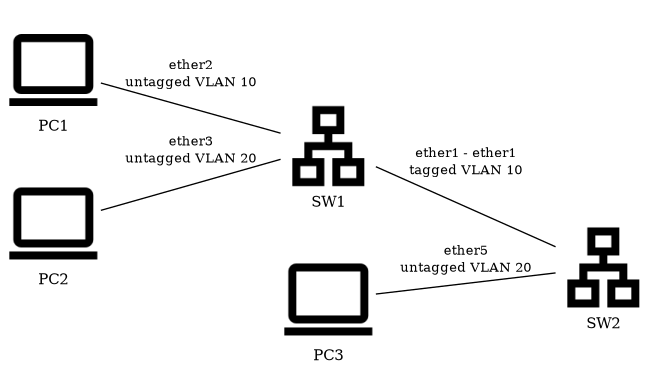
- A. No - ether5 on SW2 is an access port for VLAN 10
- B. No - PC1 and PC2 are connected to different bridges
- C. Yes - PC2 and PC3 are both members of VLAN 20
- D. No - the trunk between SW1 and SW2 only carries VLAN 10 Correct answer
Option D is correct because the exhibit shows the SW1-SW2 trunk tagged only for VLAN 10, so PC2's VLAN 20 traffic has no path across it to reach PC3, even though both are nominally in VLAN 20.
Spanning Tree Protocol
What is the default bridge priority value in RouterOS when a new bridge is created?
- A. 32768 Correct answer
- B. 4096
- C. 65535
- D. 0
Option A is correct because RouterOS creates new bridges with a default priority of 32768 (0x8000), which is the IEEE 802.1D standard default. Options A, B, and D are not the default value.
The default STP bridge priority in RouterOS is 32768.
- A. True Correct answer
- B. False
The default bridge priority in RouterOS is 32768, which matches the IEEE 802.1D standard default. Bridge priority is used in the root bridge election process, where the switch with the lowest priority (combined with its MAC address to form the Bridge ID) becomes the root bridge. The value can be set in increments of 4096, ranging from 0 to 65535.
Based on the topology shown, which switch will STP elect as the root bridge?
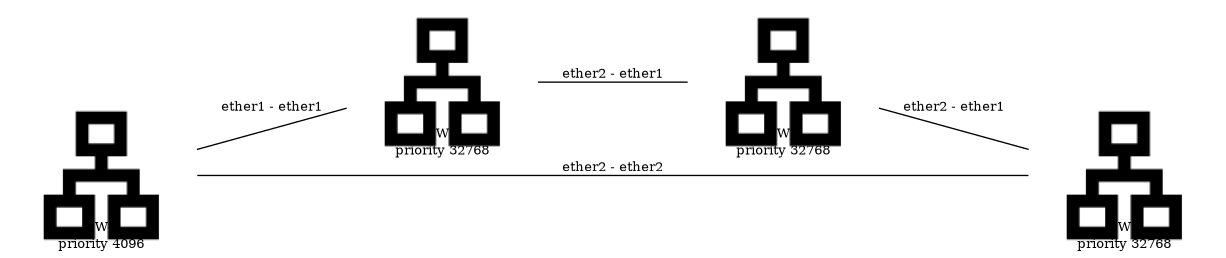
- A. SW4
- B. SW3
- C. SW2
- D. SW1 Correct answer
Option D is correct because SW1's configured bridge priority of 4096 is lower than the other three switches' default 32768, and STP elects the bridge with the lowest priority as the root bridge.
Link Aggregation
In RouterOS, which menu is used to create a bonding interface for link aggregation?
- A. /interface bonding Correct answer
- B. /interface bridge bond
- C. /interface link-aggregation
- D. /interface etherchannel
Option A is correct because in RouterOS, bonding interfaces for link aggregation are created and configured under the '/interface bonding' menu. Options B, C, and D are not valid RouterOS menu paths.
RouterOS supports adding bonding interfaces as bridge ports.
- A. True Correct answer
- B. False
RouterOS fully supports adding bonding (link aggregation) interfaces as bridge ports. This allows aggregated links to participate in bridging, combining the bandwidth and redundancy benefits of bonding with the L2 switching capabilities of the bridge.
Based on the topology shown, what happens to traffic between PC1 and PC2 while the ether2 link is down?

- A. All traffic between PC1 and PC2 stops until ether2 is restored
- B. It continues uninterrupted over ether1 - bonding1 stays up with one active member Correct answer
- C. Traffic is duplicated on ether1 to compensate for the lost bandwidth
- D. bonding1 falls back to using spanning tree to select a single link
Option B is correct because bonding1 is built from two member links; losing one (ether2) still leaves ether1 active, so the bonded interface stays up and PC1-PC2 traffic keeps flowing over the surviving link without interruption.
Port Isolation
In RouterOS, which bridge port setting is used to configure port isolation by grouping ports with a shared uplink?
- A. isolation-id
- B. port-group
- C. private-vlan
- D. horizon Correct answer
Option B is correct because the 'horizon' setting on bridge ports controls port isolation in RouterOS. Ports with the same non-zero horizon value are isolated from each other, while ports with horizon=none can communicate with all ports. Options A, C, and D are not valid RouterOS bridge port settings for this purpose.
QoS
How many priority levels does the 802.1p PCP field support in VLAN-tagged frames?
- A. 8 (values 0-7) Correct answer
- B. 4 (values 0-3)
- C. 16 (values 0-15)
- D. 64 (values 0-63)
Option A is correct because the PCP field is 3 bits wide, providing 2^3 = 8 priority levels with values ranging from 0 (lowest/best effort) to 7 (highest/network control). This allows differentiated treatment of traffic at Layer 2.
Layer 2 Security
What is the primary purpose of IGMP snooping on a RouterOS bridge?
- A. To convert all multicast traffic into unicast streams
- B. It sends multicast only to interested receiver ports Correct answer
- C. To fully encrypt multicast traffic between bridge ports
- D. To completely block all multicast traffic by default
Option B is correct because IGMP snooping's purpose is to track which ports have hosts that joined a multicast group, so the bridge can forward multicast only to those interested ports instead of flooding it everywhere.
Power over Ethernet (PoE)
What is the maximum power per port that IEEE 802.3af (PoE) can deliver?
- A. 15.4 W Correct answer
- B. 90 W
- C. 60 W
- D. 30 W
Option A is correct because IEEE 802.3af (the original PoE standard) delivers a maximum of 15.4 W per port at the PSE (Power Sourcing Equipment). The higher values of 30 W, 60 W, and 90 W correspond to 802.3at (PoE+), 802.3bt Type 3, and 802.3bt Type 4 respectively.
Based on the topology shown, if SW1's total PoE power budget of 30W is exceeded, which device loses power first?
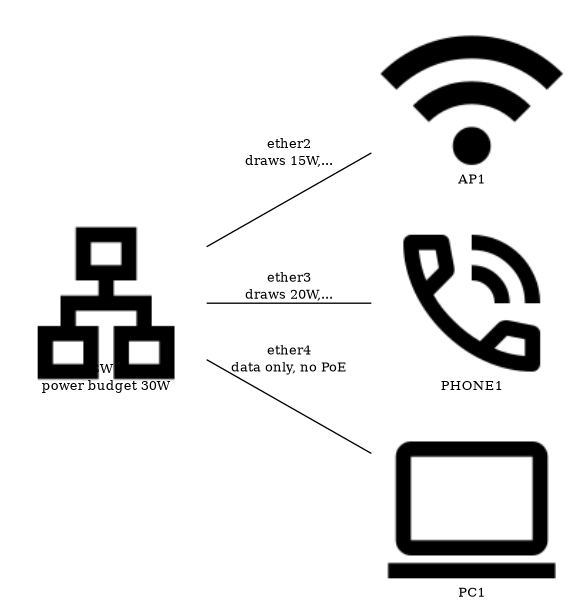
- A. AP1 - it has the lower PoE priority
- B. SW1 disables all PoE ports, including ether4
- C. Both AP1 and PHONE1 lose power at the same time
- D. PHONE1 - it has the lower PoE priority Correct answer
Option D is correct because PHONE1's poe-priority of 3 is numerically higher (lower priority) than AP1's poe-priority of 1, so when the combined 35W draw exceeds SW1's 30W budget, PHONE1 is shed first to protect the higher-priority AP1.
Tools
Which TWO RouterOS tools can help identify the cause of high CPU usage on a MikroTik switch? (Choose two)
- A. /tool cable-test — checks physical cabling that could cause retransmissions leading to CPU load
- B. /tool profile — shows CPU time consumed by each RouterOS process to pinpoint what is using resources Correct answer
- C. /tool bandwidth-test — measures link speed to determine if the CPU is bottlenecking throughput
- D. /tool torch — reveals which traffic flows are hitting the CPU by showing real-time per-flow rates on an interface Correct answer
Options B and D are correct because /tool profile shows CPU time consumed by each RouterOS process to pinpoint resource usage, and /tool torch shows real-time per-flow traffic rates on an interface to reveal which flows are hitting the CPU. Cable-test (A) checks physical cabling issues unrelated to CPU load, and bandwidth-test (C) generates test traffic rather than diagnosing CPU usage.
SwOS
Which TWO features are available in MikroTik SwOS? (Choose two)
- A. Port mirroring for sending a copy of traffic from source ports to a monitoring port Correct answer
- B. OSPF and BGP dynamic routing protocols
- C. IP firewall with filter, NAT, and mangle chains
- D. 802.1Q VLAN tagging with per-port tagged/untagged membership configuration Correct answer
Options D and A are correct because SwOS supports 802.1Q VLAN tagging with per-port tagged/untagged membership configuration and port mirroring for monitoring traffic. SwOS does not include an IP firewall with filter, NAT, and mangle chains (C), and it does not support OSPF or BGP dynamic routing protocols (B) as it is a Layer 2 switch operating system.
Free Study Guide
Read the free MikroTik MTCSWE study guide: every exam topic explained in plain English, with diagrams, exam tips and the mistakes to avoid.
More MikroTik Practice Exams
Practise with realistic mock exams to prepare for your MikroTik certification.