VLANs · Topic 2 of 6
VLAN Interfaces, VLAN Bridging and Router on a Stick
Use RouterOS VLAN interfaces to tag and untag traffic, bridge VLANs to access ports, and route between VLANs over one trunk with router on a stick.
- 5 min
- Includes a diagram
- A VLAN interface needs a parent
interfaceand avlan-id. - It strips the tag on receive and adds it on send.
- Bridging a VLAN interface with an access port makes that port a member of the VLAN.
What it is
A RouterOS VLAN interface is a virtual interface that sends and receives frames with one VLAN tag on top of a real interface.
You create it on a parent interface, give it a VLAN ID, and then use it like any other interface. It can hold an IP address, be placed in a bridge, or be used in firewall rules.
This page covers three uses of VLAN interfaces: tagging for the router itself, bridging VLANs to untagged ports, and routing between VLANs.
How it works
The VLAN interface removes the tag on the way in and adds it on the way out.
Creating VLAN interfaces
The two key settings are the parent interface and the vlan-id.
/interface vlan add name=vlan10 interface=ether1 vlan-id=10
/interface vlan add name=vlan20 interface=ether1 vlan-id=20
/interface vlan print
Frames that arrive on ether1 with tag 10 appear on vlan10 without the tag. Traffic sent out of vlan10 leaves ether1 with the tag added. Untagged frames on ether1 stay on ether1.
The VLAN interface works only if the other end of the link also sends tagged frames for that VLAN. It does not change the parent interface in any other way.
VLAN bridging with VLAN interfaces
A VLAN interface can be bridged with an access port, so that the access port belongs to that VLAN.
Create a separate bridge for each VLAN. Put the VLAN interface and the access ports of that VLAN in it. The bridge carries untagged frames between the hosts and the tagged trunk.
/interface vlan add name=vlan10 interface=ether1 vlan-id=10
/interface bridge add name=bridge-v10
/interface bridge port add bridge=bridge-v10 interface=vlan10
/interface bridge port add bridge=bridge-v10 interface=ether2
In this example ether2 is an access port of VLAN 10. A frame from the host enters the bridge untagged, and leaves through vlan10 with tag 10. This is simple and clear, but every VLAN needs its own bridge and its own VLAN interface, and the traffic is handled by the CPU.
Bridged VLAN interfaces are not hardware offloaded. On a device with a switch chip, use bridge VLAN filtering for speed.
Inter-VLAN routing with router on a stick
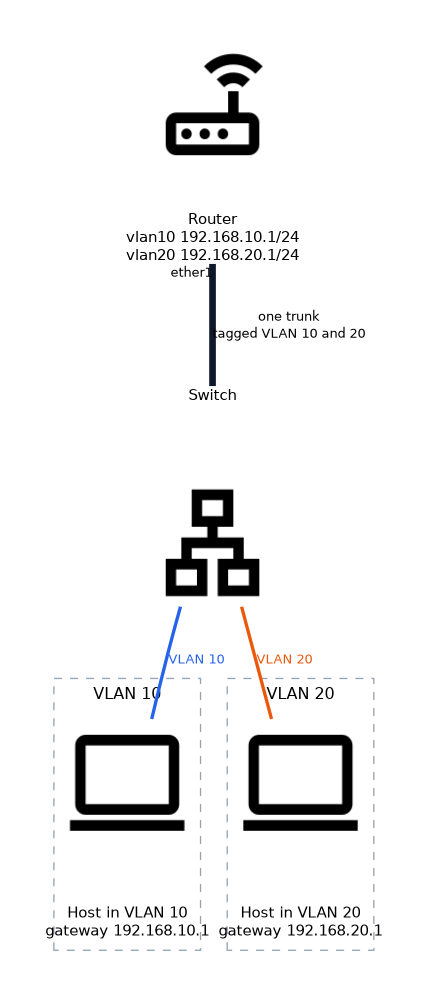 Hosts in different VLANs need a router, and one trunk link can carry all of them.
The router has one physical interface towards the switch. It creates a VLAN interface for every VLAN on that interface, and gives each one an IP address. Each address is the default gateway for the hosts in that VLAN.
/interface vlan add name=vlan10 interface=ether1 vlan-id=10
/interface vlan add name=vlan20 interface=ether1 vlan-id=20
/ip address add address=192.168.10.1/24 interface=vlan10
/ip address add address=192.168.20.1/24 interface=vlan20
The switch port facing the router must be a trunk that carries both VLANs tagged. Hosts use 192.168.10.1 and 192.168.20.1 as their gateways.
A packet from VLAN 10 to VLAN 20 travels up the trunk to the router and back down the same cable. The name comes from this shape: one link, with the router standing on the end.
Limits of the design
The single link is shared by traffic in both directions.
All inter-VLAN traffic crosses it twice, so it can become a bottleneck. For heavy inter-VLAN traffic, use a switch with Layer 3 capability, or give the router more than one link.
Checking your work
/interface vlan print
/ip address print
/ip route print
The router adds a connected route for each VLAN subnet when you add the address. If a host cannot reach its gateway, check the tag, the trunk and the PVID on the switch first.
What to remember for the exam
Seven facts cover most questions on this topic.
- A VLAN interface needs a parent
interfaceand avlan-id. - It strips the tag on receive and adds it on send.
- Bridging a VLAN interface with an access port makes that port a member of the VLAN.
- Each VLAN bridged this way needs its own bridge.
- Bridged VLAN interfaces run on the CPU, not in the switch chip.
- Router on a stick uses one trunk and one VLAN interface with an IP address per VLAN.
- Each VLAN interface address is the default gateway of its hosts.
If inter-VLAN traffic is slow, remember that it crosses the single trunk twice.
Common mistakes
These four mistakes appear often.
Forgetting the tagged trunk on the switch. The router VLAN interfaces see no frames if the switch sends them untagged.
Putting the parent interface in the bridge too. Then tagged and untagged traffic mix in the same bridge, and VLANs leak.
Using one bridge for several VLANs. That joins the VLANs into one broadcast domain.
Expecting full speed. CPU bridged VLANs and a single trunk limit the speed.
Check yourself
Work through these three questions.
What two settings does a VLAN interface need?
The parent
interfaceand thevlan-id.How do you make an access port part of VLAN 10 using VLAN interfaces?
Bridge the port together with the VLAN 10 interface, in a bridge used only for that VLAN.
What is router on a stick?
One trunk link carries all VLANs to a router that has a VLAN interface and gateway address for each VLAN.
Topic 2 of 6 in VLANs
Test yourself on VLANs
The full MikroTik MTCSWE question bank has 484 questions, with timed practice exams and an explanation for every answer.
This study guide is independent and is not affiliated with, endorsed by, or sponsored by MikroTik. Vendor names, certification names and exam codes are trademarks of their respective owners and are used for identification only.