CAPsMAN v2 · Topic 3 of 6
CAP Configuration and Security
Learn how to configure a CAP and secure the link between the CAP and the CAPsMAN manager using certificates, locking, and a protected management network.
- 5 min
- Includes a diagram
- A CAP needs only a few local settings, and the manager sends the rest.
certificate=requestmakes the CAP ask the manager for a certificate.- The manager
ca-certificateis the authority that signs CAP certificates.
What it is
CAP configuration is the small set of settings that turns an access point into a CAP and secures its link to the manager.
The CAP needs very little local setup. Most of the wireless settings come from the manager, so the main task is to make the link trusted.
Security here means two things: the control link between the CAP and the manager, and the security profile that protects the wireless clients.
How it works
The CAP identifies itself with a certificate, and the manager decides whether to trust it.
Basic CAP settings
/interface wifi cap set enabled=yes discovery-interfaces=ether1 certificate=request lock-to-caps-man=no
/interface wifi cap printenabledturns on the CAP function.discovery-interfacesandcaps-man-addressestell the CAP where to look for a manager.certificatedecides how the CAP gets a certificate, andrequestasks the manager to provide one.lock-to-caps-manlimits the CAP to the manager it first joined.
Once a CAP is enabled, its radios are normally controlled by the manager and take their wireless settings from it.
Why certificates
The control link carries the settings of the whole wireless network. If an attacker could pose as a manager or as a CAP, they could change the SSIDs, turn off security or read client data.
Certificates let each side prove who it is. They also allow the link to be encrypted.
The manager side
The manager has a certificate authority (CA) and a certificate of its own.
/interface wifi capsman set enabled=yes ca-certificate=auto certificate=auto require-peer-certificate=noca-certificateis the authority that signs CAP certificates, andautolets the manager create one.certificateis the certificate that the manager presents to CAPs.require-peer-certificatemakes the manager insist that every CAP shows a valid certificate.
With require-peer-certificate=no, a CAP can join without a certificate. This is easy for a first setup, but it is weaker. For a production network, turn it on once the CAPs have certificates.
A manager that accepts CAPs without a certificate will accept a rogue CAP too. Require certificates once the network is working.
How the CAP gets its certificate
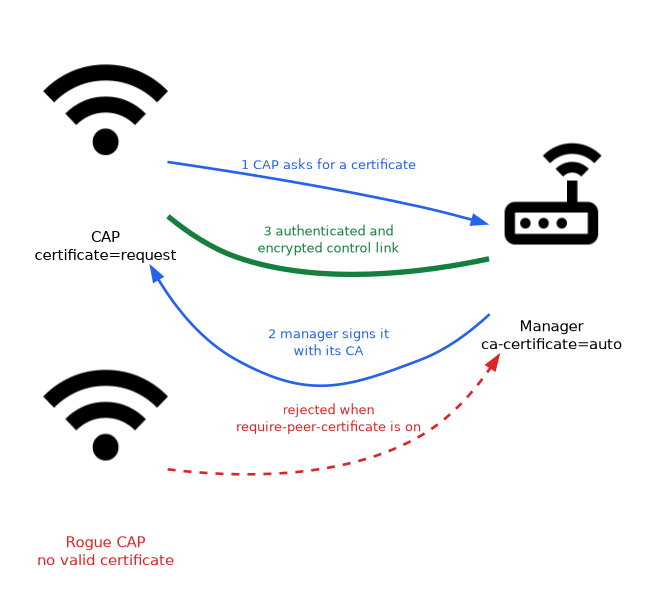 When the CAP is set to
 request, it asks the manager for a certificate during the join. The manager signs it with its CA. The CAP can then prove its identity on later connections.
You can also create and install certificates yourself. This is useful when you use your own certificate authority.
Checking the manager from the CAP
The CAP can verify the manager it joins. Settings such as the allowed manager names or the manager certificate names restrict which managers the CAP trusts.
Use them together with lock-to-caps-man. The CAP then joins only the manager that you expect.
Time
Certificates are valid for a period. If a CAP or a manager has the wrong clock, the certificate can look invalid and the link fails.
Use a time source such as NTP on the manager and the CAPs.
Upgrades
A manager can be set to check the RouterOS packages of its CAPs.
upgrade-policyon the manager decides whether it only suggests an upgrade or requires the same version.package-pathnames the place on the manager where the packages are stored.
Keeping manager and CAPs on matching versions avoids problems, because the two sides must understand each other.
Protecting the management network
The control link should run on a network that clients cannot reach.
- Put the CAPs and the manager on a management VLAN.
- Do not let the client SSIDs share that VLAN.
- Limit the manager
interfacesso it answers only on the management side. - Use a firewall to allow the CAP traffic only from known addresses.
Security of the clients
The security profile for the wireless clients is a different thing. It is part of the configuration that the manager sends, and the next pages cover it. The control link and the client security must both be set correctly.
When a CAP will not join, check certificates and time before you change anything else. Both are easy to get wrong.
What to remember for the exam
Seven facts cover this topic.
- A CAP needs only a few local settings, and the manager sends the rest.
certificate=requestmakes the CAP ask the manager for a certificate.- The manager
ca-certificateis the authority that signs CAP certificates. require-peer-certificatemakes the manager reject CAPs that lack a valid certificate.lock-to-caps-manlimits a CAP to the first manager it joins.- Correct time is needed, because certificates have validity dates.
- The control link belongs on a protected management network.
Common mistakes
These four errors are common.
Allowing CAPs without certificates for good. This leaves the network open to a rogue CAP.
Wrong clock. The certificates look invalid and the CAP will not join.
Putting the control link on a client network. Clients could then reach the manager.
Mixing up the two kinds of security. The control link and the client security profile are separate.
Check yourself
Work through these three questions.
What does
certificate=requestdo on a CAP?It makes the CAP ask the manager for a certificate during the join. The manager signs it with its certificate authority.
Why is a correct clock important for CAPsMAN security?
Certificates have validity dates. A wrong clock can make a certificate look invalid and stop the link.
What does
require-peer-certificatedo on the manager?It makes the manager reject CAPs that do not present a valid certificate. This blocks rogue CAPs.
Topic 3 of 6 in CAPsMAN v2
Test yourself on CAPsMAN v2
The full MikroTik MTCEWE question bank has 476 questions, with timed practice exams and an explanation for every answer.
This study guide is independent and is not affiliated with, endorsed by, or sponsored by MikroTik. Vendor names, certification names and exam codes are trademarks of their respective owners and are used for identification only.