CAPsMAN v2 · Topic 4 of 6
CAPsMAN Configuration Settings
Learn how CAPsMAN v2 groups wireless settings into channel, security, datapath and steering profiles that a configuration profile ties together.
- 5 min
- Includes a diagram
- CAPsMAN v2 splits settings into channel, security, datapath and steering profiles.
- The configuration profile adds the SSID and country, and refers to the other profiles.
- The v2 menus are under
/interface wifi, and the original CAPsMAN uses/caps-man.
What it is
CAPsMAN configuration settings are the profiles that describe how a managed radio should behave.
Instead of one long list of parameters, v2 splits the settings into small profiles by purpose. A configuration profile then ties them together and adds the SSID and the country.
Because the profiles are separate, you can reuse them. One security profile can serve many configurations, and one channel profile can serve many bands.
How it works
You build the small profiles first, and then you refer to them from a configuration.
The profiles
| Profile | What it holds | Menu |
|---|---|---|
| Channel | Band, frequency and channel width | /interface wifi channel |
| Security | Authentication types, passphrase, roaming options | /interface wifi security |
| Datapath | Bridge, VLAN and client isolation | /interface wifi datapath |
| Steering | Settings that help clients choose an access point | /interface wifi steering |
| Configuration | SSID, country, and links to the profiles above | /interface wifi configuration |
These menus belong to RouterOS v7 with the wifi driver. The original CAPsMAN used different menus under /caps-man.
Channel
The channel profile sets the band, the frequency and the width.
/interface wifi channel add name=ch5 band=5ghz-ax frequency=5180 width=20mhzIf you leave the frequency out, the radio chooses one itself. The width controls how much spectrum the radio uses, and a narrower width usually gives a cleaner channel in a crowded place.
Security
The security profile sets how clients authenticate and how the data is encrypted.
/interface wifi security add name=sec1 authentication-types=wpa2-psk,wpa3-psk passphrase=StrongPassphrase1It can also hold the settings for fast roaming between access points. The security chapter explains the methods.
Datapath
The datapath profile controls how client traffic is handled.
/interface wifi datapath add name=dp1 bridge=bridge1 vlan-id=10 client-isolation=yesbridgeis the bridge that the interface joins.vlan-idplaces the clients of that SSID in a VLAN.client-isolationstops clients of one access point from talking to each other.
A guest SSID usually has its own datapath with a guest VLAN and client isolation.
Use one datapath per purpose, such as staff and guests, so that a VLAN change affects only the group that needs it.
Steering
The steering profile holds the options that help clients to roam and to pick a better band or access point. They depend on the client supporting the matching standards. The RF chapter describes 802.11k and 802.11v.
The configuration profile
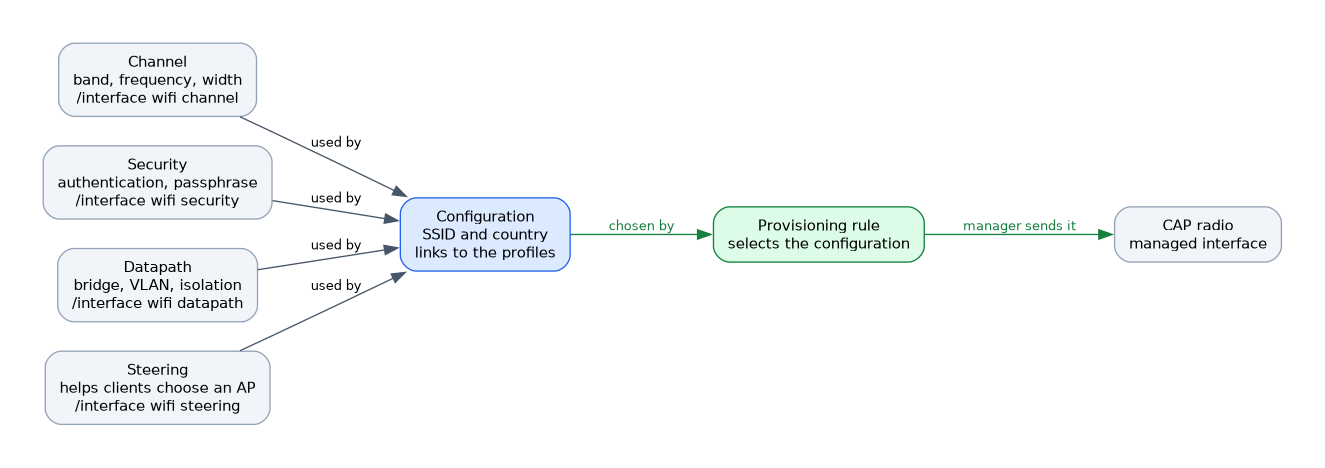 The configuration profile ties everything together.
/interface wifi configuration add name=cfg-office ssid=Office country=Germany channel=ch5 security=sec1 datapath=dp1ssidis the network name.countrysets the regulatory rules, which the regulatory chapter covers.channel,securityanddatapathrefer to the profiles by name.
You can also write the settings inside the configuration instead of referring to a named profile. Named profiles are better when several configurations need the same settings.
Applying a configuration
A configuration does nothing by itself. A provisioning rule selects it for a radio, and then the manager sends it. The next page covers the rules.
When you change a profile, the manager updates the radios that use it. Plan a change carefully, because clients can disconnect while the radios apply the new settings.
Master and slave configurations
A radio has one master configuration for its main interface. It can also have slave configurations that create extra SSIDs on the same radio, for example for guests.
Each extra SSID uses airtime for its own management traffic, so do not create more than you need.
Consistency across bands
Use the same SSID and security on 2.4 GHz and 5 GHz if clients should move freely between them. Use different channel profiles for each band, because the frequencies and widths are different.
Change one profile at a time and check the result. A mistake in a shared profile reaches every radio that uses it.
What to remember for the exam
Seven facts cover this topic.
- CAPsMAN v2 splits settings into channel, security, datapath and steering profiles.
- The configuration profile adds the SSID and country, and refers to the other profiles.
- The v2 menus are under
/interface wifi, and the original CAPsMAN uses/caps-man. - The datapath sets the bridge, the VLAN and client isolation.
- A configuration is applied only when a provisioning rule selects it.
- A master configuration gives the main SSID, and slave configurations add extra SSIDs.
- Changing a shared profile affects every radio that uses it.
Common mistakes
These four errors are common.
Creating a configuration and no rule. Nothing is sent to the CAPs until a rule selects it.
Using one channel profile for both bands. The frequencies differ between 2.4 GHz and 5 GHz.
Forgetting the datapath bridge. Clients then have no path to the network.
Editing a shared profile casually. The change reaches every radio that uses it.
Check yourself
Work through these three questions.
What does the configuration profile do in CAPsMAN v2?
It adds the SSID and the country and refers to the channel, security and datapath profiles. A provisioning rule then selects it for a radio.
Which profile sets the VLAN and client isolation?
The datapath profile. It also names the bridge that the interface joins.
What is the difference between a master and a slave configuration?
The master configuration gives the main interface of the radio. Slave configurations add extra SSIDs on the same radio.
Topic 4 of 6 in CAPsMAN v2
Test yourself on CAPsMAN v2
The full MikroTik MTCEWE question bank has 476 questions, with timed practice exams and an explanation for every answer.
This study guide is independent and is not affiliated with, endorsed by, or sponsored by MikroTik. Vendor names, certification names and exam codes are trademarks of their respective owners and are used for identification only.