CAPsMAN v2 · Topic 2 of 6
CAP Communication and Discovery
Learn how a CAP finds its CAPsMAN manager using layer 2 discovery or configured IP addresses, and how to check and troubleshoot the connection.
- 6 min
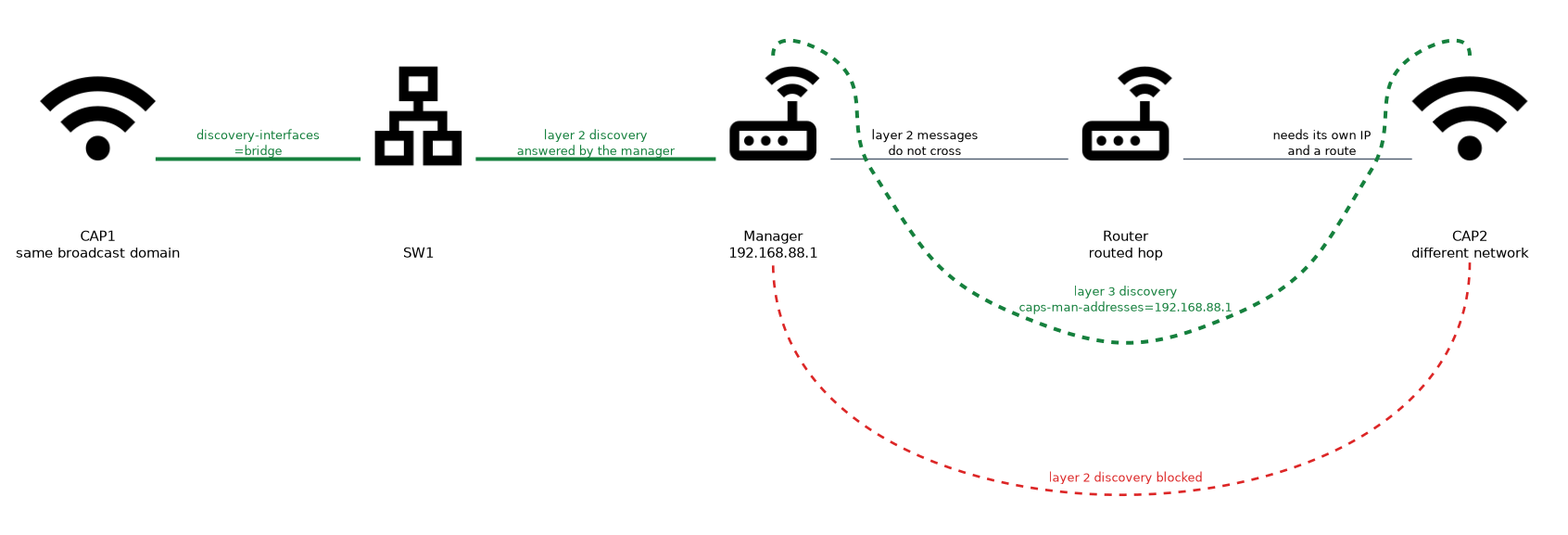
- Includes a diagram
- A CAP finds the manager using layer 2 discovery, configured IP addresses, or both.
discovery-interfacessets the interfaces that the CAP uses for layer 2 discovery.caps-man-addresseslists manager IP addresses for layer 3 discovery.
What it is
Discovery is how a CAP finds the manager that will control it.
A CAP starts with no wireless settings. It must reach a manager over the network before it can serve any client.
There are two ways to find a manager. The CAP can search its local network at layer 2, or it can contact a manager at an IP address that you give it.
How it works
The CAP uses the settings in its cap menu to look for a manager, and the manager must be reachable and listening.
Layer 2 discovery
With layer 2 discovery, the CAP sends discovery messages on the interfaces you list. A manager on the same layer 2 network hears the messages and answers.
This needs no IP address for the manager. It works only when the CAP and the manager are in the same broadcast domain, so a router in between blocks it.
/interface wifi cap set enabled=yes discovery-interfaces=bridgediscovery-interfaceslists the interfaces on which the CAP sends the discovery messages.- The interface must be up, and traffic must reach the manager on that VLAN or network.
Layer 3 discovery
When the manager is on a different network, give the CAP its IP address.
/interface wifi cap set enabled=yes caps-man-addresses=192.168.88.1caps-man-addressesis a list of manager IP addresses that the CAP contacts directly.- The CAP needs an IP address of its own and a route to the manager.
You can use both methods at the same time. The CAP tries the configured addresses and also the discovery interfaces.
Use IP addresses when the CAPs are in different subnets or when the layer 2 network is large and noisy.
DHCP option 138 (described for the RouterOS v6 CAP)
The DHCP server can hand the manager address to the CAP, so you do not enter caps-man-addresses on every CAP. The server sends it in DHCP option 138, and the value is the manager IPv4 address written as four bytes in hex.
/ip dhcp-server option add name=capsman code=138 value=0xC0A85801
/ip dhcp-server network set [find address=192.168.88.0/24] dhcp-option=capsman
The value 0xC0A85801 is 192.168.88.1, because C0 is 192, A8 is 168, 58 is 88 and 01 is 1.
- The CAP must get its address from DHCP on that network.
- It still needs a route to the manager.
- It is useful when many CAPs sit in a routed network where layer 2 discovery does not reach.
Choosing between them
| Method | Good for | Needs |
|---|---|---|
| Layer 2 discovery | Small flat networks and quick setup | The same broadcast domain |
| Manager IP address | Routed networks and larger sites | An IP address and a route |
Limiting which manager a CAP joins
In a network with more than one manager, a CAP could join the wrong one. Two settings help.
caps-man-nameslists the manager names that the CAP may join.lock-to-caps-manmakes the CAP remember the first manager that it joins and then accept only that manager.
Lock the CAP once the network is stable, so that a rogue device that pretends to be a manager cannot take control.
The manager side
The manager must be enabled and must listen on the right interfaces.
/interface wifi capsman set enabled=yes interfaces=bridge
/interface wifi capsman remote-cap printinterfaceslimits the manager to the interfaces on which it answers CAPs.remote-cap printshows each CAP that is connected or trying to connect.
Limiting the interfaces keeps the manager from answering on a public port. This is a simple and useful safety step.
Network requirements
For the join to work:
- the path between the CAP and the manager must be open
- a firewall on the manager must allow the CAPsMAN traffic from the CAP network
- the clocks should be correct, because certificates have dates
- the addresses and routes must be correct for layer 3 discovery
If the manager has a firewall, add a rule that allows the CAP traffic before the drop rules. A missing rule is a common reason for a CAP that never joins.
Troubleshooting a CAP that does not join
Check in this order:
- Is the CAP interface enabled, and is the cap function turned on?
- Are the discovery interfaces correct and up?
- Can the CAP ping the manager, if you use IP addresses?
- Is the manager enabled, and is it listening on the right interface?
- Does a firewall block the traffic?
- Do the certificates and the clock allow the secure link?
/interface wifi cap print
/log print
cap printshows the settings, and the state of the CAP.- The log can show the discovery and join messages. Look there on both the CAP and the manager.
After the join
When the CAP has joined, it keeps a control connection with the manager. The manager uses it to send configuration and to learn about the CAP radios and clients. A break in the link makes the CAP look for a manager again.
Rebooting a manager can briefly interrupt the control of every CAP. Plan changes outside busy hours.
What to remember for the exam
Seven facts cover this topic.
- A CAP finds the manager using layer 2 discovery, configured IP addresses, or both.
discovery-interfacessets the interfaces that the CAP uses for layer 2 discovery.caps-man-addresseslists manager IP addresses for layer 3 discovery.- Layer 2 discovery works only inside one broadcast domain.
lock-to-caps-manmakes the CAP accept only the manager it first joined.- The manager
interfacessetting limits where it answers CAPs. - A firewall that blocks the CAPsMAN traffic is a common reason that a CAP does not join.
Common mistakes
These four errors are common.
Expecting layer 2 discovery across a router. The messages do not cross a routed hop.
Forgetting the firewall. The manager drops the traffic before the CAP can join.
Wrong discovery interface. The CAP then sends its messages where no manager listens.
Leaving the CAP unlocked. A rogue manager could take control.
Check yourself
Work through these three questions.
When would you use
caps-man-addressesinstead of layer 2 discovery?When the manager is on a different network, so the discovery messages cannot reach it. The CAP then contacts the listed IP addresses.
What does
lock-to-caps-mando?It makes the CAP accept only the manager it first joined. This stops a rogue manager from taking control.
Why limit the manager
interfacessetting?It stops the manager from answering CAPs on public or unwanted ports. This is a simple safety step.
Topic 2 of 6 in CAPsMAN v2
Test yourself on CAPsMAN v2
The full MikroTik MTCEWE question bank has 476 questions, with timed practice exams and an explanation for every answer.
This study guide is independent and is not affiliated with, endorsed by, or sponsored by MikroTik. Vendor names, certification names and exam codes are trademarks of their respective owners and are used for identification only.