CAPsMAN v2 · Topic 1 of 6
CAPsMAN v2 Overview
Learn what CAPsMAN v2 is, how the manager and CAPs work together, how it differs from the older CAPsMAN, and the roles of configuration and provisioning.
- 5 min
- Includes a diagram
- CAPsMAN lets one manager control the wireless settings of many CAPs.
- In the MTCEWE outline, CAPsMAN v2 means the
/caps-manmenu with the wireless package. The newer RouterOS v7 version uses the wifi driver and the/interface wifimenus. - The two generations are not compatible with each other.
What it is
CAPsMAN is a feature that lets one RouterOS device manage the wireless settings of many access points from a single place.
The managing device is the CAPsMAN manager. Each managed access point is a CAP, which stands for controlled access point.
The manager holds the configuration and sends it to the CAPs. This replaces setting up every access point by hand, and it keeps SSIDs, security and channels consistent.
How it works
The CAP finds the manager, receives its settings, and the manager creates the wireless interfaces.
Two generations
There are two separate versions of CAPsMAN.
| Item | /caps-man CAPsMAN | CAPsMAN with the wifi driver |
|---|---|---|
| Wireless driver | The wireless package | The wifi driver |
| Menu | /caps-man on the manager, /interface wireless cap on the CAP | /interface wifi capsman and /interface wifi cap |
| RouterOS | Available in v6, and in v7 with the wireless package | RouterOS v7 only |
| Name | Called CAPsMAN v2 in the MTCEWE outline | The newer implementation that came with RouterOS v7 |
The two versions are not compatible. A CAP that runs the wifi driver cannot join a /caps-man manager, and the reverse is also true. In a mixed network you need a manager for each generation.
The MTCEWE outline dates from RouterOS v6, where "CAPsMAN v2" means the /caps-man menu. In the exam, check which menu a command uses. /caps-man is the version the outline means, and /interface wifi is the newer wifi driver version.
The parts of the system
CAPsMAN has four main parts.
- The manager, which holds the settings and the rules.
- The CAPs, which connect to the manager and run the radios.
- The configuration profiles, which describe the SSID, channel, security and datapath.
- The provisioning rules, which decide which configuration each CAP radio receives.
The next pages cover them in turn.
The life of a CAP
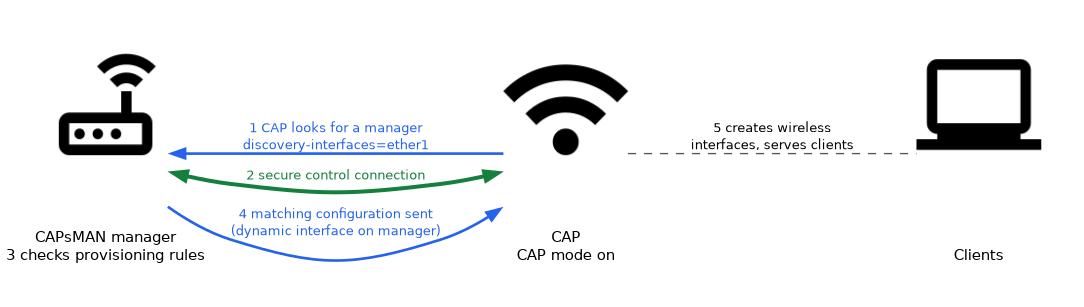 A CAP goes through these steps.
- The CAP is switched on in CAP mode and looks for a manager.
- The CAP and the manager set up a secure control connection.
- The manager checks its provisioning rules against the radios of the CAP.
- The manager sends the matching configuration.
- The CAP creates the wireless interfaces and serves clients.
If the control link is lost, the CAP looks for a manager again.
Enabling the manager and a CAP
/interface wifi capsman set enabled=yes
/interface wifi cap set enabled=yes discovery-interfaces=ether1- The first command turns on the manager function on the central router.
- The second command puts an access point into CAP mode, and
discovery-interfaceslists the interfaces it uses to look for a manager. /interface wifi capsman remote-cap printon the manager lists the CAPs that have joined.
The same steps with the /caps-man menu (the version in the MTCEWE outline) look like this:
/caps-man manager set enabled=yes
/interface wireless cap set enabled=yes interfaces=wlan1 discovery-interfaces=ether1
/caps-man remote-cap print
The /caps-man menu holds the same parts as the wifi version: configuration, channel, datapath, security, rates, provisioning and access-list. For example, a configuration is created with /caps-man configuration add name=cfg1 ssid=office, and a rule hands it to new radios with /caps-man provisioning add action=create-dynamic-enabled master-configuration=cfg1.
A manager can also control its own local radios.
Benefits
CAPsMAN gives a number of advantages:
- one place to change the SSID, security and channels
- the same settings on every access point
- easier roaming, because the SSID and security match
- less work when you add a new access point
For small sites with one or two access points, the manager may add more complexity than it saves.
What the CAP radio becomes
When the manager provisions a radio, a dynamic interface appears on the manager for that radio. You can see it in the wireless interface list, and you can use it in other settings, for example to put it in a bridge.
Dynamic interfaces are created from the rules and the configuration. You change them by changing the configuration, not by editing the interface.
Where CAPsMAN fits
CAPsMAN is useful when:
- there are several access points that should share settings
- the access points are spread over a building or a campus
- you want roaming between access points
- you want to change a setting once and apply it everywhere
Always think of CAPsMAN in two steps. The CAP finds and joins the manager, and then the manager provisions the radios.
What to remember for the exam
Seven facts cover this topic.
- CAPsMAN lets one manager control the wireless settings of many CAPs.
- In the MTCEWE outline, CAPsMAN v2 means the
/caps-manmenu with the wireless package. The newer RouterOS v7 version uses the wifi driver and the/interface wifimenus. - The two generations are not compatible with each other.
- The manager holds the configuration profiles and the provisioning rules.
- A CAP finds the manager, joins it, and receives the settings for its radios.
- Provisioned radios appear as dynamic interfaces on the manager.
/interface wifi capsman remote-cap printlists the CAPs that have joined the manager.
Common mistakes
These four errors are common.
Mixing the two generations. A wifi driver CAP cannot join a /caps-man manager.
Editing a dynamic interface. Change the configuration or the rule instead.
Forgetting to enable the manager. The manager function is off until it is turned on.
Using CAPsMAN for one access point. The setup is more work than the benefit.
Check yourself
Work through these three questions.
What are the two roles in CAPsMAN?
The manager holds the settings and the rules. The CAPs connect to it and run the radios with the settings it sends.
Can a CAP that uses the wifi driver join a
/caps-manmanager?No. The two generations are not compatible, so each needs a manager of its own generation.
Which command lists the CAPs that have joined a manager?
On a
/caps-manmanager it is/caps-man remote-cap print. On a wifi driver manager it is/interface wifi capsman remote-cap print.
Topic 1 of 6 in CAPsMAN v2
Test yourself on CAPsMAN v2
The full MikroTik MTCEWE question bank has 476 questions, with timed practice exams and an explanation for every answer.
This study guide is independent and is not affiliated with, endorsed by, or sponsored by MikroTik. Vendor names, certification names and exam codes are trademarks of their respective owners and are used for identification only.