Manage and secure Power BI · Topic 2 of 3
Subscriptions, Alerts, Endorsement, Gateways and Refresh
PL-300 keeping content fresh and trusted: email subscriptions, data alerts, promotion and certification, when a gateway is required and scheduled refresh limits.
- 6 min
- Includes a diagram
- Pro allows 8 scheduled refreshes a day. PPU and Premium allow 48.
- The schedule is disabled after four consecutive failures, and pauses after two months of no use.
- A gateway is required for on premises sources. Standard mode supports DirectQuery and clusters. Personal mode is Import only.
What it is
Once content is published, you need readers to notice it, trust it and see current data. Subscriptions send a snapshot by email. Data alerts warn when a number crosses a limit. Endorsement marks content as promoted or certified. A gateway lets the service reach data that is not on the internet, and scheduled refresh keeps an Import model up to date.
How it works
Email subscriptions
A subscription emails you a snapshot and a link to a report or dashboard on a schedule. Select Subscribe on the report.
| Setting | Detail |
|---|---|
| Frequency | Hourly, daily, weekly, monthly, or after data refresh (once a day) |
| Limits | Up to 24 subscriptions per report or dashboard, each with its own recipients, time and frequency |
| Content | A preview of a report page and a link. For reports in a Premium or PPU workspace you can attach the full report as PDF or PowerPoint, up to 20 pages and 25 MB |
| Your license | Pro or Premium per user, or access to a workspace on a paid Premium capacity |
| Subscribing others | Needs Pro or PPU and the Contributor, Member or Admin role in the workspace |
The tenant admin must enable subscriptions. With row level security, the preview image shows data as the subscription owner sees it, so take care. Microsoft 365 groups cannot be used as recipients, but distribution lists and mail enabled security groups can. Paginated reports can be subscribed too, with attachments such as PDF, Excel or Word.
Data alerts
A data alert sends a notification when a value goes above or below a threshold.
- You set alerts on dashboards, on tiles pinned from a report that are a card, gauge or KPI. They are not available in Power BI Desktop.
- The value must be numeric, and alerts fire only when the data refreshes.
- You choose a condition (above or below), a threshold and how often to notify, at most once an hour or once a day, plus an optional email.
- Alerts appear in the notification center, and you can connect them to Power Automate.
- Only you see alerts you set, and each user can have up to 250 alerts.
Promote or certify content
Endorsement helps people find reliable content. It applies to semantic models, dataflows, reports and apps.
| Promotion | Certification | |
|---|---|---|
| Meaning | The owner thinks it is valuable | It meets the organization's quality standards |
| Who can do it | Any owner or member with write permission on the workspace | Only authorized reviewers that the Fabric admin has defined |
| Where | The item's Settings, in the Endorsement section | The same, if you are an authorized reviewer. Others can request certification |
Endorsed items rank higher in search, and endorsed semantic models can be made discoverable, so users without access can find and request it. A good description helps.
When a gateway is required
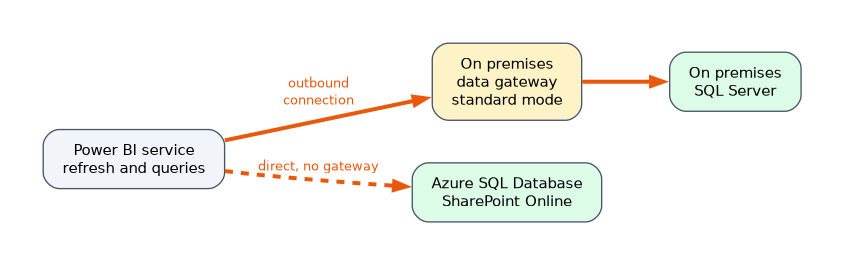 An on-premises data gateway is software installed on a Windows machine in your network that lets the Power BI service reach on premises data using outbound connections. You need one when the service must query or refresh data that it cannot reach over the internet.
| Scenario | Gateway? |
|---|---|
| Scheduled refresh of an Import model from on premises SQL Server | Yes |
| DirectQuery or a live connection to an on premises source | Yes, standard mode |
| Cloud sources such as Azure SQL Database or SharePoint Online | No |
| Data in a file stored in OneDrive or SharePoint Online | No |
| Data sources in a virtual network | A VNet data gateway |
There are three types.
- Standard mode is centrally managed and used by many people. It is the choice for DirectQuery, live connections and high availability clusters.
- Personal mode is for one user and only for Import refresh.
- VNet data gateway is a managed service for sources secured in an Azure virtual network.
To add redundancy, add a second gateway to the same cluster. Direct Lake models do not use gateways, as they support cloud connections only.
Scheduled refresh
Import models need a refresh to stay current. In the semantic model Settings, set Refresh, then configure the time slots and the gateway connection and credentials.
| Limit | Value |
|---|---|
| Daily refreshes with Pro | Up to 8 |
| Daily refreshes with PPU or a Premium or Fabric capacity | Up to 48 |
| Start time | Aims to start within 15 minutes of the scheduled time |
| Inactivity | Refresh pauses after two months with no one opening a report on the model |
| Failures | The schedule is disabled after four consecutive failures or an unrecoverable error such as expired credentials |
To fix a disabled schedule, correct the cause, such as updating credentials, then switch Configure a refresh schedule back on. Refresh history lists status and errors. DirectQuery and live connections do not rely on scheduled refresh for the data itself. You can also run Refresh now manually.
A worked scenario
A finance team has an Import model on an on premises SQL Server. The analyst asks IT to install a standard gateway and sets scheduled refresh to run daily at 6 a.m. on a Pro workspace. Three weeks later refreshes stop because a service account password expired, and the schedule is disabled after four failures. She updates the credentials and turns the schedule back on. The report owner also adds an alert on a card for cash balance, and the head of finance subscribes to the report every Monday.
What to remember for the exam
- Pro allows 8 scheduled refreshes a day. PPU and Premium allow 48.
- The schedule is disabled after four consecutive failures, and pauses after two months of no use.
- A gateway is required for on premises sources. Standard mode supports DirectQuery and clusters. Personal mode is Import only.
- Alerts are set on card, gauge and KPI tiles of dashboards, and need refreshed numeric data.
- Anyone with write permission can promote. Only authorized reviewers can certify.
A scenario with an on premises source and a refresh that must have high availability points to a gateway cluster.
How the exam asks about this
- "The refresh has stopped, and the data source password changed." Update credentials and re-enable the schedule.
- "Notify when daily sales drop below a number." A data alert on a dashboard tile.
- "Mark a dataset as meeting company standards." Certification.
- "Refresh an Import model from an on premises database." An on premises data gateway.
Common mistakes
Setting alerts in Desktop. They exist only in the service.
Expecting a gateway for cloud sources.
Using a personal gateway for DirectQuery.
Subscribing others without a paid license.
Check yourself
How many scheduled refreshes does a Pro license allow per day?
Eight.
Who can certify a semantic model?
Authorized reviewers defined by the Fabric admin.
Which gateway mode supports DirectQuery?
Standard mode.
Topic 2 of 3 in Manage and secure Power BI
Test yourself on Manage and secure Power BI
The full Microsoft PL-300 question bank has 657 questions, with timed practice exams and an explanation for every answer.
This study guide is independent and is not affiliated with, endorsed by, or sponsored by Microsoft. Vendor names, certification names and exam codes are trademarks of their respective owners and are used for identification only.