Manage and secure Power BI · Topic 1 of 3
Workspaces, Apps and Dashboards
PL-300 workspaces and distribution: create and configure workspaces, publish content, build apps with audiences, create dashboards and choose how to share.
- 5 min
- Includes a diagram
- A workspace needs a name, a license mode and role assignments.
- Publishing the same name again replaces the existing items.
- An app has setup, content and audience steps. Multiple audiences control who sees which items.
What it is
A workspace is a shared place in the Power BI service where a team keeps reports, semantic models, dashboards and paginated reports. You publish content into it, and then distribute it to consumers, most often through an app. A dashboard is a single page of tiles pinned from reports. The exam asks you to choose the right container and the right way to reach readers.
How it works
Creating and configuring a workspace
In the service, select Workspaces and New workspace. You set:
- A name and description, and optionally an image.
- The license mode: Pro, Premium per user, a Premium or Fabric capacity, or Embedded. The mode decides which features are available, such as Copilot or larger models.
- Contact list, so users know whom to ask.
- Access: add users or groups and give each one a role (Admin, Member, Contributor or Viewer).
Each person also has My workspace, a personal area that is not for sharing content with others.
Publishing, importing and updating items
| Task | How |
|---|---|
| Publish a report | In Power BI Desktop, Home then Publish, and choose the workspace. This sends the report and its semantic model |
| Import a file | In the workspace, Upload a .pbix, or Get data for files such as Excel |
| Update a published report | Publish again to the same workspace and the same name. Power BI offers to replace the existing items |
| Edit in the service | Edit the report in the browser, which saves the changes in the workspace |
Publishing with the same name replaces the semantic model and report, so check that the new file is the one you intend. Items in a workspace should be tested in a dev or test workspace before production, and deployment pipelines automate moving content between stages.
Apps
An app packages selected workspace content for consumers. Users see a curated, read only set of reports and dashboards, with its own navigation.
- In the workspace, select Create app (or Update app for later changes).
- Setup: name, description, logo, theme and contacts.
- Content: pick the reports, dashboards and other items to include and arrange the navigation.
- Audience: choose who gets access. You can create multiple audiences and decide per audience which items they see, which allows one app to serve several groups.
- Publish. The app then appears for the people you chose.
The workspace is where authors work, and changes there are not visible to app users until you update the app. Consumers need a Pro or PPU license, unless the content is on Premium capacity. In an app, you can allow users to build content with the data, and to share the semantic models.
Dashboards
A dashboard is a single canvas in the service only, made of tiles. Tiles are pinned from report visuals or whole report pages, from Q&A, from Excel and from other dashboards.
| Feature | Detail |
|---|---|
| One page | A dashboard has no pages and no filter pane |
| Many sources | One dashboard can combine tiles from several reports and semantic models |
| Link | Selecting a tile opens the report it came from |
| Alerts | Can be set on card, gauge and KPI tiles |
| Not for Desktop | Dashboards are created in the service, not in Power BI Desktop |
Use a dashboard to give an at a glance view across reports, and a report for exploration.
Choosing a distribution method
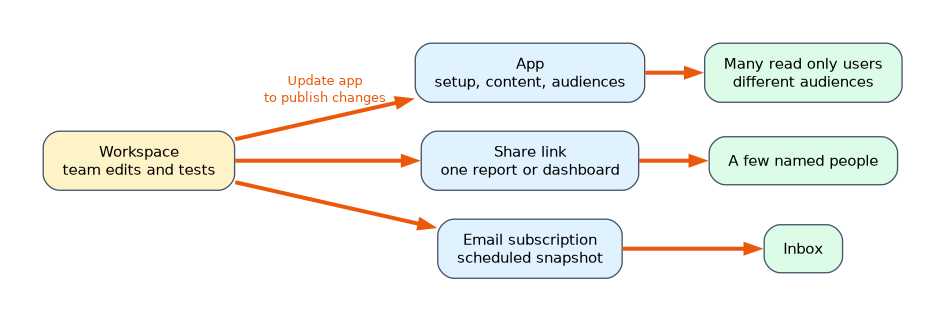
| Method | Best for |
|---|---|
| Workspace access | Colleagues who collaborate on and edit content |
| App | A large audience of consumers, with several audiences and a curated set |
| Share (a link) | A few specific people, for one report or dashboard |
| Email subscription | A regular snapshot of a report sent to the inbox |
| Embed (secure embed, Teams, SharePoint Online) | Showing a report inside another application, with sign in |
| Publish to web | Public data only. Anyone with the link can see it |
| Export or print | PDF, PowerPoint or Excel for offline use |
A share link can be given to people in your organization, to specific people or to people who already have access, and you can allow recipients to share it and to build content with the data. Reports shared by a link still need access to the underlying semantic model, and respect row level security.
A worked scenario
An analyst finishes a sales report in Desktop and publishes it to a Sales Analytics workspace on a Premium capacity, where the team tests it. Executives need only the final report, and regional managers need the same report plus a regional dashboard. She creates an app with two audiences: one with the report only, another with the report and the dashboard. When she improves a visual in the workspace, she selects Update app so readers see it.
What to remember for the exam
- A workspace needs a name, a license mode and role assignments.
- Publishing the same name again replaces the existing items.
- An app has setup, content and audience steps. Multiple audiences control who sees which items.
- Changes in the workspace do not reach app users until you update the app.
- Dashboards exist only in the service and are made of pinned tiles from many reports.
Publish to web makes content public. Never use it for confidential data.
How the exam asks about this
- "Distribute reports to hundreds of read only users with different content for each group." An app with audiences.
- "Give an at a glance page combining visuals from several reports." A dashboard.
- "Send one report to two named people." Share a link.
- "A workspace edit is not showing for readers." Update the app.
Common mistakes
Sharing the workspace when an app would do. Workspace roles also give edit rights.
Forgetting to update the app.
Using publish to web for internal data.
Expecting dashboards in Desktop.
Check yourself
How do you give two groups different content from the same app?
Create multiple audiences.
Where can you create a dashboard?
In the Power BI service only.
What happens when you publish a report with the same name to a workspace?
It can replace the existing report and semantic model.
Topic 1 of 3 in Manage and secure Power BI
Test yourself on Manage and secure Power BI
The full Microsoft PL-300 question bank has 657 questions, with timed practice exams and an explanation for every answer.
This study guide is independent and is not affiliated with, endorsed by, or sponsored by Microsoft. Vendor names, certification names and exam codes are trademarks of their respective owners and are used for identification only.