Manage and secure Power BI · Topic 3 of 3
Roles, Access, Row Level Security and Labels
PL-300 securing Power BI: assign workspace roles, grant item and semantic model access, implement row level security roles and apply sensitivity labels.
- 6 min
- Includes a diagram
- Admin, Member, Contributor and Viewer. Viewer is read only, and RLS applies to Viewers only.
- Build permission lets someone create reports on a semantic model. Contributors have it automatically.
- Dynamic RLS uses USERPRINCIPALNAME and a mapping table. Members are added in the service.
What it is
Power BI security works in layers. Workspace roles control what people can do in a workspace. Item level access and semantic model permissions control a single report or model. Row level security (RLS) controls which rows of data a person sees. Sensitivity labels protect the content and travel with it when it is exported. The exam asks which layer gives exactly the access a scenario needs.
How it works
Workspace roles
| Role | Can |
|---|---|
| Admin | Everything, including update or delete the workspace and manage all users |
| Member | Add users with lower roles, publish and update apps, share items, edit content |
| Contributor | Create, edit and delete content, and schedule refresh. Cannot publish an app, unless the admin allows updating |
| Viewer | View and interact with content only |
Users and groups get roles, and someone in several groups gets the highest role. Members can add users with equal or lower roles, but cannot remove users from roles. If the workspace is not in a Premium capacity, everyone in it needs a Pro or PPU license, but in a Premium capacity, Viewers can read content without Pro.
Item level access
You can share a single report, dashboard or semantic model without adding people to the workspace. In Share, you choose the people and options such as allow recipients to share and allow recipients to build content with the data. The result is item permissions, visible in Manage permissions on the item.
Grant access at the item level when:
- Consumers need one report, not the whole workspace.
- You must avoid giving edit rights, because workspace roles above Viewer let people edit.
Access to semantic models
Semantic model permissions are separate from report access.
| Permission | Allows |
|---|---|
| Read | Query the model through reports shared with you |
| Build | Build new reports, use Analyze in Excel, and use the model as a source |
| Reshare | Share the model with others |
| Write | Edit the model |
Contributors and above get Build automatically through their workspace role. To let a Viewer build their own report on a shared model, grant Build on the model. This is how many reports can share one certified semantic model while keeping the model in one place.
Row level security
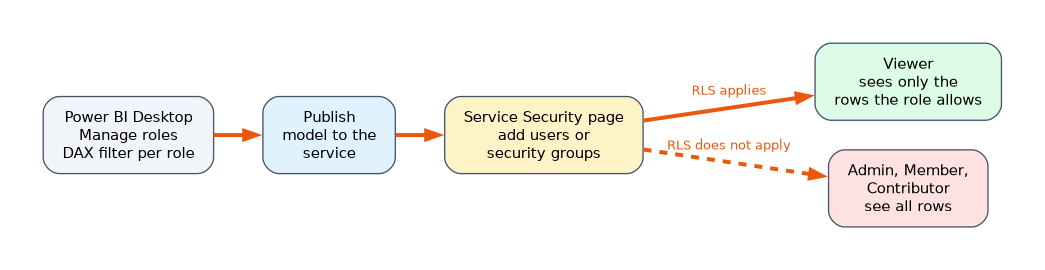 RLS filters the rows a user can see in a semantic model, using roles defined by DAX expressions. The flow is:
- In Power BI Desktop, choose Manage roles on the Modeling tab.
- Create a role, pick a table and write a DAX filter that returns true or false for each row.
- Publish the model.
- In the service, open the model's Security page and add members (users or security groups) to each role.
- Use Test as role (also known as View as) to confirm.
-- static role
[Region] = "West"

-- dynamic role: a user mapping table holds the email of each person
[UserEmail] = USERPRINCIPALNAME ()| Type | Behaviour |
|---|---|
| Static | A fixed value in each role, so you need one role per group |
| Dynamic | One role that uses USERPRINCIPALNAME or USERNAME and a mapping table, so each user sees their own rows |
Important rules:
- RLS restricts only Viewers. It does not apply to Admin, Member or Contributor, because they can edit the model.
- Members cannot be assigned in Desktop, only in the service.
- A user in several roles sees the union of the rows.
- Microsoft 365 groups cannot be role members. Use security, distribution or mail enabled groups, or individuals.
- RLS applies to Import and DirectQuery models. For a live connection to Analysis Services, define RLS in that model.
- In the service, USERNAME and USERPRINCIPALNAME both return the user's UPN. In Desktop, USERNAME returns DOMAIN\user.
- RLS filters rows, not columns. Hiding columns or tables needs object level security.
- By default RLS filters in one direction. Enable Apply security filter in both directions on a relationship if dynamic security needs it.
Sensitivity labels
Sensitivity labels come from Microsoft Purview Information Protection. A label such as Confidential marks how sensitive the content is and can enforce protection settings.
- Apply a label to a semantic model, report, dashboard or dataflow in the service, and to a .pbix in Power BI Desktop.
- When data is exported to Excel, PowerPoint or PDF, the label goes with it, and its protection applies to the file.
- Labels can be inherited: a report can inherit the label of its semantic model, and content can inherit from its data source.
- An administrator can make labeling mandatory, so users must choose a label before saving or publishing.
- A label does not replace workspace roles or RLS. It protects the content after it leaves Power BI.
The tenant admin must enable labels for Power BI, and users need permission to apply them.
A worked scenario
A company has one Sales semantic model, and regional managers must only see their own region. The analyst adds a Managers table with each person's email and region, relates it to Region, and creates one role with [ManagerEmail] = USERPRINCIPALNAME (). After publishing, she adds the managers' security group to the role in the service and tests with Test as role. The managers are workspace Viewers. The analysts, who are Contributors, see all rows, because RLS does not apply to them. The model carries a Confidential sensitivity label, which flows to Excel exports.
What to remember for the exam
- Admin, Member, Contributor and Viewer. Viewer is read only, and RLS applies to Viewers only.
- Build permission lets someone create reports on a semantic model. Contributors have it automatically.
- Dynamic RLS uses USERPRINCIPALNAME and a mapping table. Members are added in the service.
- A user in several RLS roles sees the union of the rows. Microsoft 365 groups cannot be role members.
- Sensitivity labels come from Purview, travel with exports and can be inherited.
Giving a person the Contributor role to let them see data removes row level security for them.
How the exam asks about this
- "Managers must see only their own region, using one role." Dynamic RLS with USERPRINCIPALNAME.
- "A user needs to create reports on a model but not edit it." Build permission.
- "RLS does not seem to work for a workspace member." They have Member, Contributor or Admin, which bypasses RLS.
- "Exports to Excel must remain protected." A sensitivity label.
Common mistakes
Testing RLS as a workspace admin. It will not filter, so use Test as role.
Using static roles for hundreds of users.
Adding people to the workspace when item sharing would do.
Thinking RLS hides columns.
Check yourself
Which workspace roles does RLS apply to?
Viewers only.
Which permission lets a Viewer create a report on a shared semantic model?
Build.
Where do you add members to an RLS role?
In the Power BI service, on the semantic model's Security page.
Topic 3 of 3 in Manage and secure Power BI
Test yourself on Manage and secure Power BI
The full Microsoft PL-300 question bank has 657 questions, with timed practice exams and an explanation for every answer.
This study guide is independent and is not affiliated with, endorsed by, or sponsored by Microsoft. Vendor names, certification names and exam codes are trademarks of their respective owners and are used for identification only.