Layer 2 Switching and VLANs · Topic 4 of 4
Inter-VLAN Routing
Learn inter-VLAN routing on Junos: irb interfaces with l3-interface, default gateways, router on a stick, and how to configure, verify and troubleshoot it.
- 6 min
- Includes a diagram
- Different VLANs need Layer 3 routing; the switch does it with an IRB, or an external router does it.
- ELS IRB:
set interfaces irb unit N family inet address ...andset vlans NAME l3-interface irb.N. - The IRB address is the hosts' default gateway.
What it is
Hosts in different VLANs are in different broadcast domains, so they can only talk through a Layer 3 device. Inter-VLAN routing is that routing step. On a Junos switch it is done by an integrated routing and bridging (IRB) interface, a virtual interface that sits inside a VLAN and has an IP address.
The IRB address is the default gateway for the hosts in the VLAN. A switch with an IRB for each VLAN can route between them itself. The alternative is an external router connected by a trunk, often called router on a stick.
How it works
IRB interfaces in ELS
An IRB has two parts. The interface irb with a numbered unit holds the IP address, and the VLAN is told which IRB unit to use with l3-interface.
user@switch# set vlans SALES vlan-id 10
user@switch# set vlans ENG vlan-id 20
user@switch# set interfaces irb unit 10 family inet address 10.1.10.1/24
user@switch# set interfaces irb unit 20 family inet address 10.1.20.1/24
user@switch# set vlans SALES l3-interface irb.10
user@switch# set vlans ENG l3-interface irb.20
The unit number does not have to match the VLAN ID, but using the same number makes the design easy to read. The link between the two is l3-interface. Without it, the address exists but the VLAN does not use it.
Hosts then use 10.1.10.1 and 10.1.20.1 as their gateways.
What happens to a routed packet
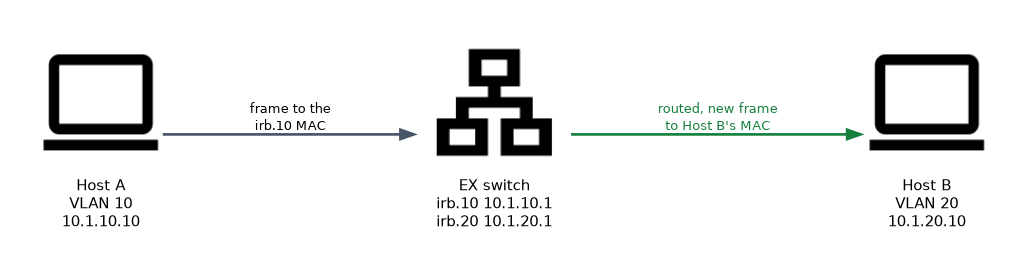
- Host A sends a frame to the gateway's MAC address, with the IP address of Host B inside.
- The switch sees its own IRB MAC address as the destination and hands the packet to the routing process.
- It looks up the destination in the routing table. Both IRB subnets are directly connected, so they are there already.
- It sends the packet out through the other IRB and into VLAN 20, with a new Layer 2 header addressed to Host B.
The IP packet keeps its source and destination addresses, but the Ethernet header changes at the routing step.
Router on a stick
An external router can route instead. The switch port to the router is a trunk, and the router has one logical interface for each VLAN.
user@router# set interfaces ge-0/0/0 vlan-tagging
user@router# set interfaces ge-0/0/0 unit 10 vlan-id 10
user@router# set interfaces ge-0/0/0 unit 10 family inet address 10.1.10.1/24
user@router# set interfaces ge-0/0/0 unit 20 vlan-id 20
user@router# set interfaces ge-0/0/0 unit 20 family inet address 10.1.20.1/24
All inter-VLAN traffic crosses that one link twice, which makes it a bottleneck. An IRB on the switch avoids it, and that is why IRBs are the normal enterprise choice.
| IRB on the switch | Router on a stick | |
|---|---|---|
| Routing done by | The switch itself | An external router |
| Gateway interface | irb.<unit> | Logical unit with vlan-id on the router |
| Switch port to router | Not needed | Trunk |
| Traffic path | Stays in the switch | Goes out and back on one link |
Verifying
user@switch> show interfaces irb terse
Interface               Admin Link Proto    Local                 Remote
irb                     up    up
irb.10                  up    up   inet     10.1.10.1/24
irb.20                  up    up   inet     10.1.20.1/24

user@switch> show route 10.1.20.0/24
user@switch> show arp
user@switch> ping 10.1.20.10 source 10.1.10.1
show vlans shows the IRB linked to each VLAN. show arp lists the hosts the switch has resolved on the IRB subnets.
By default, an IRB comes up only when at least one port in its VLAN is up. If the IRB shows down, check that a port is up in that VLAN before looking at the IP configuration.
To test the gateway, ping the IRB address from a host in the same VLAN first. If that works but another VLAN fails, the fault is routing or the far side, not the access port.
Troubleshooting
- Does each VLAN have a
l3-interfacethat points to the rightirbunit? - Is the IRB
up upand does it have the expected address? - Does the host have the right subnet mask and the IRB address as its default gateway?
- Is the destination subnet in
show route? Directly connected IRB subnets appear automatically. - Is a firewall filter on an IRB or VLAN discarding the traffic?
A host with a wrong gateway address can reach its own VLAN but nothing else. That symptom points to the host settings, not to the switch.
Common mistakes
Missing l3-interface. The IRB has an address, but it is not bound to the VLAN.
Wrong host gateway. Hosts use the switch's management address or a neighbor's address instead of the IRB address.
Expecting an IRB to be up with no active port. With every VLAN port down, the IRB is down.
Forgetting the trunk with router on a stick. The switch port to the router must carry all the VLANs, and the router needs vlan-tagging.
What to remember for the exam
- Different VLANs need Layer 3 routing; the switch does it with an IRB, or an external router does it.
- ELS IRB:
set interfaces irb unit N family inet address ...andset vlans NAME l3-interface irb.N. - The IRB address is the hosts' default gateway.
- Router on a stick uses a trunk and one logical unit for each VLAN with
vlan-taggingandvlan-id. - Directly connected IRB subnets appear in the routing table automatically, with route preference 0.
show interfaces irb terse,show vlans,show routeandshow arpverify the setup.- By default, an IRB is up only while a port in its VLAN is up.
Check yourself
Which two statements are needed to give VLAN SALES a gateway in ELS?
An address on an
irbunit, andl3-interface irb.Nunder the VLAN to bind it.What is the drawback of router on a stick compared with IRBs?
All inter-VLAN traffic crosses one trunk link to the router and back, which can become a bottleneck.
The IRB for a VLAN shows down although its address is correct. What is a likely cause?
No port in that VLAN is up.
Topic 4 of 4 in Layer 2 Switching and VLANs
Test yourself on Layer 2 Switching and VLANs
The full Juniper JNCIS-ENT JN0-352 question bank has 846 questions, with timed practice exams and an explanation for every answer.
This study guide is independent and is not affiliated with, endorsed by, or sponsored by Juniper. Vendor names, certification names and exam codes are trademarks of their respective owners and are used for identification only.