IP Multicast · Topic 4 of 5
PIM Sparse Mode RP, Anycast RP and MSDP
JN0-650 study page on PIM sparse mode RP operation: static, Auto-RP and BSR discovery, election, anycast RP, PIM anycast, and MSDP source active messages.
- 5 min
- Includes a diagram
- The RP is where shared trees are rooted and where sources register.
- Discovery: static, Auto-RP (224.0.1.39 and 224.0.1.40), bootstrap (BSR).
- Selection: longest group match, then priority, then hash, then highest address.
What it is
In PIM sparse mode, the rendezvous point (RP) is the router where sources and receivers meet. Every router that needs it has to know which RP serves a group. How routers learn that is called RP discovery.
Two designs add resilience and reach. Anycast RP gives several routers the same RP address so the nearest one is used. MSDP shares information about active sources between RPs, including between domains.
How it works
RP discovery methods
| Method | How it works | Notes |
|---|---|---|
| Static | Every router is configured with the RP address | Simple and predictable; no election |
| Auto-RP | Candidate RPs announce on 224.0.1.39; a mapping agent sends the chosen mapping on 224.0.1.40 | Cisco originated; Junos supports it, but those groups run in dense mode |
| Bootstrap (BSR) | Candidate RPs send to the elected BSR; the BSR floods the RP set hop by hop to 224.0.0.13 | Standard; RFC 5059 |
set protocols pim rp static address 10.255.0.1
set protocols pim rp local address 10.255.0.1
set protocols pim interface lo0.0 mode sparse
set protocols pim interface ge-0/0/1.0 mode sparse
The first line is on every router, and the second is on the RP itself. The RP address is normally a loopback, so the PIM interface list must include lo0.0.
Election
With static RP there is nothing to elect. With Auto-RP and bootstrap, more than one candidate may offer a group range. The selection works as follows.
| Step | Rule |
|---|---|
| 1 | The longest matching group prefix wins |
| 2 | Then the preferred priority: with BSR a lower RP priority value is preferred |
| 3 | If priority ties, a hash function over the group and RP address selects one RP, spreading groups across RPs |
| 4 | If the hash ties, the highest RP address wins |
A bootstrap router itself is elected among candidate BSRs: the highest BSR priority wins, then the highest address.
set protocols pim rp bootstrap family inet priority 100
set protocols pim rp local family inet address 10.255.0.1 priority 150Use a static RP for a small network. Use BSR when the RP set changes often and you want routers to learn it automatically.
The designated router
On a LAN, the PIM DR is elected by the highest priority, then the highest IP address; the default priority is 1. The DR on the source LAN sends Register messages. The DR on a receiver LAN sends the joins toward the RP.
Anycast RP
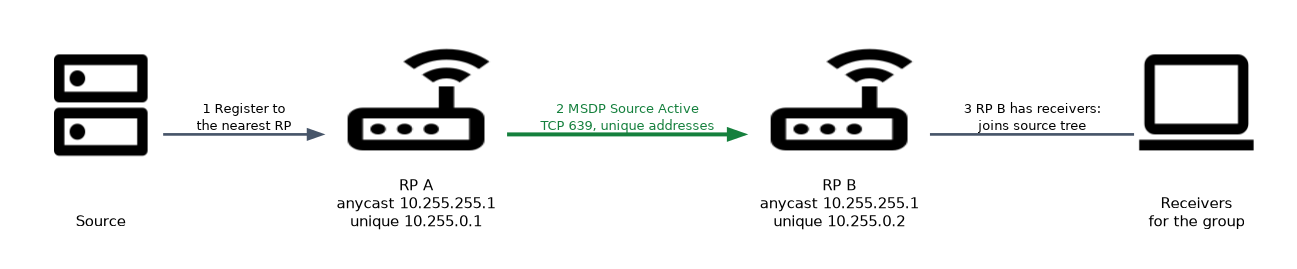 Anycast RP configures the same RP address on several routers, usually on a loopback. The IGP routes each router to the closest copy, so load is shared and a failed RP simply drops out of the IGP.
Because each RP only learns the sources that registered to it, the RPs must tell each other about sources. There are two ways:
| Method | Mechanism |
|---|---|
| MSDP anycast | MSDP peering between the RPs, each peering using a unique local address, not the shared anycast address |
| PIM anycast | RPs forward Register messages to the other RPs in the set (RFC 4610), configured with anycast-pim |
set protocols pim rp local address 10.255.255.1
set protocols pim rp local anycast-pim rp-set address 10.255.0.2
set protocols pim rp local anycast-pim local-address 10.255.0.1MSDP
MSDP connects RPs in different domains, or inside one domain for anycast RP. It runs over TCP port 639. When an RP learns about a new local source through a Register, it sends a Source Active (SA) message to its MSDP peers carrying the source, group and RP addresses. A receiving RP that has receivers for that group joins the source tree.
set protocols msdp local-address 10.255.0.1
set protocols msdp peer 10.255.0.2
set protocols msdp peer 10.255.0.2 local-address 10.255.0.1| MSDP point | Detail |
|---|---|
| Transport | TCP port 639 |
| Message that matters | Source Active (SA) |
| Loop prevention | Peer RPF check: SA is accepted only from the correct peer toward the originating RP |
| Scope | ASM only, for IPv4; SSM does not need it |
show msdp
show msdp source-active
show pim rpsIn an anycast RP with MSDP, never use the shared anycast address as the MSDP local address. Use a unique address, so each peer is distinct and the TCP session works.
Common mistakes
Forgetting lo0.0 in PIM. The RP is unreachable by PIM if the loopback is not a PIM interface.
Using the anycast address for MSDP. The peering needs unique addresses.
Expecting an election with a static RP. There is none.
Missing MSDP between anycast RPs. Receivers behind one RP never learn about sources registered at another.
Treating Auto-RP groups as sparse. The Auto-RP groups themselves are flooded in dense mode.
What to remember for the exam
- The RP is where shared trees are rooted and where sources register.
- Discovery: static, Auto-RP (224.0.1.39 and 224.0.1.40), bootstrap (BSR).
- Selection: longest group match, then priority, then hash, then highest address.
- PIM DR: highest priority, default 1, then highest IP.
- Anycast RP uses one address on several RPs; sources are shared with MSDP or PIM anycast.
- MSDP: TCP 639, Source Active messages, ASM only.
- Verify with
show pim rpsandshow msdp source-active.
Check yourself
Why must anycast RPs run MSDP or PIM anycast between them?
Each RP only sees sources that registered to it, so they must share active sources.
Which TCP port does MSDP use and which message carries a source?
TCP port 639, and the Source Active message.
How does a router pick between two candidate RPs with equal priority?
A hash over the group and RP address decides, and the highest RP address breaks a hash tie.
Topic 4 of 5 in IP Multicast
Test yourself on IP Multicast
The full Juniper JNCIP-ENT JN0-650 question bank has 858 questions, with timed practice exams and an explanation for every answer.
This study guide is independent and is not affiliated with, endorsed by, or sponsored by Juniper. Vendor names, certification names and exam codes are trademarks of their respective owners and are used for identification only.