EVPN · Topic 2 of 3
VXLAN
JN0-650 study page on VXLAN for EVPN: encapsulation format, VNI, VTEP, UDP port 4789, MTU overhead, the IP underlay, gateway models and verification.
- 5 min
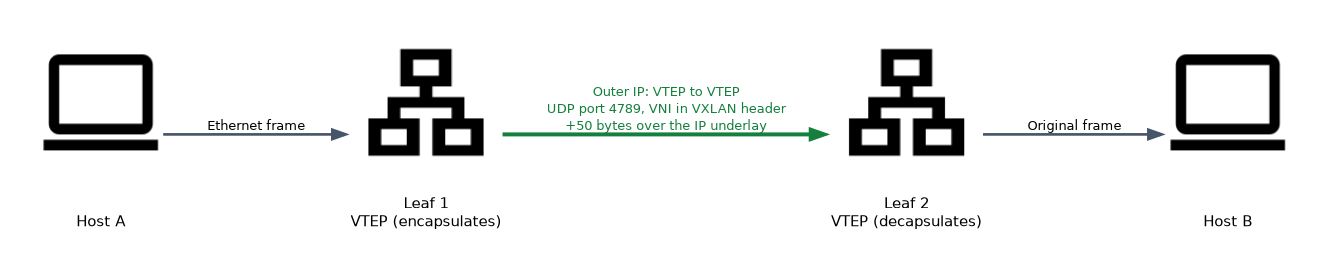
- Includes a diagram
- VXLAN: RFC 7348, UDP port 4789, 24 bit VNI, about 16 million segments.
- The VXLAN encapsulation adds 50 bytes, so increase the MTU of the underlay.
- A VTEP encapsulates and decapsulates; its address is normally a loopback.
What it is
VXLAN (Virtual Extensible LAN, RFC 7348) carries Layer 2 frames inside UDP packets across an IP network. It lets a Layer 2 segment stretch across a routed fabric, so two hosts in the same VLAN can sit in different racks or sites.
A VLAN ID has only 12 bits, which allows 4094 usable VLANs. VXLAN uses a 24 bit VXLAN network identifier (VNI), which allows about 16 million segments.
How it works
The VXLAN frame
| Layer | Content |
|---|---|
| Outer Ethernet | Next hop MAC addresses on the underlay |
| Outer IP | Source and destination VTEP addresses |
| Outer UDP | Destination port 4789; the source port varies with a hash of the inner flow |
| VXLAN header | 8 bytes, including the 24 bit VNI |
| Inner Ethernet frame | The original frame from the host |
The extra headers add 50 bytes to a frame: 14 for the outer Ethernet, 20 for the outer IPv4 header, 8 for UDP and 8 for VXLAN. The underlay MTU has to be larger than the host MTU by at least that much.
If the underlay MTU is too small, large frames are dropped or fragmented, and the symptom is that small pings work while real traffic stalls. Raise the MTU on every underlay link.
The varying UDP source port lets the underlay balance traffic across equal cost paths, because it hashes on the outer headers.
VTEPs and VNIs
A VTEP is the device that encapsulates and decapsulates. On a QFX leaf the VTEP is the switch itself, and its address is usually a loopback. A VNI identifies the segment. A VLAN is mapped to a VNI on each VTEP, and the VLAN ID itself is only locally significant, so two leaves may use different VLAN IDs for the same VNI.
set vlans V100 vlan-id 100
set vlans V100 vxlan vni 10100
set switch-options vtep-source-interface lo0.0
The underlay
VXLAN needs IP reachability between all VTEP loopbacks. This is the underlay, often a leaf and spine fabric using eBGP or OSPF, with equal cost multipath between leaves and spines. The overlay is the VXLAN network and the EVPN control plane running above it.
| Part | Role | Typical protocol |
|---|---|---|
| Underlay | Reachability between VTEP loopbacks | OSPF or eBGP |
| Overlay control plane | MAC and IP distribution | MP-BGP EVPN |
| Overlay data plane | Encapsulation | VXLAN |
Handling BUM traffic
Broadcast, unknown unicast and multicast traffic must reach every VTEP in the VNI. There are two ways to do this.
| Method | How it works |
|---|---|
| Ingress replication | The source VTEP copies the frame to each remote VTEP by unicast, using the list built from type 3 routes |
| Multicast underlay | The underlay carries multicast groups, one per VNI or per group of VNIs |
Ingress replication is simpler because the underlay needs no multicast. It is configured under protocols evpn multicast-mode ingress-replication.
Gateways between VLANs
A VXLAN segment is Layer 2. To route between segments you need a Layer 3 gateway, usually an IRB interface.
set interfaces irb unit 100 family inet address 10.1.100.2/24 virtual-gateway-address 10.1.100.1
set vlans V100 l3-interface irb.100
The virtual-gateway-address is a shared anycast gateway, so the same default gateway address exists on every leaf and hosts keep it when they move.
| Model | Where routing happens |
|---|---|
| Centrally routed | On the spine or border devices; leaves only bridge |
| Edge routed | On every leaf; traffic is routed at the first hop |
Verification
show ethernet-switching vxlan-tunnel-end-point remote
show ethernet-switching vxlan-tunnel-end-point source
show ethernet-switching table
show interfaces vtep
vxlan-tunnel-end-point remote lists the remote VTEPs that this device learned and the VNIs. source shows the local VTEP address. The Ethernet switching table shows remote MAC addresses with the VTEP interface they are reached through.
| Symptom | Likely cause |
|---|---|
| No remote VTEPs | Underlay routing missing, or BGP EVPN down |
| Same VLAN cannot talk across leaves | VNI mismatch, or the VLAN is not mapped on one leaf |
| Small packets work, large fail | Underlay MTU too small |
| Hosts cannot reach the gateway | IRB not attached to the VLAN, or the virtual gateway address is wrong |
Common mistakes
Assuming VLAN IDs must match between leaves. The VNI must match; the VLAN ID is local.
Forgetting the 50 byte overhead. Raise the underlay MTU.
Using a physical interface as the VTEP source. Use a loopback, so the tunnel survives a link failure.
Expecting VXLAN to route between VNIs. A Layer 3 gateway does that.
Treating the underlay as an afterthought. No underlay reachability means no tunnels.
What to remember for the exam
- VXLAN: RFC 7348, UDP port 4789, 24 bit VNI, about 16 million segments.
- The VXLAN encapsulation adds 50 bytes, so increase the MTU of the underlay.
- A VTEP encapsulates and decapsulates; its address is normally a loopback.
- VLAN IDs are locally significant; the VNI identifies the segment across the fabric.
- BUM traffic uses ingress replication or an underlay multicast group.
- IRB with a virtual gateway address provides the Layer 3 gateway on each leaf.
show ethernet-switching vxlan-tunnel-end-point remotelists the remote VTEPs.
Check yourself
Which UDP port does VXLAN use and how large is the VNI?
UDP port 4789 and a 24 bit VNI.
By how many bytes does VXLAN increase the frame, and why does that matter?
By 50 bytes, so the underlay MTU must be larger than the host MTU or large frames are dropped.
What must match for the same segment on two leaves: the VLAN ID or the VNI?
The VNI; the VLAN ID is only locally significant.
Topic 2 of 3 in EVPN
Test yourself on EVPN
The full Juniper JNCIP-ENT JN0-650 question bank has 858 questions, with timed practice exams and an explanation for every answer.
This study guide is independent and is not affiliated with, endorsed by, or sponsored by Juniper. Vendor names, certification names and exam codes are trademarks of their respective owners and are used for identification only.