EVPN · Topic 3 of 3
EVPN Multihoming, Configuration and Troubleshooting
JN0-650 study page on EVPN multihoming: Ethernet segments, ESI, all-active mode, designated forwarder, aliasing, split horizon and troubleshooting.
- 6 min
- Includes a diagram
- An Ethernet segment is identified by a 10 byte ESI, identical on all attached leaves.
- All-active uses all links; single-active uses one at a time.
- Type 4 is for DF election; type 1 per ESI is mass withdrawal; type 1 per EVI is aliasing.
What it is
Multihoming connects one device, such as a server or a switch, to two or more EVPN leaves, so the failure of one leaf or link does not cut it off. The links to the different leaves form one Ethernet segment, identified by a 10 byte Ethernet segment identifier (ESI).
In all-active mode, the device sends traffic to all of its leaves at once. In single-active mode, only one leaf forwards for the segment and the others stand by. Both are standard in EVPN, and all-active is the common choice because it uses all links.
How it works
The Ethernet segment
All leaves attached to the same segment are configured with the same ESI. For a server using link aggregation, they also use the same LACP system ID, so the server sees one logical partner.
set interfaces ae0 esi 00:01:01:01:01:01:01:01:01:01
set interfaces ae0 esi all-active
set interfaces ae0 aggregated-ether-options lacp active
set interfaces ae0 aggregated-ether-options lacp system-id 00:01:01:01:01:01
set interfaces ae0 unit 0 family ethernet-switching interface-mode trunk vlan members V100
The ESI is 10 bytes and is written as ten colon separated hex bytes. A value of all zeros means a single homed port.
What the route types do
| Route | Role in multihoming |
|---|---|
| Type 4 Ethernet segment | Leaves on a segment find each other and elect the designated forwarder |
| Type 1 per ESI | Mass withdrawal: if a link fails, one route withdrawal tells remote leaves the segment is gone |
| Type 1 per EVI | Aliasing: remote leaves learn that all leaves of the segment can reach a MAC, so they balance toward all of them |
| Type 2 | MAC addresses, carrying the ESI |
Aliasing matters for load balancing. A MAC address is often learned on only one leaf, because the server hashes its flows across links. Without aliasing, remote leaves would send everything to that leaf. With it, they send flows to every leaf on the segment.
Mass withdrawal gives fast convergence. When a segment fails, a single type 1 withdrawal removes the paths, instead of one withdrawal per MAC address.
Designated forwarder and split horizon
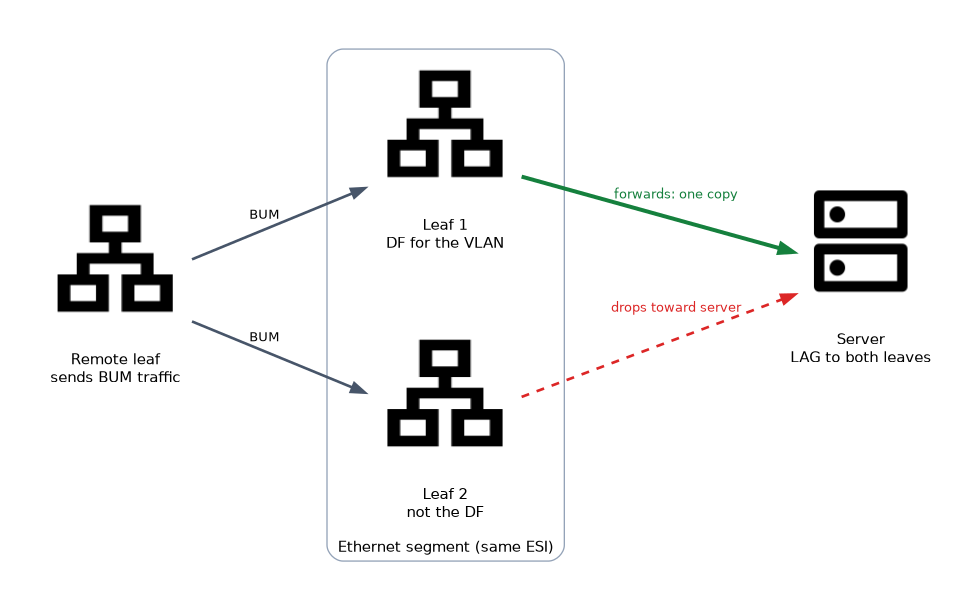 Broadcast, unknown unicast and multicast traffic arrives at every leaf in the segment. To stop the server from receiving duplicates, one leaf is elected designated forwarder (DF) for each VLAN, and only the DF forwards BUM traffic toward the server. The election uses type 4 routes. The default method is based on the VLAN and the ordered list of leaves.
Split horizon stops BUM traffic that came from a segment from being sent back to it. In EVPN over MPLS this uses an ESI label. In VXLAN there is no such label, so the leaf uses local bias: a leaf that receives BUM traffic from a local multihomed server sends it to local members of the segment itself, and the remote leaf does not forward it to that segment.
Remember three terms and their jobs: aliasing is for load balancing, mass withdrawal is for fast convergence, and the designated forwarder is for avoiding duplicate BUM frames.
Configuration checklist
- Build the underlay and check loopback reachability.
- Configure BGP with
family evpn signalingbetween the leaves and spines. - Set
protocols evpn encapsulation vxlanand the VNI list. - Set
switch-optionswith the VTEP source, route distinguisher and route target. - Map each VLAN to a VNI.
- For multihomed servers, configure the same ESI and LACP system ID on every attached leaf.
Monitoring
show bgp summary
show route table bgp.evpn.0
show evpn database
show evpn instance extensive
show ethernet-switching vxlan-tunnel-end-point remote
show lacp interfaces
show bgp summary should list the bgp.evpn.0 table with received routes. show evpn instance extensive shows the instance, its VLANs and the Ethernet segments, including which leaf is the DF. show lacp interfaces confirms that the server's links bundle correctly.
Troubleshooting
| Symptom | Likely cause |
|---|---|
| BGP up but no EVPN routes | family evpn signaling missing on one side |
Routes in bgp.evpn.0, no MACs in the table | Route target mismatch, or the VNI is not in extended-vni-list |
| One leaf of a pair never forwards | ESI or LACP system ID differs between the two leaves |
| Duplicate BUM frames at the server | DF election is not working, so check type 4 routes |
| Traffic always goes to one leaf | Aliasing not in effect; check type 1 routes per EVI |
| MAC flaps between leaves | A loop, or a host that really moves; check sequence numbers |
| Large frames dropped | Underlay MTU too small for the VXLAN overhead |
An ESI configured with a different value on two leaves makes the fabric treat them as two separate segments. The server then sees a loop or inconsistent forwarding, and the symptom is usually duplicates or partial reachability.
Common mistakes
Different ESI values on the leaves of one segment. They must be identical.
Different LACP system IDs. The server treats the leaves as separate partners and bundling fails.
Forgetting the route target and VNI list. The routes arrive but are not installed.
Confusing aliasing with mass withdrawal. One is for load balancing and one for convergence.
Ignoring the underlay. Most EVPN faults are underlay faults.
What to remember for the exam
- An Ethernet segment is identified by a 10 byte ESI, identical on all attached leaves.
- All-active uses all links; single-active uses one at a time.
- Type 4 is for DF election; type 1 per ESI is mass withdrawal; type 1 per EVI is aliasing.
- The DF forwards BUM traffic to the segment; local bias provides split horizon in VXLAN.
- The server's LAG uses the same LACP system ID on every leaf.
- Verify with
show evpn instance extensive,show route table bgp.evpn.0andshow evpn database.
Check yourself
What does aliasing let a remote leaf do?
Send traffic for a MAC address to every leaf on the segment, even if the MAC was learned on only one.
Which leaf forwards BUM traffic to a multihomed server?
The designated forwarder for that VLAN, elected using type 4 routes.
What must be identical on all leaves of one Ethernet segment?
The ESI, and for a LAG also the LACP system ID.
Topic 3 of 3 in EVPN
Test yourself on EVPN
The full Juniper JNCIP-ENT JN0-650 question bank has 858 questions, with timed practice exams and an explanation for every answer.
This study guide is independent and is not affiliated with, endorsed by, or sponsored by Juniper. Vendor names, certification names and exam codes are trademarks of their respective owners and are used for identification only.