Network Address Translation · Topic 3 of 3
Static NAT
Learn SRX static NAT for JNCIA-SEC: one-to-one bidirectional mapping, static-nat prefix rules, reverse translation, NAT precedence and proxy ARP.
- 6 min
- Includes a diagram
- Static NAT is a one-to-one, bidirectional address mapping from one rule.
- It is configured under
security nat staticwiththen static-nat prefix <internal prefix>. - A static NAT rule-set has a
fromcontext only, and uses no pool.
What it is
Static NAT is a fixed one-to-one mapping between one address and another. It works in both directions from a single rule: incoming traffic to the public address has its destination translated to the internal address, and outgoing traffic from the internal host has its source translated to the public address.
Use it for a server that must be reachable from outside and must always appear with the same public address when it starts its own connections, such as a mail server.
How it works
Configuration
Static NAT is configured under [edit security nat static]. Like destination NAT, a static NAT rule-set has only a from context, set to a zone, an interface or a routing-instance. The rule matches the public destination address and maps it to the internal prefix.
user@srx# set security nat static rule-set FROM-INTERNET from zone untrust
user@srx# set security nat static rule-set FROM-INTERNET rule MAIL match destination-address 203.0.113.50/32
user@srx# set security nat static rule-set FROM-INTERNET rule MAIL then static-nat prefix 10.1.1.50/32
The same rule in curly-brace form:
security {
    nat {
        static {
            rule-set FROM-INTERNET {
                from zone untrust;
                rule MAIL {
                    match {
                        destination-address 203.0.113.50/32;
                    }
                    then {
                        static-nat {
                            prefix {
                                10.1.1.50/32;
                            }
                        }
                    }
                }
            }
        }
    }
}
No pool is used. The mapping can also be a whole subnet, for example 203.0.113.0/28 to 10.1.1.0/28, and each address maps to the address at the same position in the other subnet. Both prefixes must be the same size.
Both directions from one rule
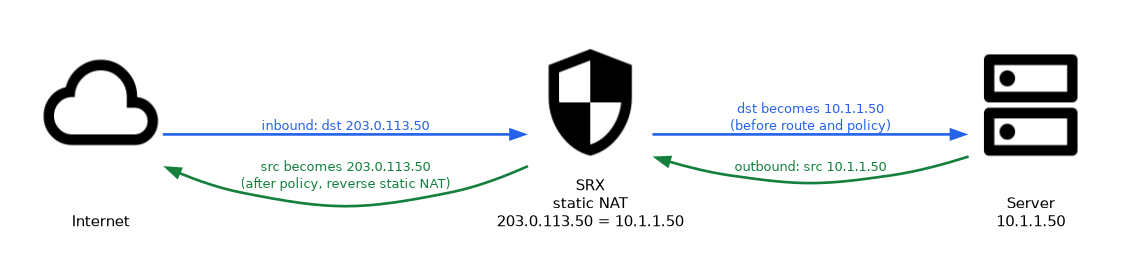 The rule is written for the incoming direction, but the SRX automatically applies the reverse mapping to traffic that the internal host starts.
| Direction | What is translated | When in the flow |
|---|---|---|
| Inbound to 203.0.113.50 | Destination becomes 10.1.1.50 | Before route and policy lookup |
| Outbound from 10.1.1.50 | Source becomes 203.0.113.50 | After policy lookup (reverse static NAT) |
A basic static NAT rule like this one does not change port numbers. It translates the address only, so every port on the public address reaches the internal host. The security policy decides which services are actually allowed.
Precedence among the NAT types
On the first packet of a session, the SRX checks the NAT types in a fixed order.
- Static NAT is checked before destination NAT. If both could translate the same incoming packet, the static NAT rule wins.
- Reverse static NAT is checked before source NAT. Traffic from the static NAT host leaves with its static public address, even if a source NAT rule-set covers its subnet.
Policies and routing
Because the inbound translation happens before the route and policy lookups, the rules match those of destination NAT.
- The security policy from untrust to trust must match the internal address 10.1.1.50.
- The outbound policy from trust to untrust matches the original internal source 10.1.1.50, because reverse static NAT runs after the policy lookup.
- The SRX must have a route to 10.1.1.50 through the trust zone.
user@srx# set security address-book global address MAIL-INTERNAL 10.1.1.50/32
user@srx# set security policies from-zone untrust to-zone trust policy ALLOW-SMTP match source-address any
user@srx# set security policies from-zone untrust to-zone trust policy ALLOW-SMTP match destination-address MAIL-INTERNAL
user@srx# set security policies from-zone untrust to-zone trust policy ALLOW-SMTP match application junos-smtp
user@srx# set security policies from-zone untrust to-zone trust policy ALLOW-SMTP then permit
Proxy ARP
As with the other types, if 203.0.113.50 is in the untrust interface subnet but is not the interface address, configure proxy ARP for it.
user@srx# set security nat proxy-arp interface ge-0/0/0.0 address 203.0.113.50/32Choosing a NAT type
| Need | NAT type |
|---|---|
| Many inside hosts reach the internet through one address | Source NAT, interface-based |
| Inside hosts share a range of public addresses | Source NAT, pool-based |
| Publish one service, possibly on a different port | Destination NAT |
| One host, same public address in both directions | Static NAT |
Checking static NAT
| Command (operational mode) | Shows |
|---|---|
show security nat static rule all | Each static rule, its prefixes and translation hits |
show security flow session destination-prefix 203.0.113.50 | Inbound sessions to the public address |
show security flow session source-prefix 10.1.1.50 | Sessions from the internal host |
When a question says a server must be reachable from outside and must also use the same public address for its own outbound connections, the answer is static NAT. Destination NAT alone covers only the inbound direction.
Common mistakes
Expecting port translation. A basic static-nat prefix rule maps addresses only. To change a port, the usual tool is destination NAT with a pool port.
Writing a second rule for the outbound direction. One static NAT rule already covers both directions.
Using the public address in the policy. Both inbound and outbound policies match the internal address 10.1.1.50.
Thinking source NAT overrides static NAT. Reverse static NAT is checked first, so the host keeps its static public address.
Static NAT exposes every port of the public address to the internal host at the NAT level. Keep the security policy tight, because it is the only thing limiting which services are reachable.
What to remember for the exam
- Static NAT is a one-to-one, bidirectional address mapping from one rule.
- It is configured under
security nat staticwiththen static-nat prefix <internal prefix>. - A static NAT rule-set has a
fromcontext only, and uses no pool. - A basic
static-nat prefixrule does not translate ports. - Inbound static NAT runs before destination NAT and before route and policy lookup.
- Reverse static NAT runs after policy lookup and before source NAT.
- Policies in both directions use the internal address.
- Proxy ARP is needed when the public address is in the interface subnet but is not the interface address.
Check yourself
A static NAT rule maps 203.0.113.50 to 10.1.1.50, and a source NAT rule translates 10.1.1.0/24 to the interface address. Which source does 10.1.1.50 use for a new outbound session?
203.0.113.50, because reverse static NAT is checked before source NAT.
How many rules are needed for a host to be reachable inbound and to use its public address outbound with static NAT?
One. A single static NAT rule translates in both directions.
Which destination address must the untrust to trust policy match for traffic to 203.0.113.50?
The internal address 10.1.1.50, because static NAT is applied before the policy lookup.
Topic 3 of 3 in Network Address Translation
Test yourself on Network Address Translation
The full Juniper JNCIA-SEC JN0-232 question bank has 658 questions, with timed practice exams and an explanation for every answer.
This study guide is independent and is not affiliated with, endorsed by, or sponsored by Juniper. Vendor names, certification names and exam codes are trademarks of their respective owners and are used for identification only.