Network Address Translation · Topic 2 of 3
Destination NAT
Learn SRX destination NAT for JNCIA-SEC: destination pools, rule-sets with from context, port mapping, why policies use the internal address, proxy ARP.
- 6 min
- Includes a diagram
- Destination NAT changes the destination address and optionally the port of incoming traffic.
- It is configured under
security nat destinationwith pools and rule-sets. - A destination NAT rule-set has a
fromcontext only.
What it is
Destination NAT changes the destination IP address, and optionally the destination port, of packets arriving at the SRX. Its usual job is publishing an internal server: users on the internet connect to a public address, and the SRX sends the traffic to the server's private address.
It is one-way in the sense that only the incoming session is matched by the rule. Replies from the server match the same session, and the SRX restores the public address as the source on the way back.
How it works
Destination pools
The internal server is defined as a destination pool under [edit security nat destination]. A pool can hold one address or a range, and it can also set a translated port.
user@srx# set security nat destination pool WEB-SERVER address 10.1.1.100/32
user@srx# set security nat destination pool WEB-8080 address 10.1.1.101/32 port 8080
The second pool maps traffic to a different port, for example public port 80 to internal port 8080.
Rule-sets and rules
A destination NAT rule-set has only a from context, because the SRX does not yet know where the packet will go when destination NAT runs. The context can be a zone, an interface or a routing-instance.
security {
    nat {
        destination {
            pool WEB-SERVER {
                address 10.1.1.100/32;
            }
            rule-set FROM-INTERNET {
                from zone untrust;
                rule PUBLISH-WEB {
                    match {
                        destination-address 203.0.113.100/32;
                        destination-port 80;
                    }
                    then {
                        destination-nat {
                            pool {
                                WEB-SERVER;
                            }
                        }
                    }
                }
            }
        }
    }
}| Part | Options |
|---|---|
from | zone, interface or routing-instance (no to) |
match | destination-address (required), optionally destination-port, source-address, protocol |
then destination-nat | pool <name> or off |
As with source NAT, rules in a rule-set are first match, and the most specific context wins when several rule-sets apply.
Where destination NAT sits in the flow
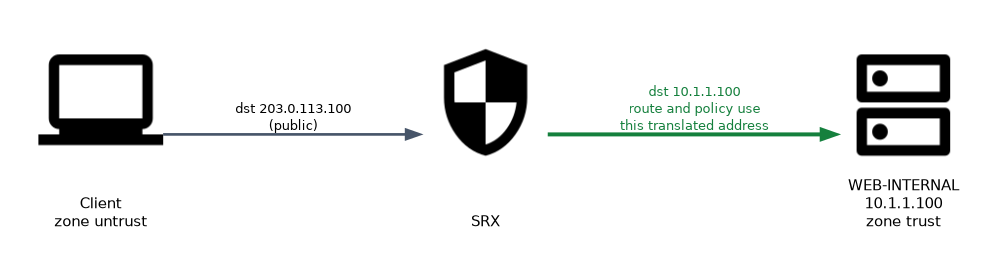 Destination NAT is applied before the route lookup and before the security policy lookup. Two things follow from that.
- The route lookup uses the translated address, so the SRX finds the route to 10.1.1.100 and the egress zone it belongs to.
- The security policy must match the translated, internal destination address, not the public one.
The matching policy for the example looks like this:
user@srx# set security address-book global address WEB-INTERNAL 10.1.1.100/32
user@srx# set security policies from-zone untrust to-zone trust policy ALLOW-WEB match source-address any
user@srx# set security policies from-zone untrust to-zone trust policy ALLOW-WEB match destination-address WEB-INTERNAL
user@srx# set security policies from-zone untrust to-zone trust policy ALLOW-WEB match application junos-http
user@srx# set security policies from-zone untrust to-zone trust policy ALLOW-WEB then permit
The address book entry and the zones in the policy are the internal ones. The public address 203.0.113.100 appears only in the NAT rule.
Proxy ARP
The public address 203.0.113.100 is often in the subnet of the untrust interface but is not the interface's own address. The upstream router then sends ARP for it, and the SRX must answer.
user@srx# set security nat proxy-arp interface ge-0/0/0.0 address 203.0.113.100/32If the public address is the interface address, no proxy ARP is needed. If the public address is in a different subnet, the upstream router needs a route to it pointing at the SRX instead.
Using the interface address
When only one public address exists, it can be the untrust interface address itself. Match destination-port so that only the published service is translated. Without a port match, traffic to the SRX's own services on that address, such as SSH or an IPsec VPN, would be sent to the server too.
Checking destination NAT
| Command (operational mode) | Shows |
|---|---|
show security nat destination summary | Pools and rule-sets |
show security nat destination rule all | Each rule, its match and translation hits |
show security nat destination pool all | Pool addresses and ports |
show security flow session destination-port 80 | Sessions showing the public and internal addresses |
If the NAT rule shows translation hits but no session forms, the problem is almost always the security policy. Check that it uses the internal address and the right zones.
Common mistakes
Using the public address in the policy. Destination NAT happens before policy lookup, so the policy must match the internal address. A policy for 203.0.113.100 never matches.
Adding a to context. A destination NAT rule-set has only from.
Picking the wrong to-zone. The egress zone comes from the route lookup on the translated address, so the policy's to-zone is the zone of the internal server.
Forgetting proxy ARP. A public address in the interface subnet that is not the interface address needs proxy ARP, or the first packet never reaches the SRX.
Matching only the destination address of the untrust interface publishes every port on it. Add a destination-port match so management and VPN traffic to the SRX itself is not redirected.
What to remember for the exam
- Destination NAT changes the destination address and optionally the port of incoming traffic.
- It is configured under
security nat destinationwith pools and rule-sets. - A destination NAT rule-set has a
fromcontext only. - Rules are first match;
then destination-nat pool <name>oroff. - It is applied before the route lookup and before the policy lookup.
- The security policy and the egress zone use the translated, internal address.
- Proxy ARP is needed when the public address is in the interface subnet but is not the interface address.
Check yourself
A server at 10.1.1.100 is published as 203.0.113.100. Which destination address must the untrust to trust policy match?
The internal address 10.1.1.100, because destination NAT runs before the policy lookup.
Why does a destination NAT rule-set have no to context?
When destination NAT runs, the route lookup has not happened yet, so the egress zone or interface is not known.
How do you send public port 80 to port 8080 on the internal server?
Define the destination pool with the server address and
port 8080, and matchdestination-port 80in the rule.
Topic 2 of 3 in Network Address Translation
Test yourself on Network Address Translation
The full Juniper JNCIA-SEC JN0-232 question bank has 658 questions, with timed practice exams and an explanation for every answer.
This study guide is independent and is not affiliated with, endorsed by, or sponsored by Juniper. Vendor names, certification names and exam codes are trademarks of their respective owners and are used for identification only.