Routing Policy and Firewall Filters · Topic 4 of 4
Firewall Filter Effects and Unicast RPF
Learn where Junos firewall filters apply, input vs output, loopback filters protecting the Routing Engine, filter lists, and strict and loose unicast RPF.
- 6 min
- Includes a diagram
- No filter means all traffic is allowed; an applied filter ends with an implicit discard.
- Apply filters with
family inet filter inputoroutputon a logical unit; lists run in order. - Input filters act before the forwarding lookup; output filters act after it.
What it is
A firewall filter does nothing until you apply it to an interface. Where and in which direction you apply it decides which packets it sees: transit traffic passing through the device, or exception traffic sent to the Routing Engine itself.
Unicast reverse path forwarding (RPF) is an automatic anti-spoofing check. For each incoming packet, the device looks up the packet's source address in its forwarding table and drops the packet if the source is not reachable the way the check requires.
How it works
Applying a filter
A filter is applied to a logical unit, per protocol family, as input (packets arriving) or output (packets leaving).
user@router# set interfaces ge-0/0/1 unit 0 family inet filter input BLOCK-TELNET
user@router# set interfaces ge-0/0/2 unit 0 family inet filter output LIMIT-WEB
In curly-brace form:
interfaces {
    ge-0/0/1 {
        unit 0 {
            family inet {
                filter {
                    input BLOCK-TELNET;
                }
                address 10.1.1.1/24;
            }
        }
    }
}| Setting | Effect |
|---|---|
| No filter applied | All packets are allowed |
input | Filter runs on packets arriving on that unit, before the forwarding lookup |
output | Filter runs on packets leaving that unit, after the forwarding lookup |
input-list [ F1 F2 ] | Several filters run in order as one chain |
When you use a filter list, Junos OS evaluates the filters in the order listed. A terminating action in any filter ends evaluation; a packet that reaches the end of one filter without a terminating action moves on to the next filter, and the implicit discard applies only at the end of the last one.
Transit traffic and the Routing Engine
Filters run in the Packet Forwarding Engine, so they work at line rate. What they affect depends on where they are applied.
| Filter applied to | Affects |
|---|---|
A transit interface, input | Packets arriving on that interface, both transit and those for the device |
A transit interface, output | Packets leaving on that interface |
Loopback lo0, input | Packets addressed to the Routing Engine, arriving on any interface |
A filter on lo0 input is the standard way to protect the Routing Engine. It sees only traffic destined to the device itself, such as SSH, SNMP, NTP, and routing protocol packets, and it does not affect transit traffic.
user@router# set interfaces lo0 unit 0 family inet filter input PROTECT-REThe implicit discard applies to a loopback filter too. If PROTECT-RE does not allow OSPF, BGP or your own SSH session, the adjacencies drop and you can lock yourself out. Use commit confirmed when applying a new lo0 filter, so the change rolls back if you lose access.
Effect of filters on packets: a worked example
Filter BLOCK-TELNET is applied as input on ge-0/0/1:
term NO-TELNET {
    from {
        protocol tcp;
        destination-port telnet;
    }
    then {
        count TELNET-DROPS;
        discard;
    }
}
term ALLOW-ALL {
    then accept;
}- A Telnet packet arriving on ge-0/0/1 for a server behind the router is counted and silently dropped.
- An SSH packet on ge-0/0/1 matches the second term and is accepted.
- A Telnet packet arriving on ge-0/0/2 is not checked, because the filter is only on ge-0/0/1 input.
- A Telnet reply leaving through ge-0/0/1 is not checked, because the filter is input only.
Unicast RPF
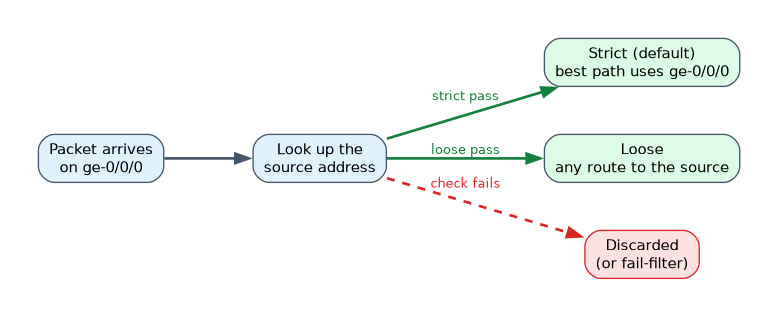 Spoofed packets carry a fake source address. Unicast RPF checks that the source address makes sense for the interface the packet came in on.
| Mode | Check | Passes when |
|---|---|---|
| Strict (default) | Source lookup must point back out the arriving interface | The best path to the source uses the interface the packet arrived on |
| Loose | Source lookup must find any route | The source address is in the forwarding table, through any interface |
Enable it per interface and family:
user@router# set interfaces ge-0/0/0 unit 0 family inet rpf-check
user@router# set interfaces ge-0/0/0 unit 0 family inet rpf-check mode loose
Use the first line alone for strict mode; add mode loose for loose mode.
Asymmetric routing and feasible paths
Strict mode compares only the active paths by default. If traffic from a source arrives on one interface but the best route back uses another, legitimate packets fail the check. You can let the check accept any feasible path the routing table knows:
user@router# set routing-options forwarding-table unicast-reverse-path feasible-pathsPackets that fail the check are discarded by default. You can attach a fail-filter to accept or count selected failed packets instead, for example DHCP requests that arrive with a source address of 0.0.0.0.
user@router# set interfaces ge-0/0/0 unit 0 family inet rpf-check fail-filter RPF-FAILUse strict mode on customer facing edge interfaces, where routing is symmetric. Use loose mode or feasible paths where traffic can arrive on a different link than the one used to reach the source.
Common mistakes
Applying a filter in the wrong direction. An input filter does not see packets the interface sends, and an output filter does not see packets it receives.
Expecting an lo0 filter to block transit traffic. A loopback input filter protects only the Routing Engine. Transit traffic is filtered on the physical or logical interfaces it crosses.
Using strict RPF on asymmetric links. Legitimate traffic is dropped when the return path uses a different interface.
What to remember for the exam
- No filter means all traffic is allowed; an applied filter ends with an implicit discard.
- Apply filters with
family inet filter inputoroutputon a logical unit; lists run in order. - Input filters act before the forwarding lookup; output filters act after it.
- An lo0 input filter protects the Routing Engine and does not affect transit traffic.
- Unicast RPF checks the source address: strict needs the arriving interface, loose needs any route.
rpf-checkdefaults to strict; addmode loosefor loose.unicast-reverse-path feasible-pathshelps with asymmetric routing; failed packets are discarded unless afail-filterhandles them.
Check yourself
A filter is applied to lo0 input. Does it affect packets routed through the device to another host?
No. A loopback input filter acts only on traffic destined to the Routing Engine.
With strict unicast RPF, a packet arrives on ge-0/0/1, but the best route to its source points out ge-0/0/2. What happens?
The packet fails the check and is discarded, unless feasible paths or loose mode allow it.
Which statement enables loose mode unicast RPF on an interface?
set interfaces ge-0/0/0 unit 0 family inet rpf-check mode loose.
Topic 4 of 4 in Routing Policy and Firewall Filters
Test yourself on Routing Policy and Firewall Filters
The full Juniper JNCIA-Junos JN0-106 question bank has 1,155 questions, with timed practice exams and an explanation for every answer.
This study guide is independent and is not affiliated with, endorsed by, or sponsored by Juniper. Vendor names, certification names and exam codes are trademarks of their respective owners and are used for identification only.