Routing Policy and Firewall Filters · Topic 3 of 4
Firewall Filter Concepts, Structure and Actions
Learn Junos stateless firewall filters, filter terms, from match conditions, accept, discard and reject, count and policer actions and the implicit discard.
- 5 min
- Includes a diagram
- Firewall filters are stateless and defined under
[edit firewall family inet filter](orinet6). - Terms run top to bottom; first match wins; no
frommatches all packets. - Every filter ends with an implicit discard.
What it is
A firewall filter is a stateless packet filter. It checks each packet on its own against header fields such as addresses, protocol and ports, and decides whether to accept it, drop it or change how it is handled. It keeps no record of sessions, so return traffic must be allowed by its own term.
Junos OS uses firewall filters to protect the device, to control transit traffic, to count and log packets, and to classify or rate limit traffic. Their layout looks like a routing policy, with terms, from and then, but they act on packets, not routes.
How it works
Filter structure
Filters are defined per protocol family under [edit firewall]. For IPv4 the family is inet, for IPv6 it is inet6.
firewall {
    family inet {
        filter PROTECT-RE {
            term ALLOW-SSH {
                from {
                    source-address {
                        192.168.100.0/24;
                    }
                    protocol tcp;
                    destination-port ssh;
                }
                then accept;
            }
            term ALLOW-OSPF {
                from {
                    protocol ospf;
                }
                then accept;
            }
            term DENY-REST {
                then {
                    count DENIED;
                    discard;
                }
            }
        }
    }
}
The same first term in set form:
user@router# set firewall family inet filter PROTECT-RE term ALLOW-SSH from source-address 192.168.100.0/24
user@router# set firewall family inet filter PROTECT-RE term ALLOW-SSH from protocol tcp
user@router# set firewall family inet filter PROTECT-RE term ALLOW-SSH from destination-port ssh
user@router# set firewall family inet filter PROTECT-RE term ALLOW-SSH then accept
How terms are evaluated
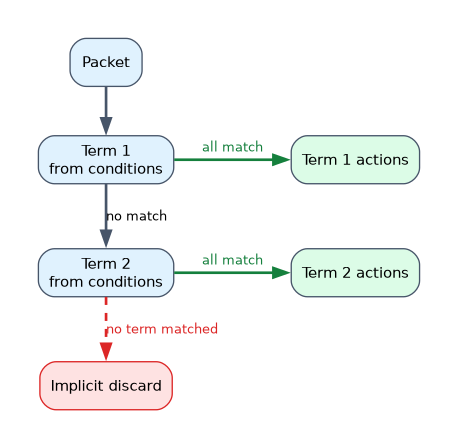
- Terms are checked top to bottom, in configuration order.
- The first term whose
fromconditions all match applies its actions. - A terminating action ends evaluation for that packet.
- A term with no
frommatches every packet. - If no term matches, the packet hits the implicit discard at the end of every filter.
A filter with only a term that accepts SSH drops everything else, including routing protocol packets, because of the implicit discard. That is why a filter usually ends with an explicit final term that either accepts or counts and discards the rest.
Match conditions
| Condition | Matches |
|---|---|
source-address, destination-address | IP prefixes; add except to exclude a more specific prefix |
address | Either the source or the destination address |
source-prefix-list, destination-prefix-list | Prefixes from a named prefix list |
protocol | IP protocol, such as tcp, udp, icmp, ospf |
source-port, destination-port, port | TCP or UDP port numbers or names, such as ssh, bgp, ntp |
icmp-type | ICMP message type, such as echo-request |
tcp-flags, tcp-established, tcp-initial | TCP flag bits; tcp-established matches packets with ACK or RST set |
As in routing policy, different conditions are combined with AND and several values of one condition are combined with OR. A term with protocol tcp and destination-port [ ssh telnet ] matches TCP packets to port 22 or 23.
Actions
| Kind | Action | Effect |
|---|---|---|
| Terminating | accept | Let the packet through |
| Terminating | discard | Drop the packet silently |
| Terminating | reject | Drop the packet and send an ICMP message back; by default ICMP administratively prohibited |
| Terminating | routing-instance | Forward the packet using another routing instance's table |
| Flow control | next term | Continue with the next term |
| Modifier | count | Add to a named counter |
| Modifier | log, syslog | Record packet headers locally or send them to system log |
| Modifier | policer | Apply a rate limit |
| Modifier | forwarding-class, loss-priority | Set CoS handling; this is a multifield classifier |
Action modifiers without a terminating action imply accept. A term with only then count WEB counts the packet and accepts it.
Discard compared with reject
discard | reject | |
|---|---|---|
| Packet | Dropped | Dropped |
| Message to sender | None | ICMP unreachable (or TCP reset with reject tcp-reset) |
| Best for | Hiding the device from scans | Telling legitimate users quickly that access is refused |
Policers in filters
A policer limits traffic to a rate and burst size. Packets above the limit are dropped or marked, depending on the policer's then action.
user@router# set firewall policer LIMIT-1M if-exceeding bandwidth-limit 1m burst-size-limit 15k
user@router# set firewall policer LIMIT-1M then discard
user@router# set firewall family inet filter LIMIT-ICMP term 1 from protocol icmp
user@router# set firewall family inet filter LIMIT-ICMP term 1 then policer LIMIT-1M
Monitoring filters
show firewall lists counters and policer statistics for every filter. show firewall filter PROTECT-RE shows one filter. clear firewall all resets the counters.
Add a count action to the final discard term. When a user reports a blocked service, the counter shows straight away whether the filter is dropping their traffic.
Common mistakes
Forgetting the implicit discard. Any packet that matches no term is dropped. A filter that permits only management traffic will also drop OSPF and BGP unless they are allowed.
Expecting stateful behavior. Firewall filters do not track sessions. Return traffic needs its own match, for example a term using tcp-established.
Thinking count alone drops traffic. A term with only action modifiers accepts the packet.
reject sends an ICMP message back to the sender, while discard stays silent. Exam options often describe one as the other.
What to remember for the exam
- Firewall filters are stateless and defined under
[edit firewall family inet filter](orinet6). - Terms run top to bottom; first match wins; no
frommatches all packets. - Every filter ends with an implicit discard.
- Different conditions are AND; multiple values of one condition are OR.
- Terminating actions:
accept,discard,reject,routing-instance. - Modifiers such as
count,log,policerimplyacceptwhen used alone. rejectsends ICMP administratively prohibited by default;discardsends nothing.show firewalldisplays counters.
Check yourself
A filter has one term that accepts TCP port 22 and nothing else. What happens to an OSPF hello that reaches it?
It is dropped by the implicit discard at the end of the filter.
A term's only action is
count HTTP. What happens to a matching packet?It is counted and then accepted, because action modifiers alone imply accept.
What is the difference between
discardandreject?Both drop the packet, but
rejectsends an ICMP message back to the sender, by default administratively prohibited, whilediscardsends nothing.
Topic 3 of 4 in Routing Policy and Firewall Filters
Test yourself on Routing Policy and Firewall Filters
The full Juniper JNCIA-Junos JN0-106 question bank has 1,155 questions, with timed practice exams and an explanation for every answer.
This study guide is independent and is not affiliated with, endorsed by, or sponsored by Juniper. Vendor names, certification names and exam codes are trademarks of their respective owners and are used for identification only.