Networking Fundamentals · Topic 2 of 5
Collision Domains, Broadcast Domains, Switches and Routers
Learn collision and broadcast domains, how hubs, switches and routers divide them, and how switches forward frames and routers forward packets for JN0-106.
- 5 min
- Includes a diagram
- Hub: one collision domain and one broadcast domain for all ports.
- Switch: one collision domain per port; one broadcast domain per VLAN.
- Router: each interface is its own collision domain and its own broadcast domain.
What it is
A collision domain is the part of a network where two devices sending at the same time can collide. A broadcast domain is the part of a network that receives a Layer 2 broadcast frame sent by any one device in it.
Switches and routers are the devices that divide these domains. A switch forwards frames by MAC address inside a LAN, and a router forwards packets by IP address between networks.
How it works
Which device splits what
| Device | Layer | Collision domains | Broadcast domains |
|---|---|---|---|
| Hub or repeater | 1 | One for all ports | One for all ports |
| Switch or bridge | 2 | One per port | One per VLAN (one in total if all ports share a VLAN) |
| Router | 3 | One per interface | One per interface |
A hub repeats every bit out of every port, so all attached devices share the medium. A switch gives each port its own collision domain, and on a full duplex port collisions cannot happen at all. A switch still floods broadcasts to every port in the same VLAN, so the broadcast domain stays whole. A router does not forward Layer 2 broadcasts, so each router interface ends a broadcast domain.
Counting domains: a worked example
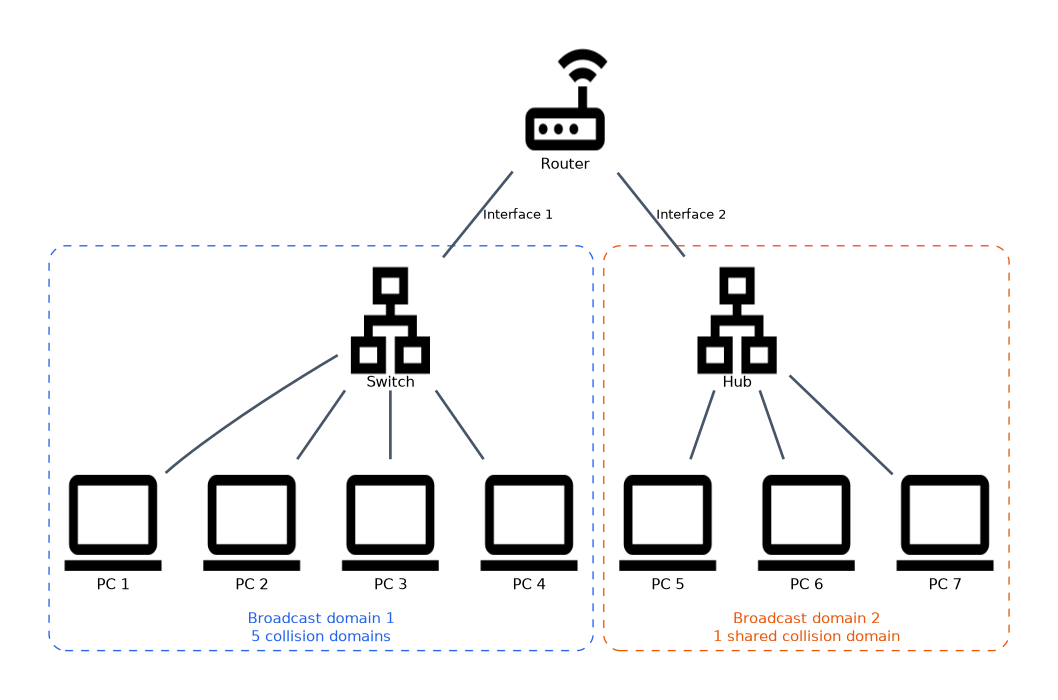 A router has two interfaces. Interface 1 connects to a switch with four PCs. Interface 2 connects to a hub with three PCs.
- Broadcast domains: 2, one per router interface.
- Collision domains: the switch side has 5 (four PC ports plus the port to the router); the hub side has 1 shared domain that includes the router interface. Total 6.
The exam often asks exactly this kind of count. Draw the picture, put a ring around each switch port and each router interface, and put one ring around everything on a hub.
What a switch does
A switch learns, floods, forwards and filters frames using its MAC address table, called the Ethernet switching table in Junos OS.
| Action | When it happens |
|---|---|
| Learn | Records the source MAC and the port a frame arrived on |
| Forward | Destination MAC is in the table on a different port: send out that port only |
| Filter | Destination MAC is on the same port the frame came in on: drop it |
| Flood | Destination is broadcast, multicast or an unknown unicast: send out all ports in the VLAN except the incoming one |
Entries that are not refreshed age out, so the table follows hosts that move. On an EX Series switch, show ethernet-switching table displays the learned MAC addresses, their VLAN and their interface.
What a router does
A router connects different IP networks. For every packet it:
- Removes the Layer 2 header.
- Looks up the destination IP address in its forwarding table, using the longest match.
- Decrements the IPv4 TTL (or IPv6 hop limit) and drops the packet if it reaches zero.
- Builds a new Layer 2 header for the outgoing interface and sends the packet.
If no route matches and there is no default route, the router drops the packet. Routers learn routes from directly connected interfaces, static routes and dynamic routing protocols.
Switches and routers compared
| Switch | Router | |
|---|---|---|
| Forwards by | MAC address | IP address |
| Table | MAC (Ethernet switching) table | Routing and forwarding tables |
| Broadcasts | Floods within the VLAN | Does not forward |
| Unknown destination | Floods within the VLAN | Drops, unless a default route exists |
| Connects | Hosts in the same LAN | Different networks or subnets |
A Layer 3 switch combines both: it switches inside a VLAN and routes between VLANs through an IRB interface. Many Juniper devices, such as EX Series switches and SRX Series firewalls, do both jobs.
VLANs split broadcast domains on a switch. Hosts in different VLANs cannot talk without a Layer 3 device, even when they are on the same physical switch.
Why domain size matters
Large collision domains waste bandwidth on retransmissions. Large broadcast domains make every host process every ARP request and every other broadcast, which costs CPU and link capacity. Splitting the network with switches, VLANs and routers keeps both small.
Common mistakes
Thinking a switch splits broadcast domains. A switch splits collision domains. Without VLANs, every port on a switch is in one broadcast domain.
Forgetting the router port in a count. The link between a switch and a router is a collision domain too, and the router interface is part of the broadcast domain on that side.
Treating a switch like a router for unknown destinations. A switch floods an unknown unicast frame; a router drops a packet that matches no route.
A hub is a Layer 1 device. Everything connected to a hub, including the switch or router port it plugs into, shares one collision domain.
What to remember for the exam
- Hub: one collision domain and one broadcast domain for all ports.
- Switch: one collision domain per port; one broadcast domain per VLAN.
- Router: each interface is its own collision domain and its own broadcast domain.
- Switches learn source MAC addresses and forward, filter or flood frames.
- Broadcast, multicast and unknown unicast frames are flooded within the VLAN.
- Routers forward by longest match, decrement TTL and rebuild the Layer 2 header at each hop.
show ethernet-switching tableshows learned MAC addresses on an EX Series switch.
Check yourself
A switch has 12 ports in one VLAN with no router. How many broadcast and collision domains are there?
One broadcast domain and 12 collision domains, one per port.
What does a switch do with a frame whose destination MAC is not in its table?
It floods the frame out every port in the same VLAN except the one it arrived on.
Which device ends a broadcast domain?
A router, because it does not forward Layer 2 broadcasts between its interfaces.
Topic 2 of 5 in Networking Fundamentals
Test yourself on Networking Fundamentals
The full Juniper JNCIA-Junos JN0-106 question bank has 1,155 questions, with timed practice exams and an explanation for every answer.
This study guide is independent and is not affiliated with, endorsed by, or sponsored by Juniper. Vendor names, certification names and exam codes are trademarks of their respective owners and are used for identification only.