WLAN Technology Basics · Topic 3 of 3
WLAN Fundamentals and Service Configuration
Learn how a Fit AP goes online over CAPWAP, how a STA joins a WLAN, and the Huawei AC profile configuration verified with display ap all for H12-811.
- 6 min
- Includes a diagram
- AP online: IP address, AC discovery, CAPWAP tunnel, access control, upgrade, tunnel maintenance, configuration.
- AC discovery: static AC list, DHCP option 43 (IPv4) or 52 (IPv6), or broadcast on Layer 2.
- STA access: scanning, link authentication, association, access authentication, then DHCP.
What it is
WLAN fundamentals are the two processes that make a WLAN work: a Fit AP going online to its AC, and a STA accessing the WLAN. Once the AP is online, the AC delivers the WLAN service configuration to it.
On a Huawei AC the service is built from profiles that are bound together.
How it works
How a Fit AP goes online
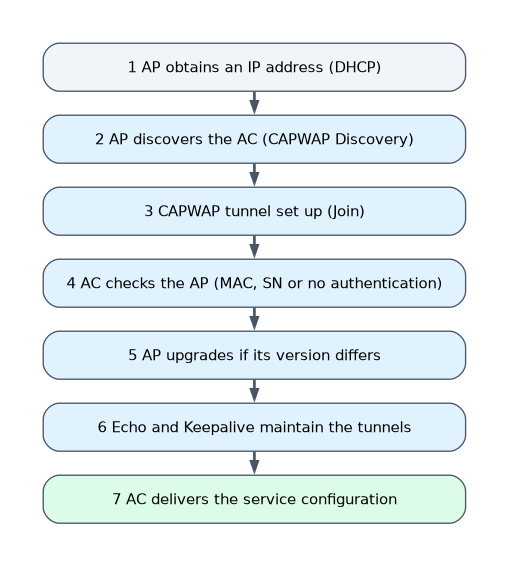
| Step | What happens |
|---|---|
| 1. AP obtains an IP address | Static address, DHCP (most common) or SLAAC for IPv6 |
| 2. AP discovers the AC | AP sends CAPWAP Discovery Request: unicast to an AC address from static config or DHCP option 43 (option 52 for IPv6), or broadcast on Layer 2; the AC replies with a Discovery Response |
| 3. CAPWAP tunnel is set up | Join Request and Join Response establish the control tunnel |
| 4. AP access control | The AC checks the AP against its authentication mode and AP list |
| 5. AP upgrade | If the AP version does not match the AC, the AP downloads a new version |
| 6. Tunnel maintenance | Echo messages keep the control tunnel alive; Keepalive messages keep the data tunnel alive |
| 7. Configuration delivery | The AC sends the service configuration to the AP |
The Huawei AP authentication modes are MAC address (mac-auth, the default), SN (sn-auth) and no authentication (no-auth). With MAC or SN authentication, an AP that is not added on the AC must be confirmed by the administrator before it can go online.
How a STA accesses the WLAN
| Phase | What happens |
|---|---|
| Scanning | Active: the STA sends Probe Requests. Passive: the STA listens for Beacon frames the AP sends periodically |
| Link authentication | Open system or shared key authentication at the 802.11 link level |
| Association | The STA sends an Association Request and the AP replies with an Association Response |
| Access authentication | WPA, WPA2 or WPA3 with a PSK or 802.1X, or Portal or MAC authentication |
| Address and access | The STA gets an IP address by DHCP and starts sending traffic |
WLAN service configuration procedure
| Step | Main commands |
|---|---|
| 1. Basic network | VLANs, interfaces, DHCP for APs and STAs |
| 2. AP onboarding | regulatory-domain-profile with country-code, ap-group, capwap source interface, ap auth-mode, ap-id ... ap-mac |
| 3. Security profile | security-profile name, then security wpa-wpa2 psk pass-phrase ... aes |
| 4. SSID profile | ssid-profile name, then ssid <name> |
| 5. VAP profile | vap-profile name, forward-mode, service-vlan vlan-id, bind the security and SSID profiles |
| 6. Bind to AP group | vap-profile <name> wlan <id> radio <id> in the AP group view |
| 7. Verify | display ap all, display vap ssid <name>, display station ssid <name> |
Profiles are created in the wlan view: SSID and security profiles bind to the VAP profile, which binds to an AP group radio.
WLAN service configuration example
The AC uses Vlanif100 as the CAPWAP source for the AP management VLAN 100, and STAs use service VLAN 101.
[AC] capwap source interface vlanif 100
[AC] wlan
[AC-wlan-view] regulatory-domain-profile name default
[AC-wlan-regulate-domain-default] country-code cn
[AC-wlan-regulate-domain-default] quit
[AC-wlan-view] ap-group name ap-group1
[AC-wlan-ap-group-ap-group1] regulatory-domain-profile default
[AC-wlan-ap-group-ap-group1] quit
[AC-wlan-view] ap auth-mode mac-auth
[AC-wlan-view] ap-id 0 ap-mac 60de-4476-e360
[AC-wlan-ap-0] ap-name area_1
[AC-wlan-ap-0] ap-group ap-group1
[AC-wlan-ap-0] quit
[AC-wlan-view] security-profile name wlan-net
[AC-wlan-sec-prof-wlan-net] security wpa-wpa2 psk pass-phrase Example@123 aes
[AC-wlan-sec-prof-wlan-net] quit
[AC-wlan-view] ssid-profile name wlan-net
[AC-wlan-ssid-prof-wlan-net] ssid wlan-net
[AC-wlan-ssid-prof-wlan-net] quit
[AC-wlan-view] vap-profile name wlan-net
[AC-wlan-vap-prof-wlan-net] forward-mode tunnel
[AC-wlan-vap-prof-wlan-net] service-vlan vlan-id 101
[AC-wlan-vap-prof-wlan-net] security-profile wlan-net
[AC-wlan-vap-prof-wlan-net] ssid-profile wlan-net
[AC-wlan-vap-prof-wlan-net] quit
[AC-wlan-view] ap-group name ap-group1
[AC-wlan-ap-group-ap-group1] vap-profile wlan-net wlan 1 radio 0
[AC-wlan-ap-group-ap-group1] vap-profile wlan-net wlan 1 radio 1
On a dual-band AP, radio 0 is usually the 2.4 GHz radio and radio 1 the 5 GHz radio. The default VAP forwarding mode is direct forwarding, so forward-mode tunnel is needed only for tunnel forwarding.
Verification with display ap all: the State nor means the AP is online and working normally.
[AC-wlan-view] display ap all
Total AP information:
nor  : normal          [1]
--------------------------------------------------------------------------------
ID   MAC            Name   Group     IP            Type     State STA Uptime
--------------------------------------------------------------------------------
0    60de-4476-e360 area_1 ap-group1 10.23.100.254 AP5030DN nor   0   10S
--------------------------------------------------------------------------------
Total: 1
A worked example
A new AP is cabled and powered by PoE but display ap all does not list it as nor. The AC uses mac-auth, and the engineer finds no ap-id ... ap-mac entry for this AP's MAC address.
The engineer adds the AP by MAC address into ap-group1. The AP joins, receives the VAP configuration and broadcasts wlan-net.
How the exam asks about this
- "Put the AP online process in order." → Obtain an IP address, discover the AC, establish the CAPWAP tunnel, AP access control, upgrade, maintain the tunnel, deliver the configuration.
- "Which profile is bound directly to a radio in the AP group?" → The VAP profile.
- "What is the default AP authentication mode on a Huawei AC?" → MAC address authentication.
What to remember for the exam
- AP online: IP address, AC discovery, CAPWAP tunnel, access control, upgrade, tunnel maintenance, configuration.
- AC discovery: static AC list, DHCP option 43 (IPv4) or 52 (IPv6), or broadcast on Layer 2.
- STA access: scanning, link authentication, association, access authentication, then DHCP.
- Profile chain: SSID and security profiles into the VAP profile, VAP profile into the AP group radio.
display ap allStatenormeans the AP is online and normal.
The regulatory domain profile with the correct country code must be bound to the AP group. It sets which channels and power levels are legal for the radios.
Common mistakes
Binding the SSID profile to the AP group. The SSID and security profiles are bound inside the VAP profile. Only the VAP profile is bound to the AP group radio.
Forgetting the CAPWAP source interface. Without capwap source interface, the AC has no address to build CAPWAP tunnels from, and APs cannot join.
Mixing up association and access authentication. Link authentication and association happen first at the 802.11 level. WPA2 PSK or 802.1X authentication happens after association.
Check yourself
How does a STA find an AP with passive scanning?
It listens for the Beacon frames that APs send periodically, which carry the SSID and capabilities.
What messages keep the CAPWAP tunnels alive?
Echo messages on the control tunnel and Keepalive messages on the data tunnel.
Which command makes a VAP use centralized forwarding through the AC?
forward-mode tunnelin the VAP profile view.
Topic 3 of 3 in WLAN Technology Basics
Test yourself on WLAN Technology Basics
The full Huawei HCIA-Datacom H12-811 question bank has 600 questions, with timed practice exams and an explanation for every answer.
This study guide is independent and is not affiliated with, endorsed by, or sponsored by Huawei. Vendor names, certification names and exam codes are trademarks of their respective owners and are used for identification only.