Data Center Network Basics · Topic 1 of 1
DC Evolution and DCN Basics
Learn how data centers evolved to virtualization and cloud, east-west traffic, three-layer versus spine and leaf designs, and VXLAN basics for H12-811.
- 6 min
- Includes a diagram
- DC evolution: physical servers, then virtualization (VMs, live migration), then cloud (pooled resources on demand).
- North-south is DC to outside; east-west is server to server inside the DC, and it dominates modern DCs.
- Three-layer is access, aggregation and core, with STP blocking redundant links.
What it is
A data center (DC) is a facility that houses servers, storage and network equipment, with the power, cooling and security to run them. The data center network (DCN) connects the servers and storage to each other and to the users outside.
The DC has moved from separate physical servers to virtualized and then cloud data centers. Each step changed where traffic flows, so the DCN design changed from a three-layer tree to a spine and leaf fabric, often with a VXLAN overlay on top.
How it works
Stages of DC evolution
| Stage | What changed | Effect on the network |
|---|---|---|
| Physical servers | Each application runs on its own server | Low utilization, mostly traffic between users and servers |
| Virtualization | A hypervisor runs many virtual machines (VMs) on one host, and VMs can migrate between hosts | Large Layer 2 domains are needed so a VM keeps its IP address when it moves |
| Cloud | Compute, storage and network are pooled and handed out on demand, often by software | The network must be provisioned automatically and scale out quickly |
A migrating VM keeps its IP and MAC address, so the source and target hosts must share one Layer 2 segment.
North-south and east-west traffic
| Traffic type | Direction | Example |
|---|---|---|
| North-south | Between the DC and the outside (users, internet, WAN) | A user opens a web page hosted in the DC |
| East-west | Between servers inside the DC | A web server queries a database server, a VM migrates, storage replicates |
In a virtualized or cloud DC, distributed applications, VM migration and storage make east-west traffic the larger share.
Traditional three-layer design
The classic design has an access layer (servers connect here), an aggregation layer and a core layer. The Layer 2 and Layer 3 boundary is usually at the aggregation layer, and redundant Layer 2 links are kept loop free by STP.
It suits north-south traffic but has limits:
- STP blocks links, so half the bandwidth can sit idle.
- East-west traffic between distant racks has to climb up and back down the tree, through several hops.
- Layer 2 domains are small, which limits where a VM can migrate.
Spine and leaf design
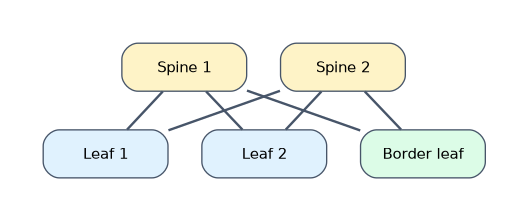 Spine and leaf is a two-tier Clos fabric. Huawei builds it with CloudEngine switches.
| Role | Function |
|---|---|
| Leaf | Connects servers, storage and services; every leaf connects to every spine |
| Spine | High-speed backbone; connects only to leaves |
| Border leaf | A leaf that connects the fabric to the WAN, internet or other DCs |
| Service leaf | A leaf that connects firewalls, load balancers and other service devices |
The key rules: leaves do not connect to each other, and spines do not connect to each other. Any two servers on different leaves are therefore always leaf to spine to leaf, the same number of hops.
Leaf to spine links are usually routed, so ECMP (equal-cost multipath) uses all spine links at once and STP blocks nothing. Add spines for capacity and leaves for ports.
VXLAN overlay
A routed fabric (the underlay) has no large Layer 2 domain, but VMs still need one to migrate. VXLAN (Virtual eXtensible LAN, RFC 7348) builds a virtual Layer 2 network (the overlay) on top of the IP underlay.
| VXLAN item | Value or meaning |
|---|---|
| Encapsulation | MAC in UDP: the original Ethernet frame is carried inside UDP and IP |
| UDP destination port | 4789 |
| VNI (VXLAN Network Identifier) | 24 bits, about 16 million segments (VLAN ID is 12 bits, 4094 usable) |
| VTEP (VXLAN Tunnel Endpoint) | Device that adds and removes the VXLAN header, usually a leaf switch |
| Added overhead | 50 bytes (outer Ethernet 14, outer IP 20, UDP 8, VXLAN 8) |
The underlay MTU should be raised to absorb the 50 bytes. In Huawei solutions the fabric and its VXLAN tunnels can be provisioned automatically by iMaster NCE-Fabric.
A worked example
A company runs VMs across 40 racks. With a three-layer design, migrating a VM from rack 3 to rack 37 fails, because the racks sit in different Layer 2 domains under different aggregation pairs.
With spine and leaf, each rack gets a leaf linked to four spines with ECMP. VXLAN puts the VM segment into one VNI spanning all racks, so the migration works and every path is leaf to spine to leaf.
How the exam asks about this
- "Which statement about spine and leaf networking is true?" → Each leaf connects to every spine, and leaves are not connected to each other.
- "In a cloud data center, which type of traffic accounts for the largest share?" → East-west traffic, between servers inside the DC.
- "How many bits is the VXLAN VNI?" → 24 bits, allowing about 16 million segments.
What to remember for the exam
- DC evolution: physical servers, then virtualization (VMs, live migration), then cloud (pooled resources on demand).
- North-south is DC to outside; east-west is server to server inside the DC, and it dominates modern DCs.
- Three-layer is access, aggregation and core, with STP blocking redundant links.
- Spine and leaf: full mesh between the two tiers, no leaf-to-leaf or spine-to-spine links, ECMP on all paths.
- VXLAN: MAC in UDP, UDP port 4789, 24-bit VNI, tunnels end on VTEPs, 50 bytes of overhead.
Do not say spines connect servers. Servers, storage and firewalls connect to leaves; the spine only forwards between leaves.
Common mistakes
Calling east-west traffic "user traffic". User to server traffic crosses the DC edge, so it is north-south. East-west stays inside the DC between servers.
Thinking VXLAN replaces the underlay. VXLAN is an overlay. It still needs a working IP underlay between the VTEPs, usually a routed spine and leaf fabric.
Mixing up the ID sizes. A VLAN ID is 12 bits and gives 4094 usable VLANs. A VNI is 24 bits and gives about 16 million segments.
Check yourself
Why does VM live migration need a large Layer 2 network?
The VM keeps its IP and MAC address when it moves, so the source and target hosts must be in the same Layer 2 segment.
Why does spine and leaf use all uplinks while a three-layer tree does not?
Leaf to spine links are routed and use ECMP, while the three-layer tree relies on STP, which blocks redundant links.
What is a VTEP?
The VXLAN Tunnel Endpoint, the device, usually a leaf switch, that adds and removes the VXLAN encapsulation.
Topic 1 of 1 in Data Center Network Basics
Test yourself on Data Center Network Basics
The full Huawei HCIA-Datacom H12-811 question bank has 600 questions, with timed practice exams and an explanation for every answer.
This study guide is independent and is not affiliated with, endorsed by, or sponsored by Huawei. Vendor names, certification names and exam codes are trademarks of their respective owners and are used for identification only.